Control Center
See the working day. Focus on what needs attention.
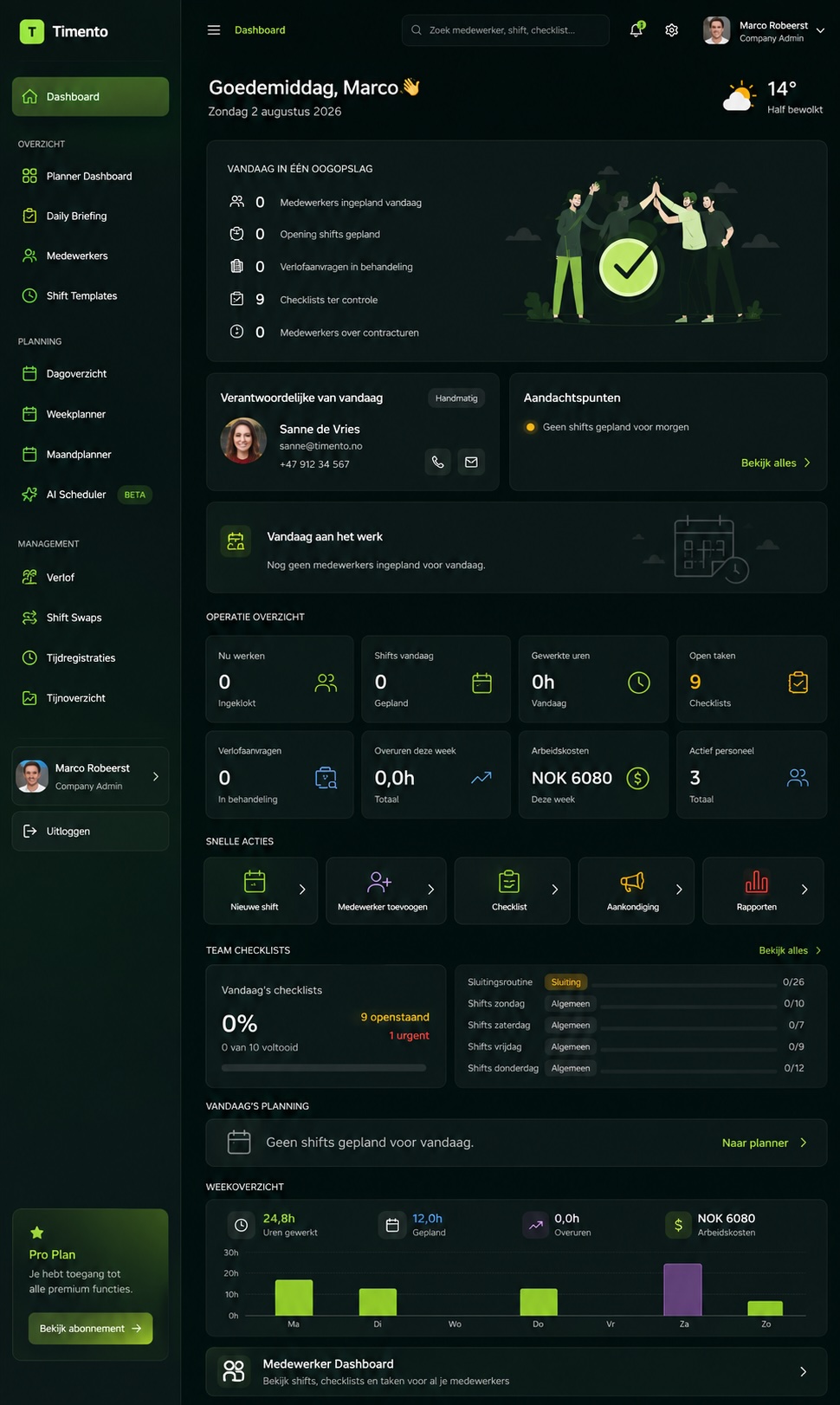
Control Center is the manager view of today. Who is working, who is scheduled and what needs a decision, in one operational picture instead of four separate screens.
Normal operations stay quiet. Exceptions rise to the surface.
- Who is working right now?
- Who is scheduled today?
- What needs attention?
30 days · Up to 4 employees · No credit card · Personal onboarding
From dashboard to decision
A number on a screen is not an answer.
Most dashboards show totals. A manager needs to know where to look next. Control Center is built to move you from overview to action in a few seconds.
- 01
Today's workforce
The people scheduled for today and the shifts that make up the operation.
- 02
Status
What is actually happening: working, on break, not clocked in, shift completed.
- 03
Exceptions
The items that differ from the expected pattern and need a person to look at them.
- 04
Action
Acknowledge it, resolve it, or follow it up in the product where the work belongs.
Operational first, analytics second. Reporting and trends live in Reports & Insights.
Working Now
Know who is on the floor without calling around.
Working Now reflects current Clock In · Breaks · Clock Out data. When someone clocks in, starts a break or ends the shift, the live picture follows.
Based on real clock records
Status comes from what employees actually registered, not from a manual list someone keeps updated.
Break status where used
If your operation registers breaks, break status is part of the live picture.
Missing clock events surface
A shift that should have started without a clock-in becomes visible instead of being discovered later.
Control Center shows workforce status from clock data. It is not continuous monitoring and it does not follow employees during the day.
Explore Time & Attendance- Working now
- On break
- Not clocked in
- Late or missing clock-in
- Shift completed
- Needs attention
Scheduled Today and Today's Team
The plan and the reality, side by side.
The schedule says what should happen today. Clocking says what is happening. Control Center puts the two next to each other so the gap is obvious.
Scheduled Today
- Shifts planned for today
- People assigned to those shifts
- Start and end times
- Roles and teams on duty
Working Now
- Clocked in and working
- On break
- Not clocked in yet
- Shift completed
When the two lists match, there is nothing to do. When they do not, that difference is exactly where a manager's attention belongs.
Explore Smart SchedulingNeed Attention
Stop inspecting everything. Start with what stands out.
A manager should not have to open every shift and every clock record to find the two things that matter. Supported attention items are brought together in one place.
Pending leave
Leave requests waiting for a decision, with the effect on today's staffing in view.
Clocking exceptions
Missing clock-in, missing clock-out, late clock-in or an unexpected duration.
Open operational alerts
Exceptions raised from the floor that are still open or acknowledged but not resolved.
Checklist follow-up
Operational routines that came back needing review or that are still open.
Time entries needing review
Corrections and records a manager should confirm before the period is closed.
Staffing gaps
Shifts that are still unassigned for the day being run.
Which items appear depends on what your company actually uses. Timento surfaces supported attention items from your own operational data; it does not predict problems or invent alert rules.
Operational Alerts
An exception stays visible until someone closes it.
Operational Alerts are not messages and not general notifications. They are exceptions that need a person to take responsibility for them.
Alert lifecycle
Open
The exception is raised and visible to the managers responsible for it.
Acknowledged
Someone has taken it on, so the rest of the team knows it is being handled.
Resolved
The item is closed with the operational record kept.
Because the lifecycle is explicit, nothing quietly disappears from view and the team can see what is already being handled.
Explore Operations HubMessages, notifications, alerts
Three different things that are usually mixed into one inbox.
Separating them is what keeps attention meaningful. If everything is a notification, nothing is.
| Layer | Who starts it | What it means |
|---|---|---|
| Messages | People | A person wants to tell someone something. |
| Notifications | The system | Something changed that you should know about, such as a published schedule. |
| Operational Alerts | An exception | Something is off and it needs to be acknowledged and resolved. |
| Control Center | The manager | The operational picture of today plus the attention items that belong to it. |
Control Center is where a manager looks on purpose. Notifications and alerts come to you; the overview is where you go to understand the day.
People actions in operational context
Pending leave is an operational question, not just an HR task.
A leave request for tomorrow changes tomorrow's coverage. Seeing it next to today's operation makes the decision faster and better informed.
- Leave requests waiting for a decision
- The staffing effect of approving them
- Approved absence already reflected in the plan
- Availability that planners should take into account
Control Center keeps people items in operational terms: dates, status and the effect on staffing. Contracts, documents and employee records stay in People Management.
Routines and follow-up
Know whether the operational routine actually happened.
Operational Checklists produce a record of the work that repeats every day. Control Center is where a manager sees whether that work needs follow-up.
Open routines
Checklists assigned for today that have not been completed yet.
Needs review
Completed routines with something a manager should look at.
Follow-up
An exception that continues as work instead of disappearing.
Managers review checklist status and follow up where needed. Timento does not claim to detect every missed routine automatically; what is configured is what is surfaced.
From plan to actual
Connected data is what makes the overview honest.
Control Center does not ask anyone to keep it up to date. It reads the same schedule and the same clock records the rest of the platform uses.
Scheduled Today
The plan published from Smart Scheduling.
Working Now
The live picture from Clock In · Breaks · Clock Out.
Exceptions
Where reality and plan do not line up.
Review
Confirmed hours handled in Review & Approve.
One data chain, four views of it. Nobody retypes anything to keep the overview alive.
Manage by exception
More employees should not mean more screen watching.
A team of fifteen can be checked by walking around. A team of a hundred and fifty cannot. Management by exception is what keeps the working day manageable as the operation grows.
Normal, no action needed
- Clocked in on time
- On break as planned
- Checklist completed
- Shift completed
- Clocked in on time
- Handover recorded
- Reading within range
- Clocked out on time
- Shift completed
- Checklist completed
- Clocked in on time
- On break as planned
Needs attention
- Missing clock-in
- Leave request pending
- Alert still open
The goal is not fewer events. The goal is fewer events that need you.
Different managers, relevant view
Operational information that fits the role.
A shift leader, a location manager and an operations manager do not need the same picture. Access follows the permissions configured in your company.
Shift leader
The team on duty right now and the items that belong to this shift.
Location manager
The working day for their location, including staffing and open attention items.
Planner
The operational effect of the plan: gaps, pending leave and coverage.
Operations manager
Operational context across the teams they are responsible for, according to their access.
Roles and access are configured per company. Timento does not promise a permission model beyond what your setup allows.
Which tool, which moment
Before the day, during the day, after the day.
Timento splits the working day into clear moments so nothing has to be a general-purpose screen.
- Before or at the startDaily BriefingContext everyone needs to start the shift with the same picture.
- During the dayControl CenterLive workforce status and the attention items of the moment.
- During the dayOperational ChecklistsThe repeatable work that has to be completed and recorded.
- During the dayOperational AlertsExceptions that need acknowledgement and resolution.
- Handing overHandover & Team UpdatesContext passed on so the next shift does not start from zero.
Daily Briefing sets the picture. Control Center keeps it current while the day is running.
Live visibility is not approval
During the day and after the day are different jobs.
Control Center helps you run today. Confirmed worked hours are a separate, deliberate step.
During the day: Control Center
- Who is working and who is not
- What needs a decision right now
- Staffing gaps in the day being run
- Open operational alerts
After the period: Review & Approve
- Time entries checked and corrected
- Breaks and durations confirmed
- Approved hours per employee and period
- Payroll Ready output and reporting
Keeping them separate is what makes approved hours trustworthy.
The same principle, different operations
Every operation has a working day to keep an eye on.
The attention items change with the industry. The way a manager works stays the same: see the day, act on the exceptions.
- HotelsToday's team across departments, who is working now and what is still pending.
- RestaurantsShift coverage, clock status and operational issues before service starts.
- RetailThe store team on duty and the attention items for the trading day.
- Facility ServicesA distributed workforce with clock context and follow-up per site.
- ProductionShift workforce status and exceptions across the running shift.
- EventsCrew visibility on the day itself and issues that need a quick decision.
- RecreationThe duty team, opening routines and operational attention items.
Sector examples describe how Timento is used, not guaranteed outcomes.
From small business to enterprise
The value grows with the number of people you cannot see.
In a small team the overview saves you a round of phone calls. At scale, it is the only realistic way to manage the working day.
- Small BusinessThe owner sees what needs attention without chasing people for updates.
- Growing TeamsSupervisors and managers share the same operational picture instead of separate lists.
- Multi-locationLocal managers run their day with the context that belongs to their location.
- EnterpriseManagement by exception becomes the working method, because inspecting everything stops being possible.
Access always follows the structure and permissions configured for your organisation.
Visibility, not surveillance
Operational data, used operationally.
Control Center exists to run the working day, not to watch people. That difference is a design decision, not a setting.
What it uses
- Schedules and shifts planned for the day
- Clock In · Breaks · Clock Out records
- Supported statuses such as working, on break or not clocked in
- Operational items such as alerts, checklists and pending leave
What it does not do
- Continuous employee location tracking
- Movement history during the working day
- Productivity scoring of individuals
- Access to information outside the manager's permissions
Where location-based clocking is used, it verifies that the clock action happens at the configured workplace. It does not follow the employee before or after that moment. Processing of personal data follows our privacy policy and the settings your company configures.
The connected control flow
Plan. Run. Control.
Control Center is the control layer. It only works because everything before it is connected.
- 01Schedule
- 02Clock and work
- 03Daily operations
- 04Attention items
- 05Acknowledge and resolve
- 06Review & Approve
- 07Reporting
Every step feeds the next. That is what turns a dashboard into a way of working.
System boundaries
What this is, and what it is not.
Being clear about the edges is part of being useful.
Control Center is
- A manager overview of today's workforce operation
- A live view of workforce status from clock and schedule data
- A place where supported attention items come together
- A starting point for acknowledging and resolving exceptions
- The control layer on top of Timento's operational data
Control Center is not
- A general business intelligence dashboard
- A security or camera monitoring centre
- A GPS tracking platform
- A POS, PMS, MES or building-control system
- A replacement for the specialist systems your operation runs on
Timento covers workforce operations visibility, based on Timento data and supported connected context.
Questions & answers
Control Center questions, answered
Short, factual answers about how managers see the working day and act on what needs attention.
What is the Timento Control Center?
Control Center is the manager overview of today's workforce operation. It brings together who is working now, who is scheduled today and the attention items that need a decision, so a manager can act on exceptions instead of checking every shift and every clock record. It is the CONTROL layer of Plan. Run. Control.
How does Working Now know who is working?
Working Now reflects the current Clock In · Breaks · Clock Out data. When an employee clocks in, starts a break or ends a shift, the live picture follows. Supported statuses include working now, on break, not clocked in, late or missing clock-in, shift completed and needs attention.
Does Control Center track employees during the day?
No. Control Center shows workforce status based on schedules and clock records, not continuous location tracking or movement history. Where location-based clocking is used, it verifies that the clock action happens at the configured workplace, and it does not follow the employee before or after that moment.
What appears under Need Attention?
Supported attention items from your own operational data, such as pending leave, clocking exceptions like a missing clock-in, open operational alerts, checklist follow-up, time entries needing review and shifts still unassigned for the day. Which items appear depends on what your company actually uses. Timento does not invent alert rules or predict problems.
What is the difference between messages, notifications and operational alerts?
Messages are people communicating. Notifications inform you that something changed, such as a published schedule. Operational Alerts are exceptions that need attention and follow the lifecycle Open, Acknowledged, Resolved. Control Center is where the manager sees the operational picture together with the attention items that belong to it.
How is Control Center different from Daily Briefing?
Daily Briefing gives everyone the same picture before or at the start of the shift. Control Center keeps that picture current while the day is running. Handover passes context onward, Operational Checklists cover repeatable work, and Operational Alerts handle exceptions.
Does Control Center approve worked hours?
No. Control Center helps during the working day. Confirmed worked hours are handled afterwards in Review & Approve, where time entries are checked, corrected and approved before payroll-ready reporting. Keeping the two apart is what makes approved hours trustworthy.
Can managers of different locations see their own operation?
Yes, according to the roles and permissions configured in your company. A shift leader, a location manager and an operations manager each work with the operational context that belongs to them. Timento does not promise a permission model beyond what your own setup allows.
One place to understand today.
Try Timento for 30 days with up to four employees and see what changes when the working day stops living in four separate screens.
30 days · Up to 4 employees · No credit card · Personal onboarding