Retail
Open the store. Not another spreadsheet.
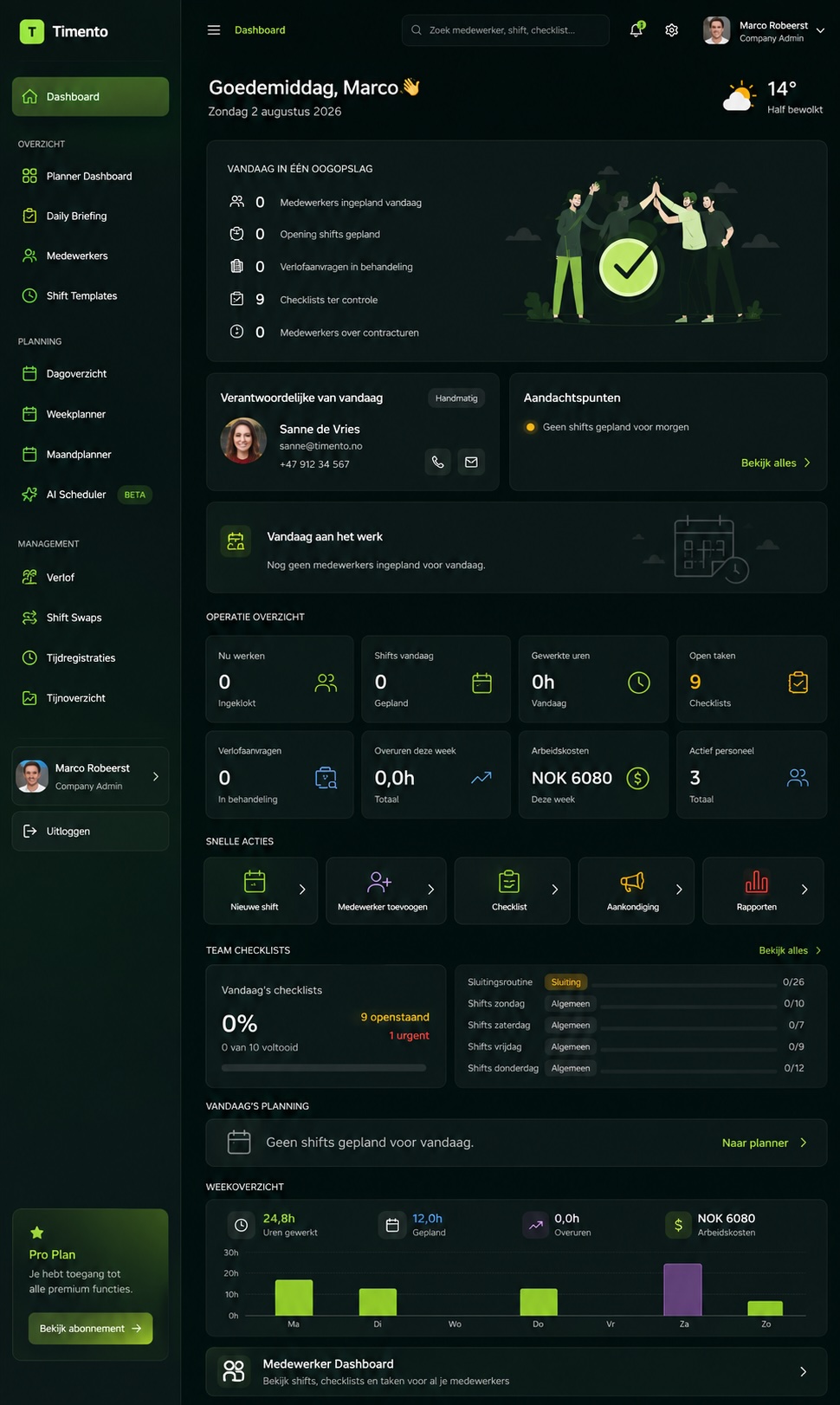
Timento connects the store schedule with the actual working day , staffing, opening and closing routines, hours, communication and cost in one workforce platform.
Built for shops, chains and multi-store retail where most of the team is part-time, works across several roles and never sits at a desk.
30 days · Up to 4 employees · No credit card · Personal onboarding
The retail problem
The schedule is one thing. The trading day is another.
Retail workforce operations rarely break down in the planning tool. They break down between the plan and what actually happened on the shop floor.
- The rota lives in a spreadsheet, the changes live in a group chat
- Availability arrives by message and is remembered, not recorded
- Nobody sees understaffing at the peak until the queue forms
- Opening and closing routines depend on who is on shift
- Worked hours are reconstructed at the end of the month
- Labour cost only becomes visible after payroll
- The next shift starts without knowing what happened before
- Every store does it slightly differently
One store can hold that together by memory. Several shifts and several stores cannot.
One trading day
From before opening to after the last customer.
A retail day is not one long shift. It is a sequence of handovers, peaks and routines that all have to line up.
08:15
Store readiness before the doors open
The opening shift clocks in, works through the opening checklist , cash desk, fitting rooms, lights, floor, safety walk , and confirms the store is ready to trade.
08:45
Daily Briefing for the shop floor
Today's focus goes to the team before opening: campaign and price changes, deliveries expected, priority replenishment, targets, and anything left over from yesterday.
10:00
Trading hours begin
Sales associates, cashiers and stock roles work to plan. Live Team Status shows who is in, who is on break and who has not clocked in yet.
12:30
Lunch peak and break coverage
Breaks are staggered so the till line stays covered. Registered breaks feed the same working-day record as the clock-in.
14:00
A gap appears in Saturday's plan
A colleague reports sick. The manager publishes the shift as an Open Shift, the team is notified in-app and by push, and an available employee responds. The manager confirms.
16:30
Shift change and handover
The late shift starts with the context it needs: deliveries received, stock issues, customer follow-ups, cash-desk notes and what was not finished.
20:00
Closing routine
The closing checklist covers cash desk, floor reset, back-of-house, security and lock-up, with timestamp and the person who completed it.
20:30
The day becomes data
Clocked hours, breaks, exceptions and completed routines land in one place , ready for review and approval instead of reconstruction.
Every step already happens in your store. Timento is what keeps them connected instead of scattered across a spreadsheet, a chat group and a paper checklist.
Plan
Plan around the rhythm of the store.
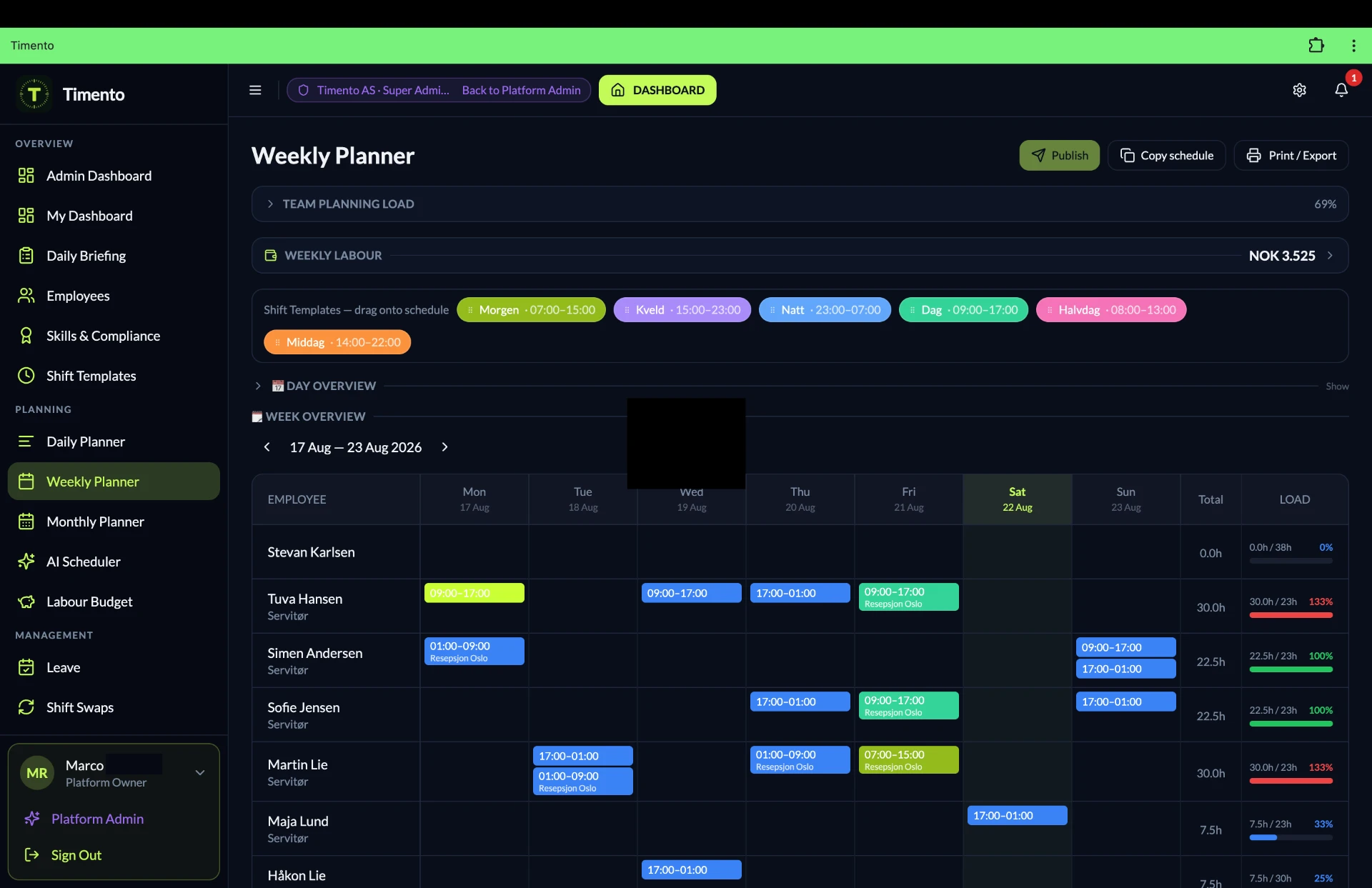
Opening hours, delivery days, campaign weekends and quiet mornings all shape the plan. Timento lets you build the schedule around that rhythm instead of rebuilding it from scratch every week.
- Store Manager
- Assistant Manager
- Sales Associate
- Cashier
- Stock & Replenishment
- Visual Merchandising
- Opening / Closing
- Weekend & seasonal staff
Smart Scheduling
Build the week in the view that fits the job , day, week or month , with roles, hours and locations in the same plan.
Shift Templates
Opening, mid, closing and weekend shifts are described once and reused instead of retyped.
Recurring shifts
Fixed patterns , the Thursday late shift, the Saturday floor team , repeat without manual rebuilding.
Copy schedule
Start next week from a week that already worked, then adjust for holidays, campaigns and availability.
Availability & Leave
Student availability, school hours, holidays and leave requests are part of the plan, not a message someone has to remember.
Role-based shifts
Plan the role the shift needs , till, floor, stock, visual , and then the right person for it.
Contract Hours
See who is under-scheduled, on target or over-scheduled before you publish, not after payroll.
Conflict Detection
Overlaps, leave clashes, availability conflicts and unrealistic sequences surface while the schedule is still a draft.
Open Shifts
Uncovered work is published to the team instead of solved with a round of phone calls.
Publish & Notify
Publish once. The team gets the schedule and every later change in-app and by push.
Staffing Requirements
How many people do I need , and how many have I actually scheduled?
Retail demand is not flat. Staffing Requirements lets you describe the cover a trading day needs per period and per role, then compare that with the schedule you are building.
- How many people does this trading day need?
- How many have I scheduled, and in which roles?
- Where is the peak under-covered?
- What will this staffing plan cost?
Staffing Requirements · Example
| Period | Required | Scheduled | Coverage |
|---|---|---|---|
| 09:00–11:00 · Opening | 2 on floor · 1 till | 3 | On plan |
| 11:00–14:00 · Lunch peak | 3 on floor · 2 till | 4 | Understaffed |
| 14:00–17:00 · Afternoon | 2 on floor · 1 till | 5 | Overstaffed |
| 17:00–20:00 · Evening peak | 3 on floor · 2 till | 5 | On plan |
Example only. Periods, roles and required cover are configured around your store , Timento does not decide your staffing model, it makes the gap visible while you can still act on it.
Run
Opening → trading → closing, the same way every day.
Operational Checklists turn the way your store should run into something visible, completed and checkable , regardless of who is on shift.
Opening
Ready to trade before the doors open
- Cash desk and float check
- Store and floor readiness
- Fitting rooms and customer areas
- Lights, music and displays
- Safety walk and entrances
- Overnight deliveries checked in
Trading
Keep the store working through the day
- Replenishment and stock rounds
- Price and campaign changes
- Visual merchandising updates
- Cleaning and tidy-down routines
- Temperature checks where the assortment requires it
- Issues reported from the floor
Closing
Close the store the same way every night
- Cash desk close and reconciliation routine
- Floor reset for tomorrow
- Back-of-house and stockroom
- Waste, recycling and cleaning
- Security check and lock-up
- Handover note for the opening shift
- Completion status
- Timestamp
- Who completed it
- Photo where the routine asks for it
- Note or comment
- Issue reported
Shifts can be classified as opening or closing, so the right routine follows the shift instead of a laminated sheet behind the till. Timento records what your team registers , it is an operational record, not a legal or food-safety guarantee.
Explore Operations HubPeople
Built for a flexible retail team.
Part-time contracts, students, weekend staff and seasonal hires make retail scheduling move. Timento gives that team a place to see and shape their own working week.
Employee Portal
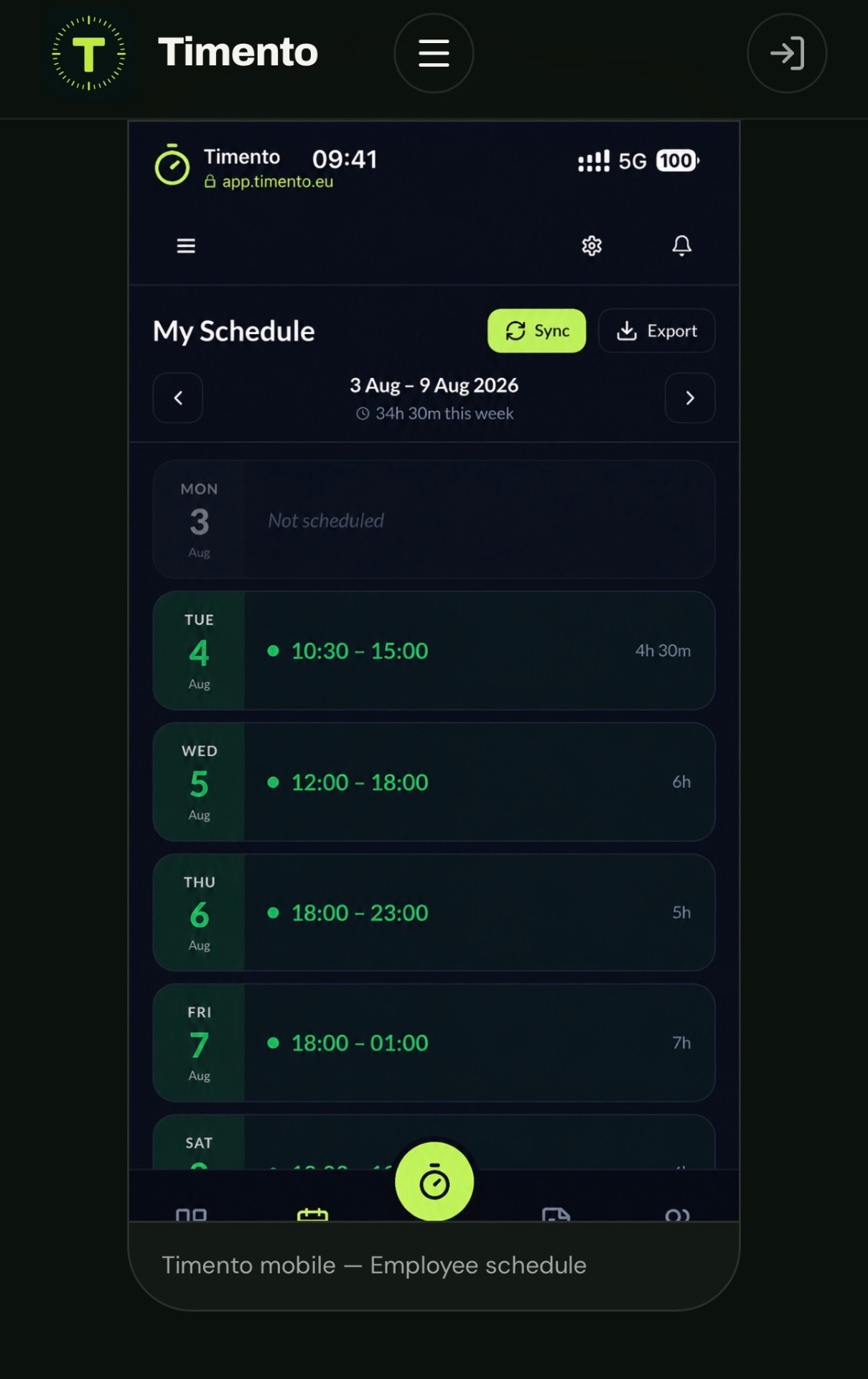
Shifts, hours, breaks, leave, messages and routines in one mobile-friendly place , no traditional app-store download required.
Availability
Employees register when they can work. Planners see it while building the schedule instead of scrolling back through messages.
Leave requests
Requests, approvals and balances sit next to the schedule they affect.
Open Shifts
Extra hours are offered to the team. An employee responds, and the manager decides , nothing is assigned automatically.
Shift Swaps
Employees can arrange a swap, but it only takes effect once a manager has approved it.
Notifications
Published schedules, changes, open shifts and approvals arrive in-app and as push notifications, following each employee's delivery preferences.
Flexibility for the team. Visibility and control for the store manager.
Run
Worked hours, not estimated hours.
The schedule says what should happen. Time & Attendance records what actually did , and that is the number payroll should be built on.
Clock In · Breaks · Clock Out
Employees register the start of the shift, paid and unpaid breaks and the end of the day on their own device.
Worked hours
Every registration builds the same working-day record used for live status, review and reporting.
Live Team Status
Working now, on break, not clocked in, late, finished , without walking the floor to count heads.
Alerts & Exceptions
Missed clock-out, a late start or an unexpected overtime signal is raised as an exception with a clear lifecycle: Open → Acknowledged → Resolved.
Review & Approve
Registered time is not automatically final. Managers review, correct what is wrong and approve , only approved hours move on.
- Clock in
- Breaks
- Clock out
- Exceptions
- Review & Approve
- Payroll Ready

Kiosk Mode
Where a shared device fits the store better than everyone's phone, the team can clock in and out on one tablet , typically at the staff entrance, in the back office or by the stockroom door.
- Staff entrance
- Back office
- Stockroom
- Cash office
- Shared store tablet
Own phone or shared kiosk , both produce the same worked hours for review and approval.
Location-based clocking
Clocking can be limited to the configured store area, so a shift is registered at the workplace rather than on the way there. It verifies the clock action at the moment it happens.
This is location verification at clock-in and clock-out , not employee tracking. It can be enabled, disabled and configured per company, and Timento makes no legal or compliance claim about how you use it.
Communication
Reaches the shop floor, not just the office inbox.
Retail teams are on the floor, at the till or in the stockroom. Timento keeps operational communication in the same place as the schedule and the routines , three distinct concepts, never merged into one noisy feed.
Messages
Communication between people and teams, inside the working environment instead of a private chat group.
- Store announcements
- Shift-team updates
- Replies from the floor
- Acknowledgements
Notifications
Events the platform generates, delivered in-app and by push according to each employee's preferences.
- Schedule published
- Shift changed
- Open Shift available
- Leave approved
- Approval result
Operational Alerts
Exceptions that need someone to act, with a lifecycle instead of a notification that scrolls away.
- Checklist not completed
- Missed clock event
- Issue reported in store
- Review requested
- Open → Acknowledged → Resolved
Action Needed
Some information is not just information. When something needs an owner, the message carries that expectation with it.
Lightweight accountability for a working day , not a project-management tool, and not a replacement for your chat app for everything else.
- MessageFitting-room lock is broken, customers are being redirected.
- Action NeededThe message is flagged as needing a response, not just a read.
- Reply / AcknowledgeThe shift team confirms they have seen it.
- I'll take itSomeone takes responsibility, and the manager can see who.
Control
From scheduled hours to labour cost you can act on.
Labour cost is the biggest controllable cost in most stores, and it is decided when the schedule is built , not when payroll is run.
- What does this week's plan cost before I publish it?
- Where did planned and actual drift apart?
- Which shifts are pushing overtime?
- How does this store compare with the same week last month?
Control · Example
| Week | Planned hours | Actual hours | Difference |
|---|---|---|---|
| Week 12 · Store centre | 412 h | 421 h | +9 h |
| Week 13 · Store centre | 398 h | 392 h | −6 h |
| Week 13 · Campaign weekend | 126 h | 141 h | +15 h |
| Week 14 · Store centre | 405 h | 404 h | −1 h |
Example figures. Timento shows the difference and where it sits , the interpretation, and the decision, stay with the manager.
- Staffing Requirements
- Scheduled hours
- Planned Labour Cost
- Worked hours
- Review & Approve
- Payroll Ready
Multi-store
One operational model. Every store keeps its own reality.
Whether you run two shops or a chain, each store plans its own week and follows its own opening hours , while the same structure, roles and routines apply everywhere.
Growing chains usually start with one store, then apply what works. Business and Enterprise plans are built for larger and multi-location operations.
See plans and pricingLocations
Shifts, hours and routines are planned per store, so a schedule always reflects where the work happens.
Store-level visibility
Store managers work with their own team, their own plan and their own working day.
Shared structure
Roles, shift templates, checklists and knowledge can follow the same model across stores instead of being reinvented locally.
Area overview
Hours, labour cost, planned vs actual and completed routines can be reported per store and compared across stores.
Access by responsibility
What someone can see and do follows their role and the locations they are responsible for.
Knowledge
The way your store works, written down once.
New weekend staff should not have to ask three colleagues how a return works. Knowledge Hub keeps store procedures where the working day already happens.
- Opening and closing instructionsThe same routine, explained the same way in every store.
- Returns and exchangesThe process the team should follow, without guessing at the till.
- Cash desk and payment routinesStep by step, for people who do it once a week.
- Deliveries and replenishmentHow goods are received, checked and put on the floor.
- Safety and incident routinesWhat to do, who to inform and what to register.
- Onboarding for new staffDay one, week one and the basics of the role in one place.
- Store procedures
- Role guides
- Campaign instructions
- Training material
- Searchable articles
Skills & Certifications
Availability tells you who can work. Skills tell you who is ready for the role , key holder, cash desk, opening, closing, age-restricted sales or specialist product training.
- Key holder
- Opening / closing trained
- Cash desk trained
- Age-restricted sales
- Product specialist
- First aid
- Valid
- Expiring
- Expired
- Pending
Planners see qualification and expiry status while scheduling. Timento gives visibility , it does not guarantee legal or regulatory compliance.
Explore Knowledge HubOperations Intelligence
A second pair of eyes on the schedule.
AI Copilot is an optional add-on that looks at the operational picture with you: staffing against the trading day, hours against contracts, patterns that keep repeating.
Read about AI Copilot- Highlights where the plan and the staffing need do not match
- Points at overtime and contract-hour risk before publishing
- Surfaces recurring patterns across weeks and stores
- Suggests where a small change would make a real difference
Suggestions, not decisions. AI Copilot never publishes a schedule, assigns a shift or approves hours on its own , the manager stays in control.
Connected retail operations
One chain, from staffing need to payroll.
Every step feeds the next. That is the difference between a scheduling tool and a workforce platform.
- 01Staffing need
- 02Schedule
- 03Publish & Notify
- 04Clock & breaks
- 05Store routines
- 06Exceptions
- 07Review & Approve
- 08Labour cost & payroll
Nothing has to be re-entered, re-counted or reconstructed to get from the plan to payroll.
One store, several teams
Floor, till, stock and management in one environment.
Everyone works differently during the day, and everyone ends up in the same operational picture.
- Sales floor
- Cash desk
- Stock & replenishment
- Visual merchandising
- Back office
- Store management
Timento
One schedule, one set of routines, one place where the working day is registered.
Timento
Timento is not a POS, an inventory system or an e-commerce platform.
Keep the systems that run your sales, stock and online store. Timento manages the workforce and operational layer around them: who works, when they work, what routines get done and what the hours cost.
Need something connected? We are transparent about what is available today and what is not.
Questions & answers
Retail workforce questions, answered
How Timento supports store teams from opening to closing — and where it stops.
Is Timento suitable for a retail store?
Yes. Timento is built for shift-based teams that work to opening hours, peaks and daily routines — which is exactly how a store runs. Scheduling, availability, clocking, opening and closing routines, communication and labour cost all live in the same platform, per store.
How do you schedule part-time and student staff?
Employees register their own availability, and planners see it while building the schedule. Contract Hours show who is under- or over-scheduled before publishing, and Conflict Detection catches overlaps with leave, availability and other shifts while the plan is still a draft.
Can I plan staffing around busy periods?
Yes. Staffing Requirements lets you describe the cover a trading day needs per period and per role, and compare it with the schedule you are building, so understaffed peaks and overstaffed quiet hours are visible before you publish.
What happens when someone calls in sick on a Saturday?
Publish the shift as an Open Shift. The team is notified in-app and by push according to their own delivery preferences, an available employee responds, and the manager confirms. Timento never assigns a shift automatically.
Can Timento handle opening and closing routines?
Yes. Operational Checklists cover opening, trading and closing routines with completion status, timestamp, who completed it and a photo or note where the routine asks for it. Shifts can be classified as opening or closing so the right routine follows the shift.
How do store employees clock in?
On their own phone, or on one shared device with Kiosk Mode — typically at the staff entrance, in the back office or by the stockroom. Location-based clocking can limit clocking to the configured store area. That verifies the clock action at the workplace; it is not employee tracking.
Can I see what a schedule costs before I publish it?
Scheduled hours feed Planned Labour Cost, and worked hours feed the actual figure, so Planned vs Actual shows where the two drifted apart. Reports can be produced per store and compared across stores.
Does Timento work for a chain with several stores?
Yes. Shifts, hours and routines are planned per location, so every store keeps its own working day while roles, shift templates, checklists and knowledge can follow the same model everywhere. Access follows the locations someone is responsible for.
Does Timento replace our POS or inventory system?
No. Timento does not handle sales, stock or e-commerce. It manages the workforce and operational layer around those systems: who works, when they work, which routines get done and what the hours cost.
Run the store from one operational picture.
Scheduling, staffing, hours, routines, communication and labour cost , for a team that works on the shop floor, not at a desk.
30 days · Up to 4 employees · No credit card · Personal onboarding
Other industries
The same platform, written around a different operational reality.