PLAN
Put the right people in the right place.
Build the schedule with the information you need before you publish it.
- Scheduling
- Shift Templates
- Recurring Shifts
- Availability
- Leave
- Open Shifts
- Role Requirements
- Staffing Visibility
- Conflict Detection
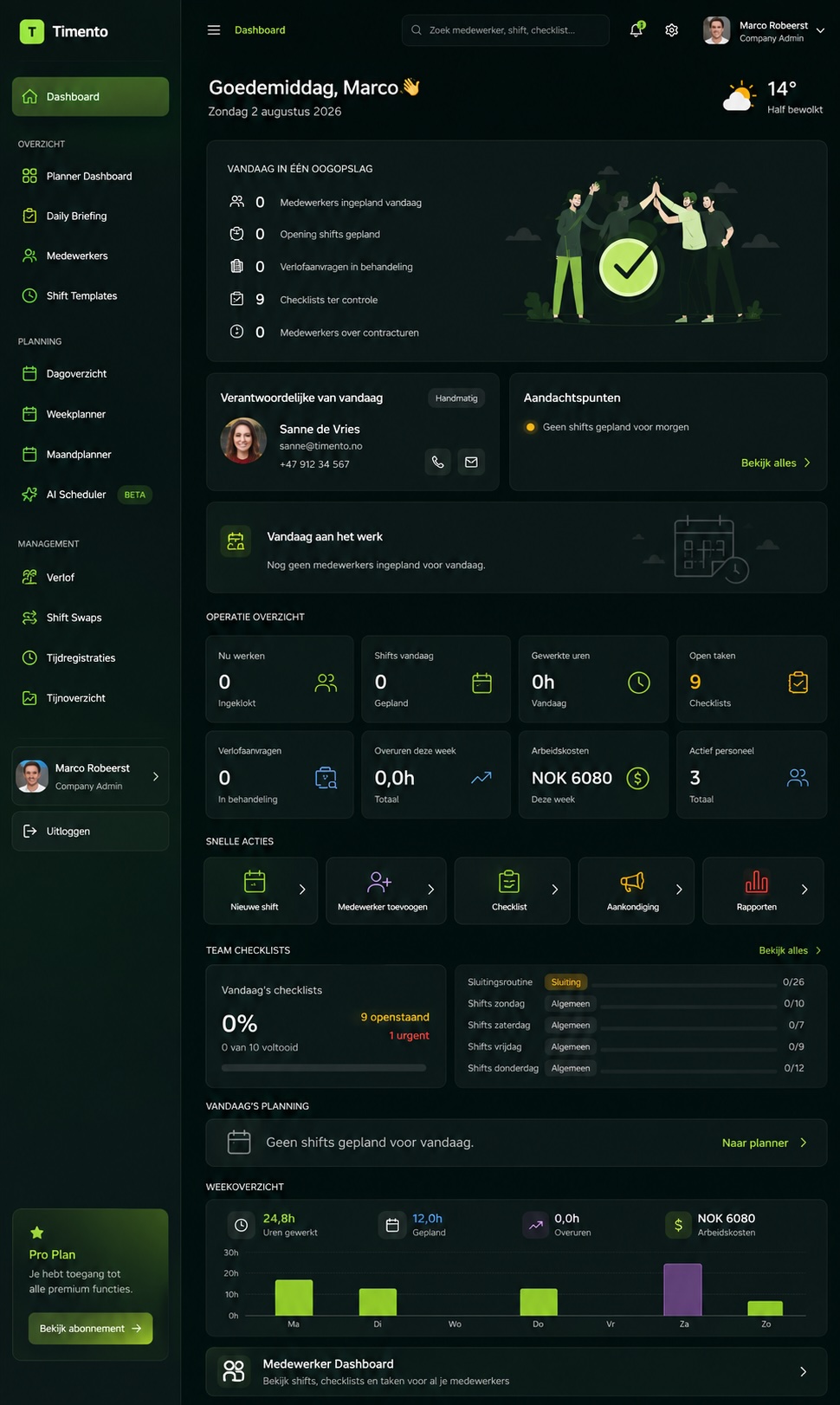
The Timento platform
Plan your people, run daily operations and stay in control from one flexible platform built around the way your business works.
Scheduling, time & attendance, people, operations, knowledge and payroll-ready reporting all work together.
30 days · Up to 4 employees · No credit card · Personal onboarding
The core idea
Every action creates context for the next. Timento keeps that workflow connected instead of spreading it across separate tools, spreadsheets and messages.
Plan. Run. Control.
Put the right people in the right place.
Build the schedule with the information you need before you publish it.
Give the team what they need to get the work done.
Once the schedule is published, Timento stays with the team throughout the working day.
See what happened and what needs attention.
Managers see the exceptions instead of having to search for them.
One connected data trail
These are not separate systems. They belong to the same working day, and every step carries context into the next.
Operations Intelligence
Scheduling, time, staffing, checklists and labour cost all tell part of the same story. Timento brings those signals together so managers can see what happened, what needs attention and where the operation can improve.
The working-day flow explains how work moves through Timento. Operations Intelligence explains what managers can learn from the connected information. Timento surfaces patterns and differences , it supports managers, it doesn't replace them.
Platform areas
Each area is powerful on its own , and even stronger because everything shares the same data.
Build schedules that match your operation.
People, roles, contracts and profiles in one place.
Clock in and out with confidence.
Paid, unpaid and rule-based breaks.
Vacation, sickness and availability requests.
Let employees trade shifts with manager approval.
Checklists and daily routines that keep standards high.
Start every shift aligned on what matters.
Instructions, procedures, recipes and training.
Catch late arrivals, missed clock-outs and conflicts.
Sign off hours, leave, swaps and corrections.
Turn work into payroll-ready data.
Live overview of team, shifts and operation.
Connect payroll, calendar and external systems.
Smart recommendations and early risk signals.
We are honest about what exists today and what is still being built.
See all integrationsIndustry-ready by design
The core platform stays connected. The workflows can reflect the reality of your business.
Timento is not a separate application for every industry. It is one flexible operational platform that can be configured around different ways of working.
Built around your business
Configure Timento around your teams, locations, roles, permissions, routines and approval processes.
Need a workflow that doesn't quite fit the standard setup? Timento is designed to adapt quickly to real operational needs , many configuration and workflow requests can be reviewed or implemented within 48 hours.
Managers and employees
Everyone works from the same platform, but sees the tools and information relevant to their role. Role-based permissions decide what each person can see and approve.
From four people to multiple locations
Add employees, locations, managers, permissions and workflows without replacing the system your team already knows.
Questions & answers
Short, factual answers about what Timento is and how it works across planning, daily operations and control.
Timento is a workforce management platform for operational teams. It connects employee scheduling, time and break registration, leave and availability, operational checklists, people management and payroll-ready reporting in one system. The idea is simple: plan the work, run the day, and keep control of what actually happened.
No. Scheduling and time registration are the foundation, but Timento also covers what happens during the working day: checklists and routines, an employee portal, knowledge and documents, leave and availability, and reporting on top of the same data. Because everything shares one data trail, a published shift, a clock-in and a completed checklist all belong to the same record.
Timento is built for businesses with shift-based, on-site teams , hospitality, hotels, restaurants, retail, events, production, recreation and facility services. It suits organisations that plan people against opening hours, locations and daily routines rather than project timesheets.
Yes. Timento is one platform that you configure around your own way of working: your roles, permissions, checklists, approval rules and operational templates. There is no separate product per industry , the workflows adapt instead of the platform being rebuilt.
Yes. You can manage several locations with shared standards and local differences, and give managers permissions scoped to the locations they are responsible for. Reporting can be viewed per location or across the organisation.
Yes. Employees have their own portal where they see their schedule, register time and breaks, request leave, submit availability and open the routines and documents relevant to their role. Managers see the operational and approval side of the same platform.
Yes. Approved hours, breaks and absence data can be reviewed and exported as payroll-ready reporting, so payroll starts from checked records instead of manual spreadsheets. Timento prepares the working-hour data; the payroll run itself stays in your payroll system.
Partly, and we are explicit about the status of each connection. File-based export to Tripletex is available today, while direct Tripletex API synchronisation is currently in development. Other integrations are on the roadmap and are listed with their current status.
Request a 30-day trial workspace for up to four employees and explore the platform with personal onboarding.
30 days · Up to 4 employees · No credit card · Personal onboarding