Request
The employee submits a leave request in the Employee Portal, with the dates and any context.
People Management
Keep the people, availability, leave, roles and everyday workforce information behind your operation connected in one place.
Employees get a simple self-service experience. Managers get the information they need to plan, communicate and stay in control.
30 days · Up to 4 employees · No credit card · Personal onboarding
One source of truth
Availability arrives in one place. Leave requests somewhere else. Shift changes get sent through messages. Employee details sit in another file. Timento brings the workforce information needed for daily operations into one connected platform.
Scattered
Connected
Employees, roles, availability, leave and permissions live in the same platform as the schedule, the worked hours and the daily operation.
Your team
An employee in Timento is more than a name in a planning grid. The operational profile keeps the details managers actually need while planning, running and reviewing the working day.
Managers have the workforce information they need in the same environment where the work is managed , not in a separate file that nobody updates.
Access & responsibility
Timento separates what someone does in the operation from what they can do in the platform. A shift leader in the kitchen is a job role. A planner who builds and publishes schedules is a permission role.
Works in the Employee Portal: schedule, hours, availability, leave requests and the operational information for their own shifts.
Builds and publishes the schedule using availability, leave and roles, and follows up on what changes afterwards.
Manages the company setup: employees, roles, permissions, locations and the settings behind daily operations.
Job role vs. permission role
Job roles describe the work , reception, kitchen, housekeeping, supervisor , and are used while planning. Permission roles describe what someone can see and do inside Timento. Keeping the two separate means you can staff flexibly without handing out management access.
Plan with real information
Availability & Leave connects employee input with workforce planning, so managers don't need to reconstruct staffing information every time they build the schedule.
Employees indicate when they can work, in the same place they check their schedule.
Requests are submitted in Timento instead of arriving through messages, notes or conversations.
Where balances are used, they stay visible alongside the request rather than in a separate file.
A manager reviews and decides. Nothing becomes final because it was mentioned in passing.
Once approved, the absence is part of the planning picture instead of a surprise on the day.
Planners see who is available, who is off and where the gaps are before publishing.
Availability and approved leave are planning information, not paperwork. They exist so the schedule reflects the team you actually have.
Leave workflow
One route for every leave request, from the moment an employee submits it to the moment the planner sees the result.
The employee submits a leave request in the Employee Portal, with the dates and any context.
A manager sees the request together with the rest of the team picture instead of judging it in isolation.
The manager approves or declines, and the employee gets a clear answer.
Approved leave shows up while the schedule is being built, so nobody is planned into time off.
A submitted request has a status and an answer, not an unread message.
Nothing is approved by accident, and decisions are made with the team in view.
Approved leave is planning information the moment the schedule is built.
Timento supports the request, review, approval and planning visibility of leave. It does not calculate statutory entitlements or process payroll.
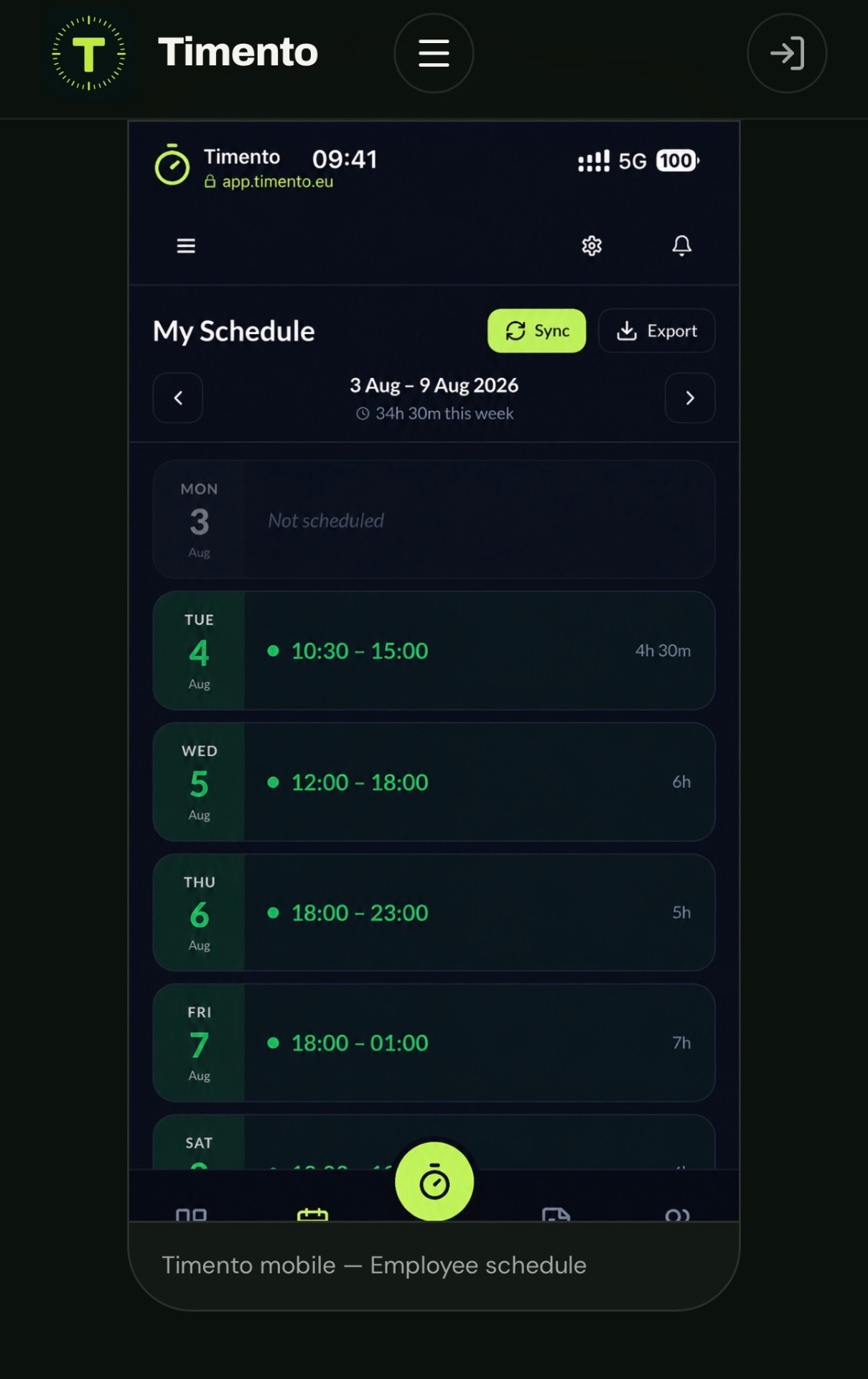
Employee self-service
Give employees one simple mobile-friendly place for the information and actions they use during the working week.
No desktop login, no separate HR portal, no chasing a manager for an answer that already exists in the platform.
Upcoming shifts, times and location , always the published version.
Your schedule, where you need it: export shifts as an iCalendar (.ics) file or subscription link and add them to a compatible calendar application. Timento stays the source of truth.
Start the shift, register breaks and clock out from the same place.
Share availability and submit leave requests without sending a message.
See registered hours instead of counting them back from memory.
Request a swap with a colleague and follow what happens with it.
The routines that belong to the shift, on the device already in hand.
Procedures and guides where the work happens, not in a binder.
Updates about schedules, requests and approvals that actually matter.
See who is on the team and who is working alongside them.
Small thing, real culture , the team knows when to say something.
Mobile first
Frontline employees should not need a desktop, training course or complicated HR portal to manage everyday work.
If the employee experience is hard, the workforce information behind it stops being reliable. Timento keeps the everyday actions short enough to do between tasks.
Flexibility with control
People get sick, exams move, life happens. Timento gives employees a structured way to solve it without letting the published schedule drift away from the manager.
The employee asks to hand over a shift instead of arranging it privately.
A colleague accepts or declines, so the replacement is a real agreement.
The change stays visible to the manager rather than happening behind the schedule.
The result is one schedule everybody works from , including the people who never saw the conversation.
Employees get flexibility, managers retain visibility. Timento is built so shift changes remain part of the schedule, not a side conversation.
Keep everyone updated
Notifications are updates triggered by workforce events. Messages are communication between people and teams. Timento keeps the two apart, so an update never disappears inside a conversation.
Every notification is tied to something that happened in the operation, so the update has a subject, an owner and a next step.
Messages
Messages carry announcements, team updates and questions. Where it is enabled, employees can reply, confirm they have read something, and start a team message themselves.
Action Needed
Some messages need more than a read receipt. An Action Needed message can be picked up by someone on the team, so the team and the manager can see that it has an owner.
Lightweight operational accountability , not project management.
In-app + Push
Schedules, requests and operational updates shouldn't depend on someone checking their inbox. Supported notifications are delivered in-app and as push notifications on the mobile employee experience.
Employees can manage how they receive supported notification types, so relevant updates arrive without unnecessary noise.
The employee experience runs in the browser on mobile , no traditional app-store download required.
Employee Pulse & Skills
Two additions to the same connected employee profile: a quick signal from the team, and a clear picture of what people are qualified to do.
Employee Pulse
Employees can quickly indicate how things are going with a simple sentiment input, optionally followed by one open question. No forms, no scheduled campaigns, no scoring.
Intentionally simple , not
Skills & Certifications
Availability tells you who can work. Skills & Certifications helps tell you who is qualified for the work , with verification status, valid-from dates, expiry and supporting documents on the same employee profile.
Qualification status
Timento gives managers visibility into qualification status and upcoming expiry. It does not guarantee legal or regulatory compliance.
AvailableRole-based access
Employees, planners and managers work in the same platform without needing access to the same information or controls.
What someone can see and do follows their permission role, not an informal agreement.
Companies are kept apart, so information stays where it belongs.
Where multiple locations are used, access can follow the locations someone is responsible for.
Managers get the planning, approval and follow-up controls their responsibility requires.
Employees manage their own schedule, hours, availability and requests , and nothing else.
Company Admins manage employees, roles, permissions and the setup behind daily operations.
Access is described here as role-based access control inside Timento. Specific security certifications are covered separately on the security page.
For managers
The manager should not have to move between five disconnected systems to understand the team.
Because people, planning, time and daily operations share one platform, the answer to “where do we stand?” is a screen instead of a round of phone calls.
See the Control CenterFor employees
The employee journey in Timento is short, predictable and the same every week.
Breaks are part of the cycle on purpose. Registering them properly is what makes worked hours worth reviewing later.
People + Scheduling
A schedule is only as good as what the planner knows about the team. People Management supplies that information before the first shift is placed.
What planning uses
People + Time
The same employee record runs from the planned shift all the way to approved hours, so nothing has to be matched up manually afterwards.
People + Operations
Timento doesn't just know who works. It connects people with what needs to happen during the working day.
Person
Employee on shift
Their work
Operational Checklists assigned to the role and the shift
Person
Shift start
Their work
Daily Briefing with today's priorities and context
Person
New or occasional employee
Their work
Knowledge Hub with the procedure for the task
Person
End of shift
Their work
Handover & Team Updates for the next team
Roles decide who is responsible, and the operational work follows the same roles , so nothing depends on remembering who normally does it.
Explore Operations HubBuilt around real teams
Team structures differ by industry. Roles, locations and permissions let Timento reflect that without becoming a different product.
Select an industry to see how Timento adapts to different operations.
The employee experience stays the same across all of them. What changes is the structure behind it.
From small team to multi-location
Add employees, locations, managers, roles and permissions while keeping the same platform and familiar employee experience.
One team, one location, one manager who does most of it personally.
More people, more shifts, and the first need for structure around availability and approvals.
Several locations, local managers and access that follows responsibility.
Multiple companies, layered permissions and managers who need overview rather than detail.
One connected platform
People Management is not an isolated employee database. It powers the rest of the working day.
Every step above uses the same employees, roles and permissions. That is what keeps the working day consistent from planning to reporting.
Why it matters
Availability affects scheduling. Roles affect responsibilities. Worked hours affect approvals. Leave affects staffing. Timento keeps those relationships connected.
Information about people
Information that runs the day
Timento People Management covers the people needed to run the workforce and the working day. It is not a recruitment, performance review or benefits system.
Questions & answers
Short, factual answers about employee information, availability, leave, shift swaps, self-service and permissions in Timento.
Timento keeps the workforce information needed to run the operation: name, contact details, role, employee number, hire date, birthdate, bank information, schedule notes, company or location and permissions. It is an operational employee profile rather than a full HR administration system. The point is that managers have the details they need in the same place where planning, hours and daily operations happen.
Yes. Employees share when they can work through the Employee Portal, in the same place they check their schedule. That availability becomes planning information, so planners build the schedule from what the team has actually indicated instead of collecting it again by message.
Employees submit a leave request in the Employee Portal with the dates and any context. The request gets a status, so the employee can see where it stands instead of waiting for a reply in a chat. Nothing depends on a note, a message or a conversation being remembered.
Yes. A manager reviews the request together with the rest of the team picture and approves or declines it. The employee gets a clear answer, and the decision stays visible in the platform. Timento supports the request, review and approval workflow; it does not calculate statutory entitlements or run payroll.
Yes. Approved leave is visible while the schedule is being built, so nobody is planned into time off by accident. Together with availability it gives the planner a realistic view of who can actually work before the schedule is published.
Yes. An employee can request a swap, a colleague responds, and the change stays visible to the manager instead of being arranged privately. Employees get flexibility while managers keep oversight, so the published schedule remains the single version everybody works from.
The Employee Portal gives employees My Schedule, Clock In · Breaks · Clock Out, Availability & Leave, Worked Hours, shift swaps, Operational Checklists, Knowledge Hub, notifications, colleagues and birthdays. It is mobile-friendly, so frontline employees can handle the working week from the device they already carry.
Yes. Timento uses role-based access, so employees, planners and Company Admins work in the same platform without the same visibility or controls. Job roles describe the work being planned; permission roles describe what someone can see and do inside Timento. Keeping them separate means you can staff flexibly without handing out management access.
Yes. Employees, roles and permissions can be organised per company and location, and access can follow the locations someone is responsible for. That lets a business grow from one team to several locations without changing platform or retraining employees.
Try Timento for 30 days with up to four employees and see how people, planning, time and daily operations work together.
30 days · Up to 4 employees · No credit card · Personal onboarding