Multi-location
Local control. One operational picture.
Let every location run its own working day while owners, operations managers and area managers keep a consistent view of staffing, routines, hours, exceptions and labour cost across the business.
For companies running teams across several stores, hotels, restaurants, sites, facilities, venues or departments.
30 days, up to 4 employees, no credit card, personal onboarding.
One location is simple. The second changes everything.
Workforce operations do not break at scale. They break at distance.
The problem is rarely the number of employees. It is that the manager who knows the schedule is no longer standing in the same room as the team, the hours and the routines. These stages are illustrative, not product limits.
1 location
One manager knows everything
One schedule, one team, one person who remembers who is available and who is close to their contract hours. A spreadsheet and a group chat still work.
- One version of the schedule
- Questions answered in person
- Hours checked by the person who was there
3 locations
Local systems start diverging
Each site develops its own way of planning, its own leave habits, its own chat group and its own idea of what a proper opening routine looks like. None of it is wrong, and none of it lines up.
- Three schedules in three formats
- Leave approved differently per site
- Routines that only exist in someone's head
10 locations
Comparison becomes guesswork
Management cannot answer simple questions: which sites are short on cover, where overtime is rising, which routines are actually being completed. Without shared structure, every answer needs a phone call.
- Labour cost compared after the period closes
- Exceptions discovered late or never
- Reporting rebuilt by hand every month
What fragmentation actually costs
Consistency should come from the system, not from everyone remembering the same thing.
The numbers above describe growth stages, not limits in Timento. The point is the shift from personal habit to shared structure.
- Spreadsheet islands nobody else can read
- A separate chat group per location, with the important message buried
- Opening and closing routines that differ by site without anyone deciding they should
- Hours arriving late, in different formats, right before payroll
- Overtime and staffing gaps visible only in hindsight
- New managers who need weeks to learn how their location works
Keep each location operationally clear
Every site needs its own people, shifts and daily reality.
A shared platform is only useful if the local day still makes sense. In Timento each location works with the people, roles, schedules, availability, leave, shifts and routines that belong to that operation, so a manager sees the workforce context they are responsible for instead of a company-wide list.
Local team
The employees who actually work at that location, with their roles and contract information.
Local schedules
Week, day and month planning built around the opening hours, peaks and shift patterns of that site.
Local availability and leave
Requests and approvals handled in the operational context where the impact lands.
Local shifts and open shifts
Shifts planned per role, with unfilled ones visible to the people who can cover them.
Local routines
Opening, closing, handover and recurring checks that fit how this site actually runs.
Relevant visibility
Managers work with the workforce context of the operation they manage, not with everything at once.
Local clarity first. The overview is built on top of it, not instead of it.
Visibility in Timento follows the responsibility someone carries and the access you configure. Timento does not impose an organisational hierarchy on your business.
Explore the platformPlan locally, see the bigger picture
Different locations need different staffing. The method can still be the same.
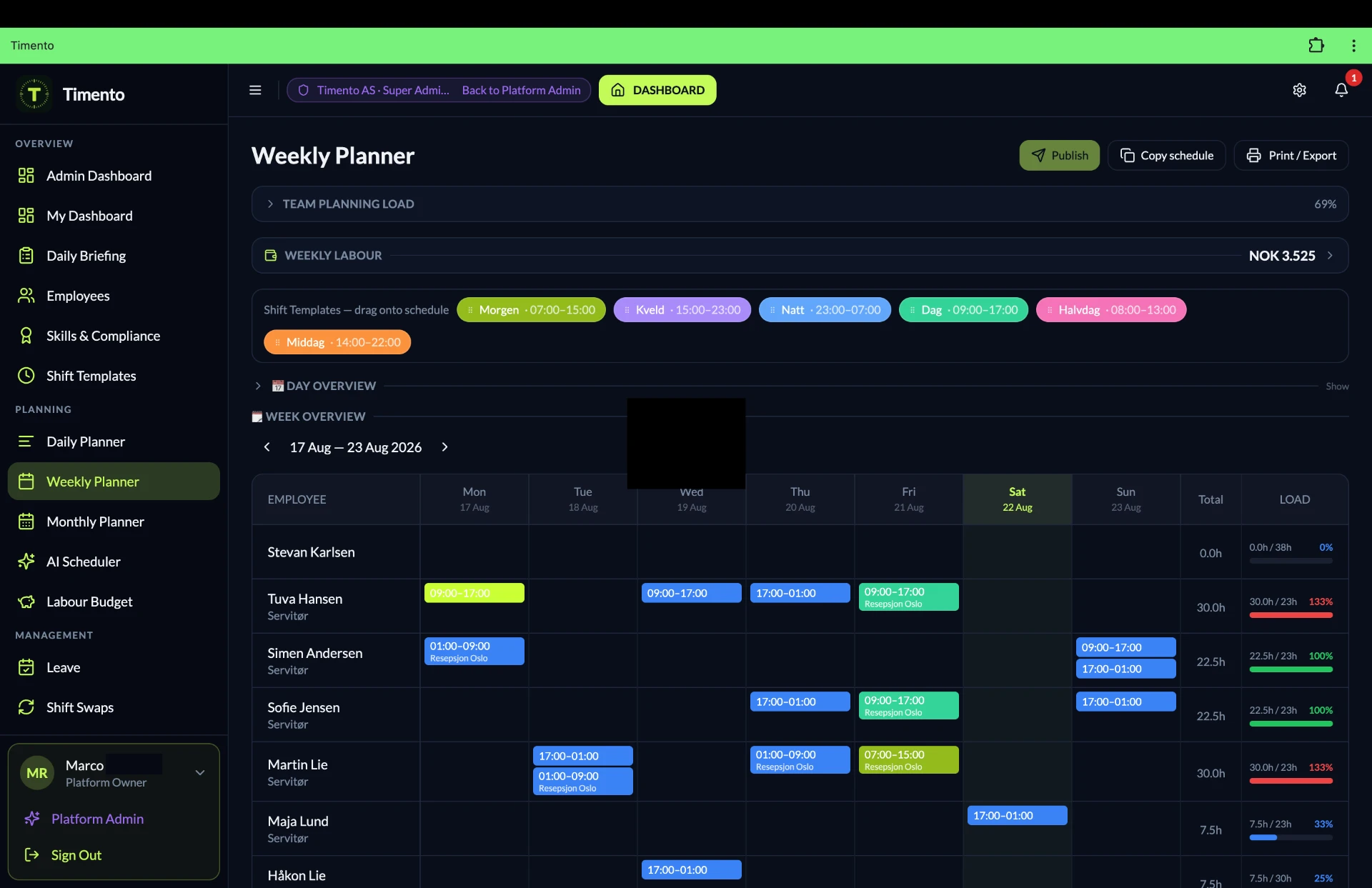
A city-centre store on Saturday and a quiet site on Tuesday are not the same planning problem. Smart Scheduling gives every location the same tools, and Staffing Requirements makes the difference between what a site needs and what is scheduled measurable before the day starts.
Week, day and month views
Zoom from one shift to a full month of coverage per location.
Shift templates
Standardise the shifts a site runs every week, so planning is repeatable instead of improvised.
Recurring shifts
Fixed patterns repeat automatically and only the exceptions need attention.
Copy schedules
Copy a week or a day forward per location and adjust what changed.
Role-based shifts
Plan the role the shift needs first, then the person, so coverage is visible before names are.
Open shifts
Publish shifts that are not filled yet and let qualified employees pick them up, with approval.
Availability and leave
Both visible while the week is built, so a gap is not discovered after publishing.
Contract hours
Planned hours against contracted hours per person, per site.
Conflict detection
Overlaps, leave clashes, double bookings and missing qualifications flagged before publishing.
Overtime signals
See where planned hours push past contract hours while there is still time to rebalance.
Publish and notify
One published version per location, reaching everyone affected at once.
Required versus scheduled, per location
Set the staffing each location needs per role and per part of the day, then compare it with what is actually scheduled. Gaps surface before publishing, and management can see which sites are consistently short instead of hearing about it afterwards.
Explore Smart SchedulingExample
| Location | Role | Required | Scheduled | Status |
|---|---|---|---|---|
| Site A | Shift lead | 1 | 1 | Covered |
| Site A | Front of operation | 5 | 4 | 1 short |
| Site B | Shift lead | 1 | 1 | Covered |
| Site B | Certified role | 1 | 0 | Gap, open shift |
| Site C | Support | 2 | 3 | Above need |
The result: planning stops being a local habit and becomes a decision about coverage that management can compare.
Consistent roles and skills across the operation
The same word should mean the same job in every location.
When each site invents its own job titles, nothing can be compared and nobody can help out. A shared language for roles and skills gives a multi-location business consistency in planning and reporting, while every employee is still managed in the operational context where they work.
Employee records
Contact details, contract information, employment data and documents in one record per person.
Job Roles
Define the roles the business runs on and use the same definitions across locations.
Role assignments
One person can carry several roles, so a flexible employee stays visible for every shift they can fill.
Skills and Certifications
Who is trained or certified for what, with validity dates, so role readiness is a fact instead of an assumption.
Role readiness
See which roles have solid cover and which depend on very few qualified people.
Comparable reporting
Shared role definitions make staffing and hours meaningful to compare between locations.
Consistent roles and skills across the operation
- Valid, ready to be planned
- Expiring soon, plan a refresh
- Expired, not counted as cover
- In training, building toward the role
- Role coverage per team, visible at a glance
Timento gives visibility over recorded roles, skills and certification dates. It does not create a shared pool of employees across locations, does not move people between locations automatically, does not certify anyone and does not guarantee regulatory compliance on your behalf.
Explore People ManagementLocal managers can run the day
Head office should not have to approve a Tuesday shift swap.
The fastest way to slow down a multi-location business is to route every local decision upward. Local managers and planners should handle the operational work in front of them, according to the access you configure, while management keeps the picture that spans locations.
When every decision travels to the centre
- Local schedule changes wait for someone at head office
- Leave requests queue in a single inbox
- Site managers ask instead of deciding
- Small problems become slow problems
- Nobody at the location feels ownership of the result
With delegated operational responsibility
- Local managers plan and adjust the schedules they are responsible for
- Leave, swaps and hours are approved by the person closest to the situation
- Checklists, handovers and attention items are handled on site
- Management sees the same operational picture without doing the local work
- Access matches responsibility, so control is delegated and not lost
Delegation should add operational capacity, not blind spots.
Timento follows the permission model you configure. This page describes the principle of delegated operational responsibility with appropriate visibility, not a fixed organisational structure.
Explore People ManagementEmployee self-service reduces local admin
Ten locations should not mean ten times as many questions.
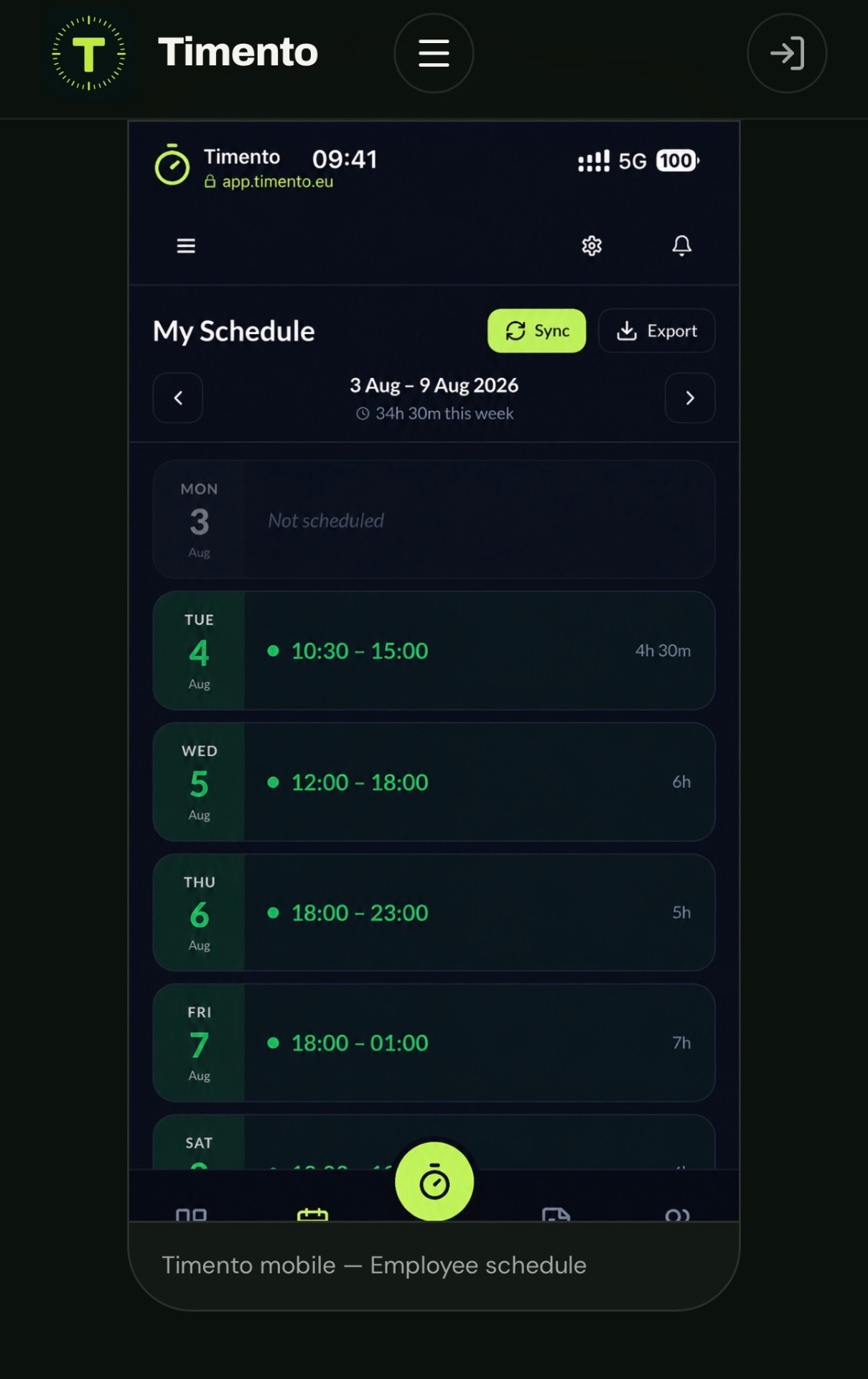
Most of what interrupts a site manager is routine: where do I work next week, can I take Friday off, can someone swap with me. The Employee Portal turns those into something the team handles on their own phone, inside the rules you set.
- My schedule, always the published version
- Availability employees keep current themselves
- Leave requests submitted and tracked in the app
- Open Shifts qualified employees can pick up
- Shift Swaps proposed between colleagues, with approval
- Notifications when something that affects them changes
- Mobile access for teams that are rarely at a desk
- Employee submitsA leave request, an availability change, a swap or interest in an open shift.
- Local manager reviewsThe request arrives with the schedule context and staffing impact of that location next to it.
- Approve or declineNothing reaches the published schedule until a manager approves it.
- Team is notifiedThe updated schedule reaches everyone affected at that location, automatically.
Self-service is not self-scheduling. Swaps, leave and open shifts always pass through approval, and publishing stays a management decision.
Time and attendance per workplace
Hours registered where the work happened.
With several locations, worked hours have to be attributable to the right workplace before they are worth anything to payroll or cost reporting. Timento records working time as the day happens, flags what looks wrong and gives each location one focused review moment.
Clock In, Breaks, Clock Out
Employees register the start, breaks and end of the shift from their phone or a shared device.
Kiosk Mode
A shared tablet at the entrance or in the back office of a site, for teams that clock in on arrival.
Location-based clock verification
Where enabled, a clock action is verified against the configured workplace, so registrations belong to the right site. It verifies the clock action, it does not follow people.
Worked hours per location
Planned and worked hours side by side, per person, per team and per period.
Exceptions
Missing clock-outs, late starts, long breaks and unusual durations surfaced instead of quietly passing through.
Review and Approve
The local manager corrects what needs correcting and approves the rest, so only approved hours continue.
- Clock in
- Breaks
- Clock out
- Exceptions
- Review and Approve
- Payroll ready
Location verification confirms that a clock action happened at the configured workplace. Having several locations does not mean an employee can clock in anywhere: verification applies to the workplace that has been configured for that registration. Timento is not an employee tracking system.
Explore Time and AttendanceStandardise the routines that matter
A guest, customer or client should recognise the standard, whichever site they visit.
Consistency across locations is not about making every site identical. It is about deciding which routines are part of how the business operates, and making sure they are actually completed, recorded and visible.
Operational Checklists
Opening, closing, cleaning and readiness routines with a record of who completed what and when.
Daily Briefing
Today in short, per location: who is in, what matters, what changed since the last shift.
Handover and Team Updates
What the next shift needs to know, written once instead of explained three times.
Temperature Monitoring
Where relevant to your operation, recorded checks with a timestamp and an owner.
Knowledge Hub
Procedures, standards and role guidance available to every team, not only to the manager who wrote them.
Routines multi-location businesses usually want consistent
- Opening and closing routines
- Cleaning and hygiene rounds
- Site or store readiness before the first customer
- Shift handovers between teams
- Service standards and presentation checks
- Safety walkthroughs and recurring equipment checks
Checklists and routines create a record of what was done and by whom. Timento does not provide formal certification and does not replace specialist quality, safety or industry systems. Locations can run the routines that fit their operation, so shared structure does not force identical checklists everywhere.
Communication without a group chat per location
Ten chat groups is not an operating model.
As locations multiply, the important message competes with everything else in the same thread, and management ends up in ten conversations to understand one day. Timento keeps three kinds of communication distinct and attaches each one to the shift, task, location or person it belongs to.
Messages
Direct and team messages for the practical back and forth of the working day.
Notifications
Automatic updates: a published schedule, an approved leave request, a shift that changed.
Operational Alerts
Signals that something needs a decision, such as a missing clock action, a staffing gap or an unfilled shift.
- TargetedSent to a location, a team, a role or a single shift instead of to everyone in the company.
- AcknowledgedYou can tell that it reached the people it was meant for, and who replied.
- Action NeededWhen something has to be done, it becomes an item with an owner instead of a hope.
- ResolvedThe item is closed with a record, and the operation moves on.
Timento is not a replacement for Slack or Microsoft Teams. It handles the operational communication that belongs to shifts, tasks and the working day.
Management by exception across locations
You do not need every normal day from every site. You need the ones that are not normal.
Area and operations management cannot read ten complete operational days every morning, and should not have to. The useful model is the opposite: assume a location that is running well stays quiet, and let the sites that need attention raise their hand.
A conceptual location overview
Locations that are on plan stay calm. Locations with something unresolved surface with the reason attached, so the next conversation starts from the actual issue.
Example
Site A
On planStaffed to requirement, hours reviewed, routines completed.
Site B
Needs attentionCertified role uncovered tomorrow, open shift unclaimed.
Site C
On planNothing outstanding, schedule published.
Site D
Needs attentionTwo missing clock-outs and overtime rising against contract hours.
Site E
On planLeave requests handled locally, no gaps.
Site F
Needs attentionClosing checklist not completed on the last two evenings.
Manage the exceptions. Let the locations that are running well run.
- OpenSomething needs attention and is visible to the people responsible for that location.
- AcknowledgedSomeone has taken it on, so it stops being everybody's and nobody's problem.
- ResolvedIt is closed with a record of what happened and who handled it.
This is a conceptual illustration of exception-based oversight, not a product screenshot. Which signals appear depends on the capabilities your locations actually use.
- Staffing gaps against required staffing
- Open shifts nobody has picked up yet
- Leave requests waiting for a decision
- Clock exceptions such as a missing clock-out
- Overtime signals against contract hours
- Operational alerts that are still unresolved
- Checklists or routines not completed on a shift
- Schedules not published close to the working week
Compare planned and actual labour cost
A small scheduling difference is cheap once and expensive ten times a week.
Two extra hours on a Saturday is a rounding error in one location. Repeated across every site, every week, it becomes one of the largest controllable costs in the business. Timento connects the staffing decision to the cost it creates, and then to what was actually worked.
- Staffing Requirements
- Scheduled hours
- Planned labour cost
- Actual worked hours
- Review and Approve
- Planned vs Actual
- Payroll Ready
Questions management should be able to answer
- Which locations are running above their planned hours?
- Where is overtime rising instead of settling?
- Which sites are consistently staffed above or below their requirement?
- Where do planned and actual hours drift apart week after week?
- Planned labour cost visible while the week is being built, not after the period closes
- Contract hours per person, so growth does not create silent structural overtime
- Overtime signals early enough to rebalance the schedule
- Planned versus actual hours per location, team and period
- Reports and insights on hours, cost and coverage across the operation
- Approved hours exported in a payroll-ready format where supported
Timento reports on the workforce data it holds: staffing, schedules, worked hours and approved hours. It prepares payroll-ready information and exports it where supported. It does not run payroll and does not replace your payroll or accounting system.
Explore Payroll and ReportingOne operating model, room for local reality
Shared structure. Local execution.
Multi-location businesses want consistency, but a city-centre site, a seasonal location and a large regional operation are genuinely different. Timento gives one workforce platform and one method, while schedules, teams, staffing patterns and routines can reflect what each location actually needs.
Shared across the business
- One workforce platform instead of separate local systems
- The same job roles and skill definitions
- The same planning method: staffing need, schedule, publish, clock, review
- The same exception and approval logic
- The same reporting language for hours and cost
- One place where procedures and standards live
Configured per location
- The team that works at that site
- Opening hours, shift patterns and peaks
- Staffing requirements per role and per part of the day
- Local schedules, availability and leave
- Operational checklists and daily routines that fit the site
- Who plans, who approves and who runs the day locally
Consistency where it creates value. Flexibility where the operation demands it.
This describes shared structure with location-specific configuration in the current product model. Timento does not provide franchise management, enterprise master-data propagation or automatic distribution of templates between locations.
Knowledge that scales beyond one site
Operational knowledge should not resign when a manager does.
In a single location the person who knows how things work is always nearby. Across ten, that knowledge is spread over ten heads and travels badly. Knowledge Hub makes procedures, standards and practical guidance available to the teams who need them.
Knowledge Hub is a practical internal knowledge base. It is not a learning management system and does not provide certified document control or training certification.
Explore Knowledge Hub- Company procedures and operating standards in one place
- Location-specific instructions where a site works differently
- Onboarding material new employees can work through themselves
- Role guidance tied to the work someone actually does
- Searchable, so the answer is faster than calling another site
- Updated centrally instead of in printed folders per location
Integrations and the payroll flow
Clean hours out of every location, in one format.
Multi-location businesses usually care less about dashboards and more about what happens downstream. When every site delivers hours in its own way, someone spends the first week of every month rebuilding them. One approval flow produces one consistent output.
- Worked hours
- Exceptions handled
- Review and Approve
- Payroll Ready
- Export or integration
- The same review and approval step in every location
- Approved hours per employee, team and period
- CSV and Excel export of payroll-ready data
- Available integrations as listed on the integrations page, including Tripletex for Norwegian operations
- One output format instead of a different spreadsheet per site
Integration availability and status are exactly as listed on the integrations page. Timento does not promise direct synchronisation with systems that are not supported.
AI Copilot and Operations Intelligence
A second pair of eyes across locations.
Patterns are easier to see across sites than inside one. A role that is always short on the same weekday, a location where overtime keeps climbing, a gap between planned and actual hours that never closes. AI Copilot surfaces those signals so a manager can look earlier.
AI Copilot makes suggestions and surfaces signals. It does not publish schedules, approve hours or make workforce decisions on its own. Managers stay in control of every decision.
- Repeating staffing gaps across locations and weekdays
- Overtime building up at a specific site before it reaches payroll
- Roles where coverage depends on very few qualified people
- Differences between planned and actual hours worth reviewing
- Locations worth a closer look based on operational signals
From multi-location to enterprise
The philosophy does not change. The requirements sometimes do.
Some businesses reach a point where the organisational structure, integration landscape, implementation approach or contractual requirements need a conversation rather than a plan page. That does not mean starting over: the workforce operating model stays the same.
Most multi-location businesses do not need enterprise capability. The point is that nothing has to be rebuilt if they eventually do.
- One growing teamRoles, planning, time and daily operations in one place for one operation.
- Several locationsLocal execution per site with one operational picture across them.
- Enterprise requirementsCustom integration, implementation and contractual needs handled together with us.
Pricing for multi-location operations
Business is the plan built for more complex operations.
Multiple locations are supported from Growth upward, and Business is specifically positioned for more complex and multi-location operations that need deeper configuration and support.
Not every business with more than one location needs Business. Smaller multi-location operations often fit Growth perfectly well. The pricing page shows the full comparison so you can judge it against your own situation.
Pay annually and get 12 months for the price of 10.
Start with a 30-day trial for up to 4 employees, no credit card required.
Compare all plansBusiness
99 EURper month
- 75 employees included
- Everything in Growth
- Built for multi-location operations
- More advanced configuration of roles and routines
- Assisted setup for available integrations and exports
- Onboarding with configuration support and priority support
Additional employees: 1.50 EUR per employee per month.
Request a trialThe connected multi-location flow
One chain, from locations to management overview.
Every step feeds the next, which is exactly what separate local spreadsheets cannot do. This is what turns several independent operations into one operating model.
- Locations
- People and Roles
- Staffing need
- Local schedules
- Publish and self-service
- Clock and daily operations
- Local exceptions
- Review and Approve
- Labour cost and Payroll Ready
- Management overview
- Locations
- People and Roles
- Staffing need
- Local schedules
- Publish and self-service
- Clock and daily operations
- Local exceptions
- Review and Approve
- Labour cost and Payroll Ready
- Management overview
You do not have to switch all of it on at once, and you do not have to roll it out to every location on the same day. Many businesses start with one site, then extend the model.
Where Timento fits, and where it stops
Timento is the workforce operations layer of a multi-location business. It brings workforce planning, people, working time and daily operations together across locations, and connects or exports to the systems around it where supported. It does not replace ERP, payroll or accounting software, POS, booking or PMS systems, MES, CRM, franchise-management platforms or specialist industry systems.
See integrationsQuestions & answers
Multi-location questions, answered
How Timento keeps every site running its own day while management keeps one operational picture.
Can each location have its own team and schedule?
Yes. Every location works with the people, roles, shifts, availability, leave and routines that belong to that operation, so a local manager sees the workforce context they are responsible for instead of a company-wide list.
Can management see all locations in one place?
Yes. Alongside the local view there is a company-level picture of staffing, live team status, attention items, hours and labour cost, so owners and area managers can compare sites without calling each one.
Do all locations have to work in exactly the same way?
No. Timento supports shared structure with room for local reality. Roles, routines and checklists can follow a common definition while schedules, teams and opening hours stay specific to each site.
Can I give a location manager access to only their own site?
Access follows responsibility. A location manager works with the team and schedule they are accountable for, while the cross-location picture stays with the people who need it.
How do we know people clocked in at the right location?
Location-based clocking verifies that a clock-in happens at the workplace it belongs to. It confirms the start of a shift at a site, it is not employee tracking and it does not follow anyone during or after their shift.
How do we avoid checking every location every day?
Manage by exception. Locations running a normal day stay quiet, and attention items surface where something needs a decision: staffing gaps, unclaimed open shifts, leave awaiting approval, clock exceptions and operational alerts. Items move through Open, Acknowledged and Resolved.
Can we compare labour cost between locations?
Yes. The same chain runs per site: required staffing, scheduled hours, planned labour cost, actual worked hours, review and approve, planned versus actual. Because the structure is shared, comparison between locations is meaningful rather than rebuilt by hand.
How do we keep routines consistent across sites?
Operational Checklists and the Knowledge Hub give every location the same opening, closing and handover structure, with completion visible per site so management can see what is actually being done.
Can we send a message to one location instead of everyone?
Yes. Team Updates and notifications can target a specific location or team, so a local message reaches the people it concerns while company-wide information still reaches everyone.
Does payroll still work when hours come from several locations?
Approved hours from every site flow into the same payroll-ready output, so payroll starts from checked records instead of collecting spreadsheets per location. Timento prepares the working-hour data; the payroll run stays in your payroll system.
Which plan fits a multi-location business?
Most multi-location operations start on the Business plan at 99 EUR per month, which includes 75 employees, with additional employees at 1.50 EUR per employee per month. Paying annually gives you 12 months for the price of 10.
Does Timento replace our POS, booking or ERP system?
No. Timento is the workforce layer around your operation: planning, time, routines, communication, exceptions and hours. Your POS, booking, PMS, ERP and payroll systems keep doing their own job.
One operating model. Every location still runs its own day.
Replace fragmented local workforce processes with one connected structure, without taking the day out of the hands of the managers who run it.
30 days, up to 4 employees, no credit card, personal onboarding.