Timento for facility services
One workforce. Many locations. Complete visibility.
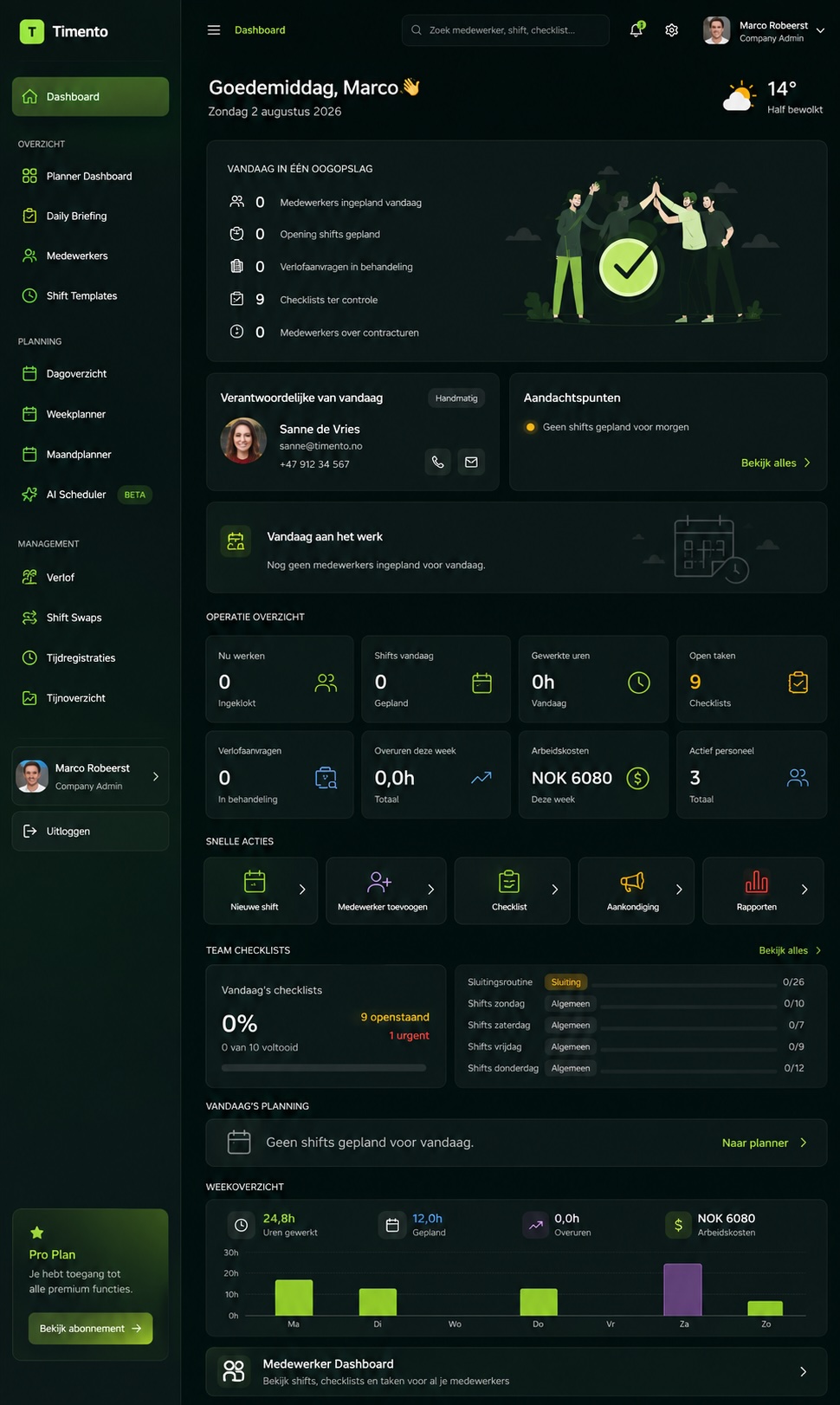
Plan teams across sites, track working time, standardize recurring routines and surface what needs attention , all from one connected workforce platform.
Give employees a simple mobile working experience while managers keep visibility across teams, sites and daily operations.
30 days · Up to 4 employees · No credit card · Personal onboarding
Work happens everywhere
You can't stand at every site.
When employees work across customer locations, managers need more than a schedule. They need to know who should be there, whether work started, what routines were completed and which sites need attention.
- Spreadsheet schedule
- WhatsApp messages
- Paper checklist
- Separate time sheet
- Photo sent to the manager
- Phone call about an issue
- Email follow-up
Timento connects the working day instead.
A distributed working day
Different people. Different sites. One operation.
A facility services day rarely starts in one place. Here is how a distributed day can run inside Timento.
05:30
Early cleaning team starts at Site A
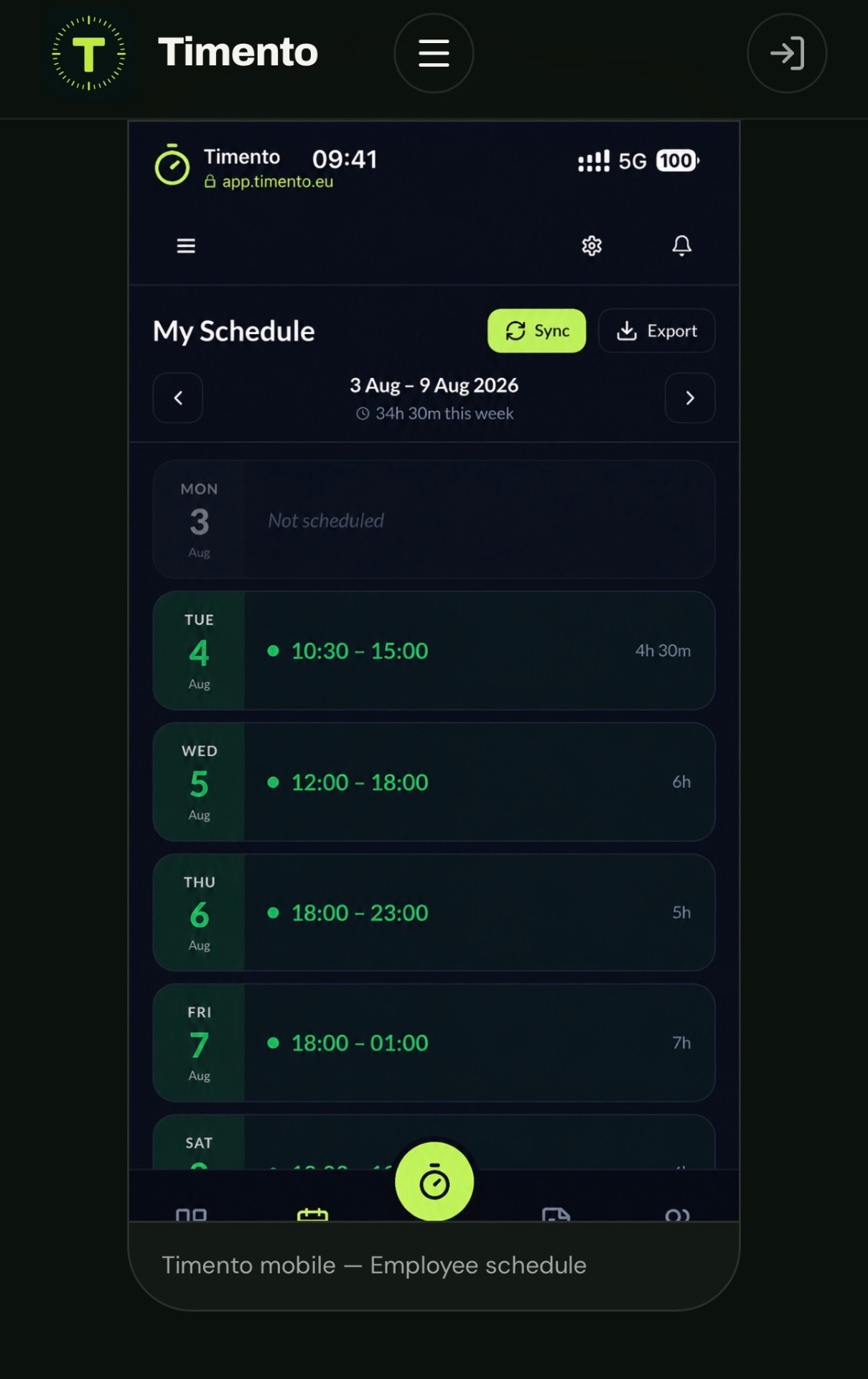
The team opens My Schedule and sees the shift, the site and today's routine before arriving.
06:00
Clock In
Working time starts on the employee's own device, or on a shared device where Kiosk Mode is used.
06:05
Opening checklist begins
The Operational Checklist for the site guides the routine step by step, with notes and photos where useful.
07:30
Supervisor reviews completed work
Completed checklists appear with status and timestamp, so the review does not require a site visit.
08:00
Day team starts at Site B
A different team, a different start time and a different routine , inside the same operational environment.
10:30
Issue reported at Site C
An employee reports a problem from the field with a short note and a photo instead of a phone call.
11:00
Action Needed assigned
The issue becomes a visible item somebody takes responsibility for, rather than a message that scrolls away.
12:00
Break registered
Breaks are registered as part of the working day, so worked hours stay correct.
14:00
Site inspection completed
The inspection routine is recorded with completion status, timestamp and any notes from the field.
16:00
Handover & Team Updates
What the team found, what is unfinished and what the next team should know is written down once.
18:00
Evening team starts
The evening team starts with today's context already in place instead of starting from zero.
Different employees, different locations, different working times , one operational environment. Timento records what employees register; it does not follow employees between sites.
Smart scheduling
Put the right team at the right site.
Plan people around locations, roles and real availability instead of rebuilding the same schedule in a spreadsheet every week.
- Morning cleaning team
- Day caretaker
- Technical maintenance
- Evening cleaning
- Weekend inspection
Employees & roles
AvailablePlan by role so a site gets the function it needs, not just a name.
Locations
AvailableShifts are planned on the site where the work happens, so the schedule reflects the operation.
Availability & Leave
AvailableAvailability and approved leave are visible while planning, not discovered afterwards.
Contract Hours
AvailableSee planned hours against contracted hours while the schedule is being built.
Shift Templates
AvailableReuse the shift patterns your operation repeats instead of typing them again.
Recurring shifts
AvailablePredictable weekly work is planned once and repeats.
Open Shifts
AvailablePublish work that still needs coverage without assigning a specific employee.
Conflict Detection
AvailableOverlaps, leave conflicts and double bookings surface while planning.
Publish & Notify
AvailablePublish the schedule and notify the team in-app and by push in one step.
Staffing Requirements
In developmentDefining required staffing per period is in development and is not part of the current release.
Recurring work
Recurring work shouldn't mean recurring admin.
Most facility work repeats: the same site, the same days, the same routine. Timento lets you describe that pattern once.
Shift Templates
AvailableSave the shifts you repeat , times, role and location , and reuse them.
Recurring shifts
AvailablePlan the weekly rhythm once instead of rebuilding it every planning round.
Operational Checklists
AvailableAttach the routine that belongs to the work so it arrives with the shift.
Publish & Notify
AvailableChanges to a recurring pattern reach the team the same way as any other update.
Managers should not have to rebuild predictable work every week.
Recurring pattern · Example data
- Site
- Site A
- Days
- Monday–Friday
- Time
- 06:00–08:30
- Team
- Cleaning team
- Routine
- Opening routine
Open shifts
Need cover at another site?
Create work that needs coverage and surface it to the team without immediately assigning a specific employee.
Open Shifts make coverage visible. Timento does not assign work automatically , a person still decides who takes the shift.
- Open ShiftSite B · Cleaning · 18:00–21:00
- In-app + PushThe open shift is surfaced to the relevant team.
- EmployeeAn employee responds, and the shift is confirmed by the planner.
Skills & certifications
Available isn't always qualified.
Some work needs more than a free slot in the schedule. It needs the right training, the right authorization or the right competence for that site.
- Specific training
- Equipment competence
- Safety training
- Technical qualification
- Internal authorization
- Site-specific competence
- Valid
- Expiring
- Expired
- Pending
See qualification and expiry status before it becomes an operational surprise.
Explore People Management- Employee
- Skills & Certifications
- Role requirements
- Smart Scheduling
Timento records skills, certifications and their status so planning happens with that information in view. It does not verify qualifications with external registers and does not guarantee regulatory compliance.
Time & attendance
One working day, wherever the shift happens.
Distributed work still has to produce one correct set of hours. Timento registers the working day where it happens and carries it through to approval.
Clock In
AvailableEmployees start the working day on their own device or on a shared workplace device.
Breaks
AvailablePaid and unpaid breaks are registered as part of the shift.
Clock Out
AvailableThe working day is closed where it ends, not on a sheet the next morning.
Worked Hours
AvailableRegistered time becomes worked hours per employee, shift and period.
Timesheets
AvailableHours are collected per period, ready to be checked.
Review & Approve
AvailableManagers review, correct and approve before hours move on.
Payroll Ready
AvailableApproved hours become a controlled basis for payroll export.
- Clock In
- Breaks
- Clock Out
- Worked Hours
- Review & Approve
- Payroll Ready

Choose the clocking setup that fits the workplace.
AvailableWhere a shared workplace device makes more sense than personal phones, Kiosk Mode lets a team clock in and out on one device at the workplace.
- Large facility
- Staff entrance
- Central service location
- Warehouse / operations base
Kiosk Mode is optional. Teams that clock in on their own device do not need it.
Clocking connected to the workplace.
In developmentOptional location-based clocking is being developed to help businesses verify that clocking happens within a configured workplace area.
This is workplace verification at the moment of clocking , not continuous tracking. Timento does not follow employees, monitor movement or show where employees are during the day.
Operational checklists
Make recurring work visible.
Routines that happen at a site nobody is watching still need to be recorded. Checklists turn the routine into something the operation can see.
- Cleaning routine
- Toilet inspection
- Common-area check
- Equipment check
- Safety routine
- Waste handling
- Opening routine
- Closing routine
- Site inspection
- Assigned
- Completed
- Timestamp
- Photo
- Note
- Sign-off
- Review
Managers don't need to physically watch every routine to know what has been recorded. Checklists document work, not people.
When the manager isn't there, the record matters.
Most facility work is completed without a supervisor present. A clear operational record of what was done, when and by whom removes a lot of the follow-up that used to happen by phone.
- Completion status
- Timestamp
- Photo where the routine asks for one
- Note from the field
- Employee who completed it
- Site context where supported
- Manager review
This creates a clearer operational record of completed work. It is not legally binding proof and not a customer certification workflow.
Knowledge hub
The checklist says what. Knowledge Hub explains how.
A distributed team cannot ask the supervisor across the corridor. The procedure has to travel with the work.
- Checklist: Clean floor machineKnowledge Hub: Floor machine cleaning procedure
- Checklist: Inspect technical roomKnowledge Hub: Technical-room inspection guide
- Checklist: Prepare Site BKnowledge Hub: Site B working instructions
- Procedures
- Images
- Attachments
- Site instructions
- Equipment guides
- Safety information
Every site has things the team needs to know.
Access details, customer expectations and local particularities are exactly what a stand-in does not have. Knowledge Hub is where that operational knowledge is organized so it can be found.
- Access instructions
- Site procedures
- Equipment location
- Customer requirements
- Cleaning standards
- Special instructions
- Emergency information
Knowledge is organized by your own structure, so articles relevant to a site can be grouped and found. Timento does not automatically target knowledge based on an employee's position.
Daily briefing
Start the team with today's operational context.
A short, structured briefing gives distributed teams the same picture of the day before they spread out across sites.
The briefing is configured to your operation. Fields that belong to a hotel or a restaurant simply do not appear here.
Explore Operations HubDaily Briefing · Example data
- Today's focus
- Site B deep clean
- Staffing changes
- Two on the day team
- Site priorities
- Site C common areas
- Technical issues
- Lift out of service, Site A
- Deliveries
- Supplies to Site B, 11:00
- Safety information
- Wet floor signage in use
- Important tasks
- Quarterly inspection, Site D
- Customer requirements
- No noise before 09:00, Site C
- Absences
- One absence, evening team
- Equipment issues
- Scrubber under repair
Keep field teams connected
The right update shouldn't depend on a phone call.
Distributed teams need a clear separation between people talking to each other, the system telling them something happened, and exceptions that need attention.
Messages
Communication between people and teams, kept inside the working environment instead of private chat apps.
- Team message
- Site team
- Direct message
- Team update
Notifications
Updates triggered by workforce events, delivered in-app and by push.
- Schedule change
- Open Shift
- Leave decision
- Checklist review
- Action Needed
Operational alerts
Exceptions that need someone to look, follow up and close them out.
- Missed clock-in
- Missed clock-out
- Working-hours warning
- Operational issue
Delivery is in-app and push notification. Timento does not send SMS.
Turn a reported issue into ownership.
Something reported from the field only helps if somebody picks it up. Action Needed makes that step explicit.
Another example: technical room light needs replacement , reported from the field, picked up by the person who will handle it.
This is lightweight operational accountability. It is not a ticketing system, a CMMS or a work-order platform.
- Action NeededSite C · Soap dispenser damaged
- I'll take itAn employee takes responsibility for the item.
- Follow-up visibleReplies and acknowledgement stay with the item, not in a chat thread.
Operational continuity
The next team should know what the last team found.
Between shifts, teams and sites, context is the thing that gets lost first. Handover & Team Updates keeps it written down where the next team looks.
Context survives between people, shifts and locations.
- Equipment problem
- Access issue
- Incomplete work
- Customer request
- Technical fault
- Supply shortage
- Follow-up required
Operational alerts
Don't call every site. See what needs attention.
Most of the day goes as planned. Management time should go to the part that doesn't.
- Missed clock-in
- Missed clock-out
- Working-hours warning
- Checklist issue
- Operational issue
- Integration error
- 01Open
- 02Acknowledged
- 03Resolved
Normal work flows through. Exceptions rise to the surface.
Control center
One operational picture across the workforce.
The Control Center answers a single question for a distributed operation: where does attention need to go?
- Live Team Status
- Employees working
- Employees on break
- Scheduled today
- Operational alerts
- Checklist status
- Reviews
- Leave
- Labour Cost
- Locations
The Control Center shows registered workforce activity , clocking, routines, alerts and approvals. It does not show employee locations during the day.
Multi-location
One team across many sites.
For facility services, multiple locations is not an add-on. It is the default operating model.
- Locations
- Employees and roles
- Permissions
- Schedules per site
- Operational routines
- Knowledge
- Control Center
- Reports & Insights
Standardize what should be consistent while preserving the reality of each site.
Explore Multi-locationOne standard. Different sites.
Facility operations fail in two directions: everything improvised, or a standard so rigid it ignores what each site actually needs. Timento's modules let you hold both.
Knowledge Hub
Company procedureHow work should be done, written once for the whole organisation.
Operational Checklists
Site routineWhat that standard looks like in practice at this site.
Daily Briefing
Today's contextWhat is different about this particular day.
Company-wide standard and site-specific context are separate layers, so improving one does not mean rewriting the other.
For supervisors
Spend less time collecting status updates.
A supervisor's day is often spent asking what happened. When the working day is registered as it goes, that question is largely already answered.
More attention on exceptions, less manual status collection.
- 01Check Control Center
- 02Review Alerts & Exceptions
- 03Review completed Operational Checklists
- 04Respond to Action Needed
- 05Review Time
- 06Handover
For field teams
One simple place for the working day.
People working alone or in small teams should not need training to use the tool. Everything for the working day sits in one mobile view.
- My Schedule
- Clock In · Breaks · Clock Out
- Daily Briefing
- Operational Checklists
- Messages
- Notifications
- Knowledge Hub
- Availability & Leave
- Open Shifts
- Calendar Export
No traditional app-store download required.
Labour cost
See the cost behind the hours.
Facility services is labour-intensive: the schedule is the cost. Planned versus actual makes the difference visible while there is still time to react.
Automatic explanation of cost variance is in development. Timento does not calculate contract profitability.
Explore Payroll & ReportingExample data
| Period | Planned | Actual | Variance |
|---|---|---|---|
| Week 12 · Site A | 182 h | 189 h | +7 h |
| Week 12 · Site B | 96 h | 94 h | -2 h |
| Week 12 · Site C | 140 h | 151 h | +11 h |
Example data for illustration. Figures depend on your own schedule, rates and approved hours.
- Smart Scheduling
- Planned Labour Cost
- Actual work
- Actual Labour Cost
- Reports & Insights
Understand where workforce cost is going.
Planned and actual hours are the questions a facility manager actually needs answered before the period closes.
This is workforce cost visibility. Timento does not produce location profitability or customer contract margin reporting.
- What was planned?
- What was actually worked?
- Where is overtime increasing?
- What needs approval?
Payroll ready
From the working day to payroll, without retyping.
The hours registered in the field are the hours that go to payroll , once they have been checked and approved.
- 01Clock In · Breaks · Clock Out
- 02Worked Hours
- 03Alerts & Exceptions
- 04Review & Approve
- 05Payroll Ready
- 06Export / integration
CSV / Excel Payroll Export
AvailableApproved hours exported in a structured file for your payroll process.
Tripletex File Export
AvailableFile-based export for Tripletex customers.
Tripletex Direct API Sync
In developmentDirect synchronisation is in development.
Approve first, export second , so payroll starts from checked hours.
People, qualifications and operations, connected.
The value is not in any single module. It is in the line that runs from a site requirement to what a manager can see afterwards.
Planners see qualification information while planning. Timento does not automatically block or enforce assignments.
- Site requiresTechnical qualification
- EmployeeSkills & Certifications with status and expiry
- Smart SchedulingThe shift is planned with that information in view
- Work completedOperational Checklist recorded in the field
- Control CenterManager visibility without a site visit
Different facility teams
Different teams. One operational picture.
Facility companies are organised in very different ways. Timento adapts to the teams you actually have.
- Cleaning
- Technical services
- Maintenance
- Site supervisors
- Mobile teams
- Management
Timento
Not every facility company has all of these teams , and Timento does not assume it.
Built around your operation
A cleaning company doesn't run like a technical service team.
The common problem is distributed people performing repeatable work across locations. How that looks in practice differs per business.
- Cleaning services
- Property services
- Technical maintenance
- Building operations
- Multi-service facility company
- Contract services
- Roles
- Locations
- Shift Templates
- Operational Checklists
- Daily Briefing
- Knowledge Hub
- Permissions
- Notifications
- Workflows
Configuration happens within the platform's structure , this is a configurable product, not unlimited custom development.
Already using systems your operation depends on?
Keep what works. Tell us what needs to connect.
- Payroll
- Accounting
- Customer and site systems
- Operational platforms
We only promise integrations we have verified. Bring the systems you depend on to the conversation and we will be specific about what is available today.
Explore IntegrationsPlan. Run. Control.
Control the operation without being at every site.
The same three phases as everywhere in Timento , applied to a workforce spread across locations.
Plan
Get the right people to the right sites
- Smart Scheduling
- Availability & Leave
- Open Shifts
- Skills & Certifications
- Locations
Run
Support the working day in the field
- Clock In · Breaks · Clock Out
- Daily Briefing
- Operational Checklists
- Knowledge Hub
- Messages & Action Needed
- Handover & Team Updates
Control
See the operation from one place
- Live Team Status
- Operational Alerts
- Control Center
- Review & Approve
- Labour Cost
- Reports & Insights
One environment from planning the week to approving the hours.
Workforce management that follows the work into the field.
Scheduling tells people where to be. Timento continues into the working day with time, routines, knowledge, communication and operational visibility.
That continuity is the point: the same environment that planned the shift is the one that records what happened during it.
Timento is not a CMMS or field-service system.
Timento doesn't replace specialist maintenance or field-service systems, asset management or customer invoicing. It manages the workforce and operational layer around the work.
Tell us which systems your operation depends on and we will be precise about what connects today.
Questions & answers
Facility services workforce questions, answered
How Timento supports teams working across customer sites — and where it stops.
Can Timento schedule employees across multiple sites?
Yes. Shifts are planned per location, so a schedule reflects where the work happens and not just who works when. Employees, roles, availability, contract hours and open shifts are all part of the same plan, and Conflict Detection surfaces overlaps before the schedule is published.
How do I handle recurring cleaning or maintenance routines?
Use Shift Templates and recurring shifts for the pattern, and attach an Operational Checklist for the routine itself. A weekly pattern such as Site A, Monday to Friday, 06:00–08:30 is described once instead of rebuilt every planning round.
Does Timento track where employees are during the day?
No. Timento records what employees register themselves — clocking, checklists, notes and messages. It does not follow employees between sites or monitor movement. Optional location-based clocking, which verifies that clocking happens within a configured workplace area, is in development.
How do employees clock in when they work away from an office?
Employees clock in, register breaks and clock out on their own device. Where a shared workplace device makes more sense — a large facility, a staff entrance or an operations base — Kiosk Mode is available. Both routes produce the same worked hours for review and approval.
Can I see that work was actually completed at a site?
Operational Checklists record completion status, timestamp, the employee, and photos or notes where the routine asks for them, so a manager can review the work without visiting the site. This is an operational record, not legally binding proof or a customer certification workflow.
Can Timento show which employees are qualified for a task?
Skills & Certifications records training, competences and certificates with their status — valid, expiring, expired or pending — so planners see that information while scheduling. Timento does not check external registers, enforce assignments automatically or guarantee regulatory compliance.
How are issues reported from the field handled?
An employee reports the issue from the working day with a short note and a photo. Action Needed turns it into a visible item somebody takes responsibility for, with replies and acknowledgement kept on the item. It is lightweight operational accountability, not a CMMS or work-order system.
How do I keep control of many sites without calling each one?
The Control Center shows live team status, who is scheduled today, checklist status, reviews, leave and labour cost, while Alerts & Exceptions surfaces things like a missed clock-in or a working-hours warning through an Open → Acknowledged → Resolved lifecycle. Normal work flows through; exceptions rise to the surface.
Where do site-specific instructions live?
In the Knowledge Hub. Procedures, images, attachments, equipment guides and site working instructions are organised in your own structure and can be linked to the routine that needs them, so a stand-in has the same information as the regular team.
Is Timento a CMMS or field-service management system?
No. Timento does not replace specialist maintenance, field-service, asset-management or customer-invoicing systems. It manages the workforce and operational layer around the work: scheduling, time, routines, knowledge, communication and visibility.
How do hours from the field reach payroll?
Clock In, breaks and Clock Out become worked hours, exceptions are handled, and a manager uses Review & Approve before the period is Payroll Ready. Approved hours can then leave through CSV / Excel Payroll Export or Tripletex File Export.
Run every site from one operational picture.
Scheduling, time, routines, knowledge, communication and visibility , for a workforce that works everywhere except the office.
30 days · Up to 4 employees · No credit card · Personal onboarding
Not facility services?
See how Timento is used in other operations.