Recreation and leisure
Open well. Run the day. Know what it cost.
Timento connects staffing, time registration, daily routines, communication and management control around the recreation operating day, from opening readiness to the last guest.
For activity parks, attractions, museums, visitor centres, ski facilities, climbing centres, leisure centres, wellness and spa operations, guided activities and rental businesses.
30 days · Up to 4 employees · No credit card · Personal onboarding
The recreation reality
Guest activity moves. Your staffing has to move with it.
A quiet Tuesday and a sunny Saturday are two different businesses. Add school holidays, weather, group bookings and a mostly part-time team, and the operating day is decided by how well the workforce layer holds together.
- A schedule in a spreadsheet, changed twice by phone
- Opening checks confirmed verbally and never recorded
- A group chat where the important message scrolled away
- Hours on paper at reception, typed over at month end
- Nobody sure who covers the café during the 14:00 peak
- An instructor certificate checked from memory
- The duty manager handover done in the corridor
- Labour cost known long after the season is over
One good day runs on people who care. A full season runs on structure.
From opening to the last guest
One operating day, opening to closing.
Recreation days have a shape: readiness before the doors open, a build in guest activity, one or two peaks, breaks and shift changes, then closing and handover.
07:30
Opening and readiness
The duty manager opens the day in Timento. Opening checklists cover facilities, guest areas, activity areas, café readiness and equipment areas, with who completed what and when.
08:30
Team arrival and clock in
Reception, guest services, activity hosts and café staff clock in on a shared kiosk device or their own phone at the configured location. The duty manager sees who arrived and where a role is still open.
09:00
Daily Briefing before the first guests
Today's focus, expected activity, groups and bookings that were entered, technical issues, priority areas, deliveries and decisions needed. Everyone reads the same version.
11:00
Activities and guest flow
Activity sessions, guided tours, rentals and guest services run on the schedule. Operational routines are completed during the day rather than reconstructed afterwards.
13:30
Peak period
Staffing Requirements shows required against scheduled staffing per role and area, so the gap at the busiest hour is visible while there is still time to act on it.
15:00
Breaks and shift change
Breaks are registered rather than estimated. The afternoon team clocks in, Live Team Status shows who is working now, who is on break and who has not arrived.
18:00
Closing routines
Closing checklists cover guest areas, activity areas, equipment return, cleaning and cash-up routines where configured. Completion is recorded on the shift.
19:00
Handover and review
Handover & Team Updates carries the open items to the next duty manager. Worked hours and exceptions move into Review & Approve, so the day closes with checked numbers.
Timento records how the workforce day ran. It does not replace your booking, ticketing, access-control or activity-management systems.
Plan for demand, activities and peaks
Staff the day the guests actually have.
Build the week around opening hours, activity sessions and expected demand, then let the system catch the conflicts before you publish.
- Duty Manager
- Guest Services
- Activity Host
- Instructor and Guide
- Reception
- Rental
- Café
- Cleaning
- Maintenance
- Operations
Smart Scheduling
Week, day and month planning for a business where Saturday, a school holiday and a wet Wednesday need three different teams.
Shift templates
Save the shapes you repeat: opening shift, activity block, peak cover, closing shift, weekend rotation.
Recurring shifts
Fixed patterns for reception, cleaning and maintenance stay in place without rebuilding them each week.
Copy schedules
Copy a comparable week as a starting point, then adjust for bookings, season and staffing changes.
Role-based shifts
Plan by role and activity area so an instructor slot is never quietly filled by someone in another function.
Availability & Leave
Requests and availability from part-time, weekend and seasonal staff sit in the plan instead of in someone's inbox.
Contract Hours
See scheduled hours against contract hours per employee while the week is still a draft.
Conflict Detection
Overlaps, leave, availability limits and overtime signals surface before the schedule is published.
Publish & Notify
One published version, everyone notified. No parallel copies circulating in chat.
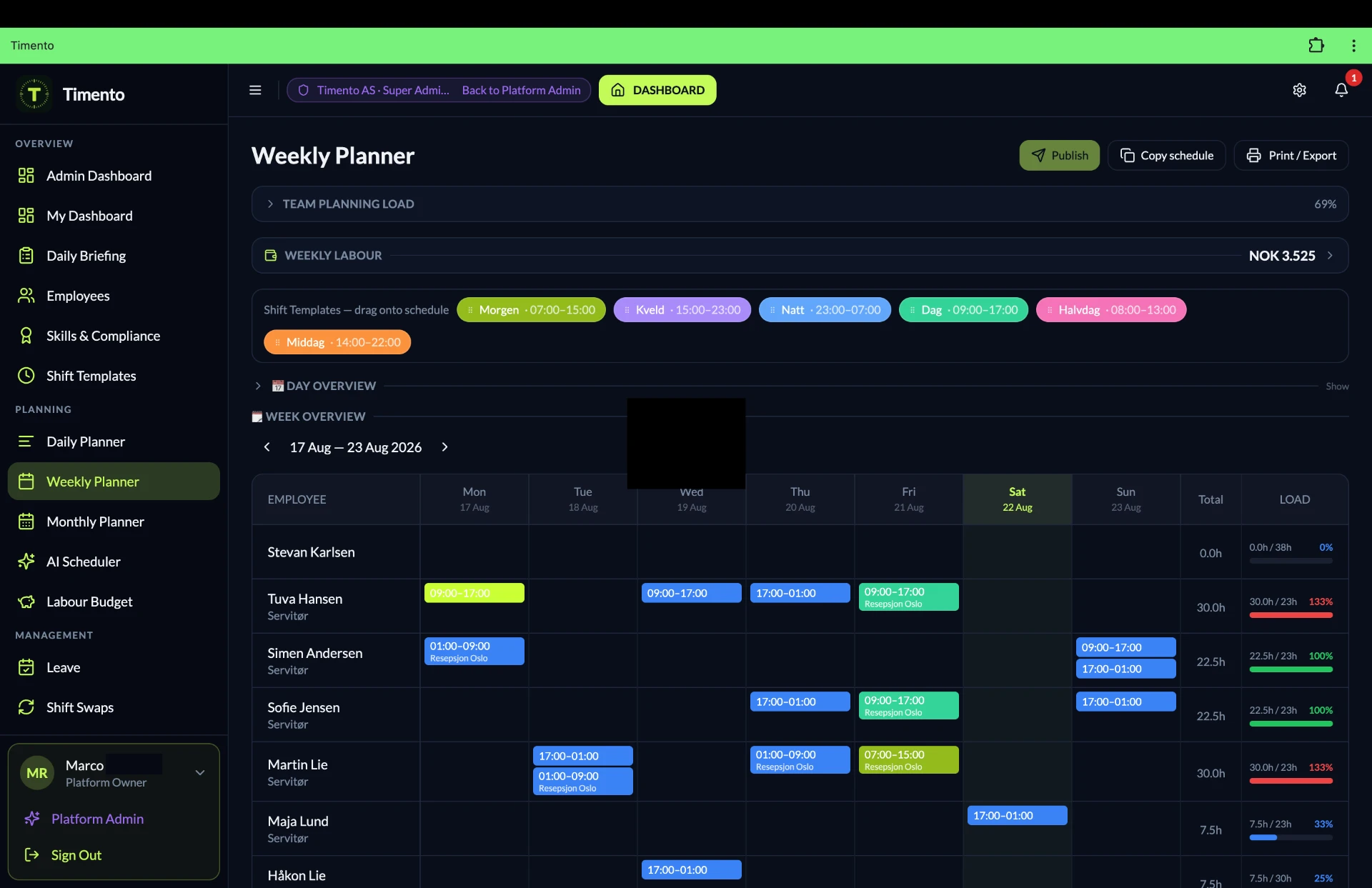
Staffing Requirements
Required staffing against scheduled staffing, hour by hour.
Set what the day needs per role, time block and activity area where configured, then compare it with what is actually scheduled. The gap becomes a number instead of a feeling.
- How many people do we need at the busiest hour?
- Which roles are short, and where?
- Which area is over-staffed on a quiet morning?
- What will today's staffing cost?
Staffing Requirements · Example
| Time and area | Required | Scheduled | Status |
|---|---|---|---|
| 09:00 Reception | 2 reception | 2 scheduled | Covered |
| 10:00 Activity area A | 3 activity hosts | 2 scheduled | 1 short |
| 11:00 Guided tours | 2 instructors | 2 scheduled | Covered |
| 13:00 Café | 4 café staff | 3 scheduled | 1 short |
| 14:00 Peak, whole site | 11 total | 9 scheduled | 2 short |
| 17:00 Closing | 4 total | 5 scheduled | 1 over |
Example configuration. Required staffing, roles and areas are set up per organisation, so the picture matches how your site actually operates.
Seasonal and flexible teams
Part-time, weekend and seasonal staff, without the phone tree.
Recreation teams are rarely a fixed group of full-timers. Timento keeps availability, open shifts and swaps in one place so the schedule survives a season of change.
- AvailabilityStaff set when they can work, before the week is built.
- Open shift publishedThe remaining gap goes to everyone qualified and available.
- Employee claimsPeople pick up shifts in the app instead of by phone.
- Manager approvesThe change is written down, notified and part of the plan.
Availability & Leave
Students, weekend staff and seasonal hires register availability and leave requests directly, so the plan starts from what is actually possible.
Open Shifts
Publish an uncovered shift to the qualified pool. The first suitable claim goes to the manager for approval.
Shift Swaps with approval
Two employees can agree a swap, and it only becomes real once the manager approves it.
Employee Portal
Schedule, hours, leave, documents and messages in one place, on a phone, for a team that is rarely at a desk.
Notifications
In-app and push notifications for published schedules, changes, open shifts and approvals.
Timento manages your own workforce. It is not a recruitment platform and it does not source temporary agency staff.
Explore People ManagementSkills & Certifications
The right people on the right activity.
Instructors, guides and activity hosts are not interchangeable. Timento keeps qualifications on the employee and connects them to what a role requires.
- EmployeeQualifications recorded on the person, with validity dates.
- Skills & CertificationsVerification status and expiry visible to managers.
- Role requirementsA role can require specific qualifications where configured.
- SchedulingThe planner sees who is qualified before the shift is published.
- Activity instruction
- Guiding
- First aid
- Lift or facility operation
- Equipment handling
- Food handling for café operations
- Guest safety briefing
- Internal role certification
- Valid
- Expiring soon
- Expired
- Awaiting verification
This gives managers operational visibility over qualifications and expiry dates. It is not a legal or regulatory compliance guarantee, and it does not replace your safety management system.
Explore People ManagementOpening, readiness and daily routines
The routines that decide whether the day feels controlled.
Operational Checklists turn opening, readiness, activity areas, cleaning and closing into recorded work instead of assumed work.
Opening
Ready before the first guest
- Facility and guest-area walk
- Activity area readiness
- Equipment area check
- Café and stock readiness
- Signage and information points
During the day
Routines while guests are in
- Guest-area checks through the day
- Cleaning rounds on schedule
- Activity turnaround routines
- Temperature checks where food is served
- Issues reported to the duty manager
Closing
Closed properly, handed over clearly
- Guest and activity areas closed down
- Equipment returned and checked in
- Cleaning and end-of-day routines
- Cash-up routines where configured
- Open items written into the handover
- Who completed it
- When it was completed
- Notes on the task
- Photo where required
- Open items carried forward
Where a café, kitchen or shop operation requires it, Temperature Monitoring records checks as part of the same daily routine rather than in a separate notebook.
Timento records workforce routines and completion. It does not replace specialist inspection, maintenance, technical or safety-management systems.
Explore OperationsTime, breaks and location verification
Hours that reflect the day that actually happened.
Clock In, Breaks and Clock Out on site, exceptions surfaced instead of hidden, and a review step before anything counts.
Clock In · Breaks · Clock Out
Worked time is registered as it happens, per shift, including breaks, instead of being reconstructed at the end of the month.
Worked hours
Scheduled hours and worked hours sit next to each other, so a difference is a conversation on the day, not a surprise in payroll.
Exception awareness
Missing clock-ins, missing clock-outs, late starts and unexpected durations appear as exceptions for the duty manager.
Review & Approve
A manager checks and approves the hours. Only approved hours move into reporting and payroll preparation.
- Clock in
- Breaks
- Clock out
- Exceptions
- Review & Approve
- Payroll ready

Kiosk Mode
A shared tablet at the staff entrance, reception or activity base lets a team clock in and out without everyone needing a personal device on shift.
- Staff entrance
- Reception back office
- Activity base
- Café back area
Kiosk Mode is one way to clock. Employees can also use their own phone through the Employee Portal, whichever fits your site.
Location-based clocking
For configured workplaces, Timento verifies that the clock action happens at the recreation location itself, so hours belong to the site where the work took place.
This verifies the clock action at a configured workplace. It is not employee tracking, and there is no continuous location history.
Daily Briefing
Everyone starts the day with the same picture.
One briefing for the whole operation, read in the app before the doors open, instead of three different versions given in three different corridors.
Briefing content comes from what your managers enter and configure. Timento does not pull booking or ticketing data automatically unless an integration actually exists.
Explore OperationsDaily Briefing · Example
- Today's focus
- Busy afternoon expected. Priority on activity area A and café coverage between 13:00 and 16:00.
- Expected activity
- Guest and booking context as entered or configured for the day, so the team knows what is coming.
- Groups
- School group of 45 arriving at 10:30, guided session in two waves.
- VIPs and special guests
- Press visit at 14:00, hosted by the duty manager.
- Weather context
- Rain from 15:00 where weather context is available. Move the outdoor session under cover and reinforce indoor areas.
- Technical issues
- Rental counter card terminal is slow. Use the reception terminal as backup.
- Priority areas
- Guest entrance, activity area A, café seating.
- Deliveries and stock
- Café delivery at 11:00, receiving handled by the café lead.
- Decisions needed
- Confirm whether the 16:30 session runs, decision by the duty manager at 15:30.
Communication across the working day
Messages, notifications and alerts, kept apart on purpose.
When everything arrives in one chat, the important item is the one that scrolls away. Timento separates conversation, system signal and operational alert.
Messages
Conversation between people and teams, tied to the operation rather than a private phone number.
- Team message
- Direct message
- Duty manager to shift lead
Notifications
System signals about the workforce: something was published, requested, approved or changed.
- Schedule published
- Shift changed
- Open shift available
- Leave approved
Operational Alerts
Things that need attention now, with a visible lifecycle so nothing disappears into a chat thread.
- Missing clock-in
- Uncovered shift
- Checklist overdue
- Escalated issue
- Open
- Acknowledged
- Resolved
Action Needed
An operational request that someone actually picks up.
Handover & Team Updates carries the open points across shift changes and duty-manager transitions, so the next shift starts informed. Timento is not a replacement for every chat or project-management tool.
- Request raisedA manager or team member flags something that needs doing.
- Sent to the right peopleThe right team or role sees it, not the whole site.
- AcknowledgedSomeone takes responsibility, visibly.
- ResolvedThe item is closed with a record of who handled it.
Weather and changing conditions
Weather changes the day. Give the manager the context.
In outdoor and visitor-facing recreation, the forecast is an operational input. Timento can surface weather context alongside the day so decisions are made with the same picture, not from memory of last Saturday.
- Rain from 15:00: move the outdoor session under cover
- Warm weekend: reinforce café and rental
- Snow conditions change: adjust activity roles
- Storm warning: review outdoor staffing with the duty manager
Context in the Daily Briefing
Where weather context is supported, it sits next to today's focus, priority areas and open items, so the team reads it with everything else.
Planning input
A manager can use the outlook when deciding how to staff outdoor areas, indoor areas and activity sessions for the coming days.
The decision stays human
Timento does not change your schedule automatically and does not staff a day on its own. It gives the duty manager better context.
Weather context is operational support for the manager. Timento makes no claim of automated weather-driven staffing, autonomous schedule changes or safety decisions.
Live operational control
What is happening right now, without walking the site.
A duty manager should be able to answer who is working, what is still open and what needs a decision, from one screen.
This is workforce visibility for duty managers. It is not surveillance, and it is not facility-control or access-control software.
Explore OperationsWorking now
Who is clocked in, who is on break and who has not started yet.
Scheduled today
The full day per role and area, so a gap is visible before it becomes a queue.
Open attention items
Alerts and Action Needed requests with their lifecycle: Open, Acknowledged, Resolved.
Routines and exceptions
Which checklists are done, which are overdue and which time records need review.
Labour cost and control
From planned staffing cost to what the season actually cost.
Scheduled hours give you a planned labour cost before the week starts. Approved hours tell you what really happened, per role, area or period.
- What does this week's plan cost before we publish it?
- Where did actual hours run past the plan?
- Which area drives overtime in peak season?
- Are approved hours ready for payroll on time?
Labour cost and control · Example
| Role or area | Planned hours | Actual hours | Difference |
|---|---|---|---|
| Guest services | 96 | 101 | +5 |
| Activity hosts | 128 | 134 | +6 |
| Instructors and guides | 72 | 70 | -2 |
| Café | 88 | 96 | +8 |
| Cleaning and maintenance | 56 | 55 | -1 |
Illustrative figures. Your own numbers come from your schedules and approved hours.
- Scheduled hours
- Planned Labour Cost
- Actual worked hours
- Exceptions
- Review & Approve
- Planned vs Actual
- Payroll ready
Several areas or locations
One way of working across areas, departments and sites.
Whether it is three activity areas on one site or several venues in a region, the routines, roles and reporting stay recognisable.
Multi-location workforce management is part of the Business and Enterprise positioning. Timento does not add booking hierarchies or venue-management functionality.
See pricing and plansAreas and departments
Plan and staff per activity area, department or venue while keeping one workforce picture.
Shared routines
The same opening, cleaning and closing standards can run everywhere, adapted where a location genuinely differs.
Roles and permissions
Duty managers see their own operation, management sees across locations, within the permissions you configure.
Comparable reporting
Hours, exceptions and Planned vs Actual reported per location and across the group.
Knowledge Hub
The answer is in one place, not in someone's head.
Seasonal teams change every year. The knowledge that makes the operation work should not leave with them.
- Guest-service standards
- Activity instructions
- Opening and closing procedures
- Internal training material
- Equipment-area routines
- FAQs
- Onboarding information
Knowledge Hub is internal company knowledge for your teams. Timento does not claim certified document-control functionality.
Explore Knowledge Hub- New seasonal starterOnboarding information and first-week guidance
- Activity hostActivity instructions and guest-service standards
- ReceptionOpening and closing procedures
- RentalEquipment-area routines and handling instructions
- CaféService standards and daily routines
- Any roleInternal FAQs and company knowledge
AI Copilot and Operations Intelligence
A grounded second pair of eyes on the operation.
The Copilot works from your own workforce data and points at what is worth a look. You decide what happens next.
Explore the platform- Staffing patterns that repeat across weeks and seasons
- Cost deviations between planned and actual hours
- Recurring exceptions in a specific role or area
- Routines that are regularly completed late
- Areas worth reviewing before the next peak period
Suggestions only. Timento does not change schedules on its own and never makes safety or staffing decisions autonomously. Managers stay in control.
The connected recreation flow
One chain from demand to payroll-ready hours.
Every step hands something concrete to the next one, which is exactly what separate tools cannot do.
- 01Demand and staffing need
- 02Roles and skills
- 03Schedule
- 04Publish & Notify
- 05Opening and clock in
- 06Daily Briefing
- 07Activities and routines
- 08Handover and exceptions
- 09Review & Approve
- 10Labour cost and payroll ready
Plan. Run. Control. One chain, one platform, one version of the day.
Teams on site
Every team in one operating picture.
Guest-facing teams, activity teams and facility teams work from the same schedule, the same routines and the same briefing.
- Guest services
- Activities
- Reception
- Rental
- Café
- Facilities
One Timento environment
Roles, areas and permissions are configured per organisation, so a duty manager, an instructor and a café lead each see what belongs to their work.
Timento
Timento runs the workforce layer, not your guest systems.
Recreation businesses already run booking, ticketing and access systems. Timento does not compete with them. It manages the people layer around them: who works, when, with what qualifications, on which routines, at what cost.
- Booking engines
- Ticketing
- POS
- Access control
- Equipment maintenance systems
- Activity management platforms
- ERP and accounting
- Specialist safety systems
Where a connection or export is supported, Timento fits alongside those systems instead of replacing them.
See integrationsQuestions & answers
Recreation staffing questions, answered
How Timento supports recreation and leisure teams, and where it stops.
Is Timento suitable for activity parks, attractions and leisure centres?
Yes. Timento is built for guest-facing operations where staffing follows guest activity: planning per role and time block, opening and closing routines, clocking on site, live status during the day and labour cost after it.
Can we plan around peaks instead of flat opening hours?
Yes. Staffing Requirements let you say what each part of the day needs per role and area, so a quiet morning and a busy afternoon are planned differently instead of being covered by the same fixed rota.
How does Timento handle seasonal and part-time teams?
Seasonal staff sit in the same employee record as your core team, with their own contract hours, availability and roles. When the season ends, the record and the history stay, so next season does not start from scratch.
Can we see who is qualified to run an activity or session?
Yes. Skills and certifications sit on the employee with validity dates and verification status, and roles can require specific qualifications. This gives the duty manager operational oversight. It is not a legal or safety compliance guarantee.
How do opening and closing routines work?
Operational Checklists cover opening readiness, during-day checks and closing, with who completed what and when. The result is a record of the day instead of a memory of it.
How do guest-facing staff clock in and out?
Clock In, Breaks and Clock Out run on a shared device in Kiosk Mode at the staff entrance or activity base, or on the employee's own phone. Hours are registered during the shift and reviewed afterwards.
Does location-based clocking track our employees?
No. Location-based clocking verifies that a clock action happens at a configured workplace. It confirms the clock-in at the site. It is not employee tracking and there is no continuous location history.
Does Timento decide anything based on the weather?
No. Timento does not forecast demand or automate weather decisions. Managers use their own knowledge of the day, adjust the plan, publish it and notify the team, so the change reaches everyone in one place.
Can a manager see what is happening during the day?
Yes. Live Team Status shows who is clocked in, who is on break and who has not arrived, and Alerts & Exceptions surface what still needs attention with an Open, Acknowledged, Resolved lifecycle.
When do we know what a day or a season actually cost?
Approved hours give you Planned versus Actual per role, area or period, so labour cost is visible while the season is still running, not months later. Approved hours then move into payroll-ready reporting.
Can we run several areas or locations in one place?
Yes. Locations, areas and teams are separated, while a manager with the right access sees them together. Employees can work across areas and their hours stay on one record.
Does Timento replace our booking or ticketing system?
No. Timento is the workforce layer. Booking, ticketing, access control, POS and activity management stay in your own systems. Timento covers the people side: planning, hours, routines, communication and control.
Run your recreation operation on one connected platform.
Start with your own team, your own opening hours and your own routines, and see what a controlled operating day feels like.
30 days · Up to 4 employees · No credit card · Personal onboarding
Other industries
The same platform, written around a different operational reality.