Small business
Everything you need to run your team. Without the complexity.
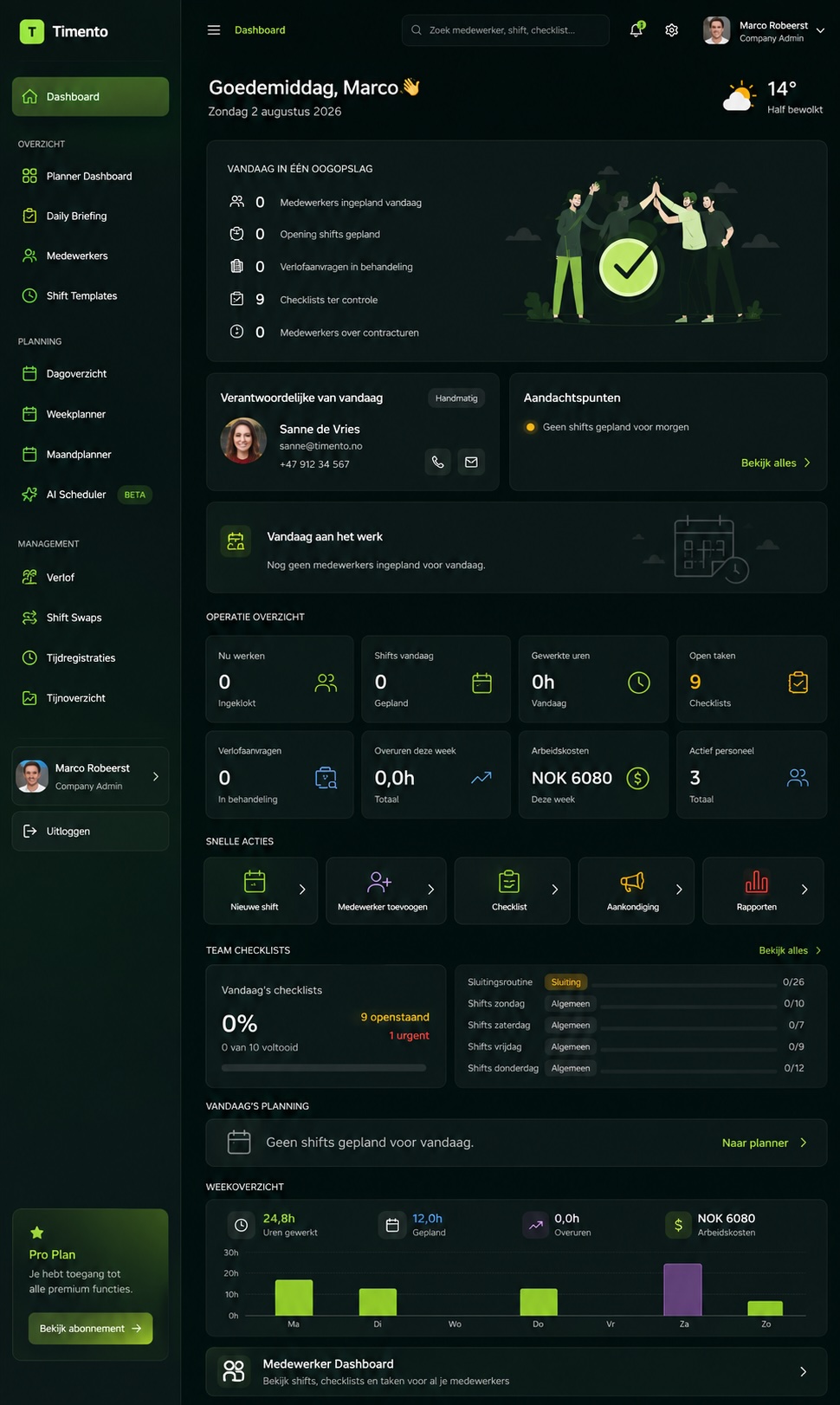
Timento brings scheduling, working time, leave and daily routines into one place, so a small business can run its team without building an HR department around it.
Plan the team, run the day, approve the hours, prepare payroll. Less chasing, less admin, more control.
30 days, up to 4 employees, no credit card, personal onboarding.
One person, too many jobs
You are the planner, the HR contact, the manager and the payroll prep.
In a small business the same person answers every question. Where the schedule lives, who swapped a shift, who asked for a day off, how many hours someone actually worked. The tools are not the problem on their own. The gaps between them are.
Today, spread across tools
- The schedule in a spreadsheet
- Changes in a group chat
- Leave requests by message or on paper
- Routines that live in someone's head
- Worked hours collected at the end of the month
- Payroll prep rebuilt by hand every period
With Timento
- One schedule the team can see on mobile
- Availability, leave and swaps in one flow
- Hours registered while the work happens
- Routines and checks with a record of who did what
- Exceptions surfaced instead of discovered later
- Approved hours ready for payroll
One connected workflow instead of six disconnected habits.
Timento prepares payroll-ready information and exports it where supported. It does not replace your payroll or accounting software.
Plan the week in minutes
Build next week from last week, not from a blank page.
Smart Scheduling is built so a manager can plan without training. Start from a template or a previous week, adjust what changed, publish, and the team is notified.
Week, day and month views
See the week at a glance, zoom into a single day, or step back to plan a month of coverage.
Shift templates
Save the shifts you run every week once, then place them in seconds instead of typing times again.
Recurring shifts
Fixed patterns repeat automatically, so a stable team does not need to be rebuilt every week.
Copy a schedule
Copy a whole week or a single day forward and adjust only what actually changed.
Availability and leave
Availability windows and approved leave are visible while you plan, not discovered after publishing.
Open shifts
Publish a shift you cannot fill yet and let the team pick it up, with your approval.
Role-based shifts
Plan by the role the shift needs, so the right kind of cover is visible before the day starts.
Contract hours
See planned hours against contract hours per person while you build the week.
Conflict detection
Overlaps, leave clashes and double bookings are flagged before you publish.
Publish and notify
Publishing sends the schedule to the team, so nobody has to ask which version is current.
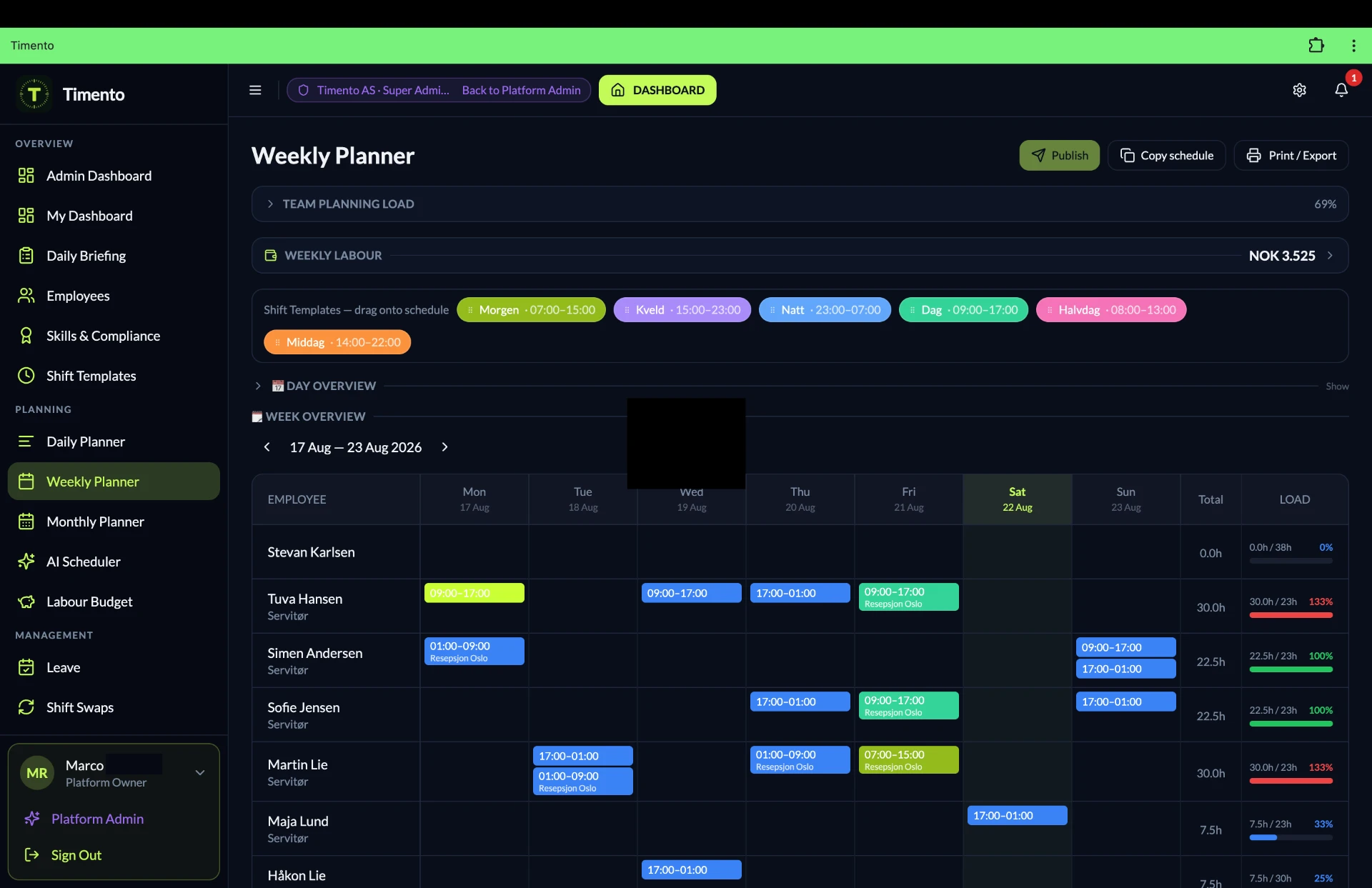
The result: the week is planned in one sitting, and the team knows about it the moment it is published.
Explore Smart SchedulingLet the team handle more themselves
Fewer interruptions, because the answers are already in the app.
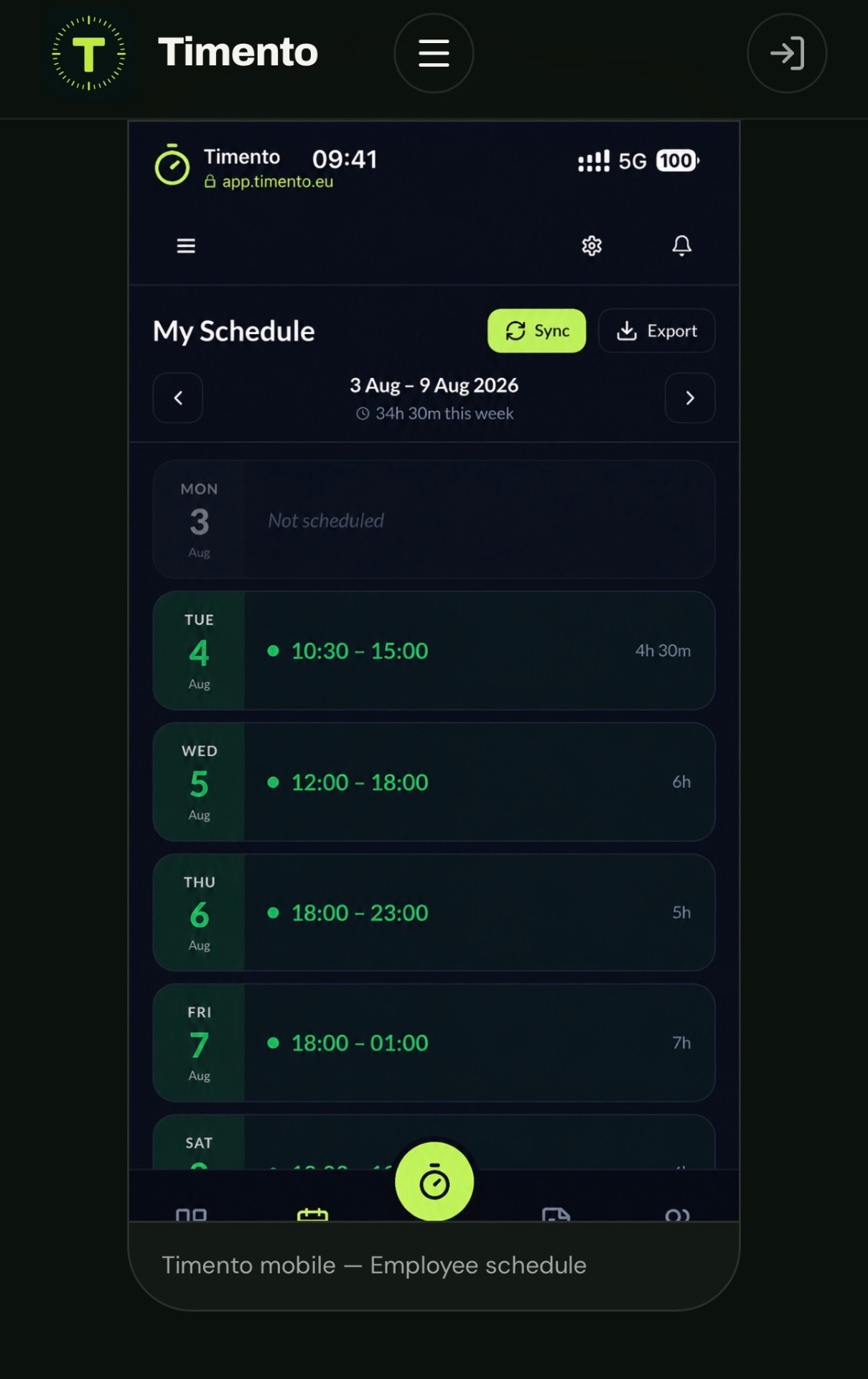
Most questions a small-business manager answers every week are questions the employee can answer alone: when am I working, can I take Friday off, is there a shift I can pick up. The Employee Portal gives them that, on their own phone.
- My schedule, always the published version
- Availability the employee keeps up to date
- Leave requests submitted in the app
- Open Shifts the team can pick up
- Shift Swaps proposed between colleagues
- Notifications when something changes
- Employee submitsA leave request, an availability change, a swap or interest in an open shift.
- Manager reviewsThe request lands in one place with the schedule context next to it.
- Approve or declineNothing changes the published schedule until you approve it.
- Team is notifiedThe updated schedule reaches everyone automatically.
Self-service does not mean self-scheduling. Swaps, leave and open shifts always pass through manager approval, and you decide what gets published.
Clock in, work, clock out
Hours that are registered during the day, not reconstructed after it.
Working time is where small businesses lose the most admin time. Timento records it while it happens, then gives you one review moment before payroll preparation.
Clock In, Breaks, Clock Out
Employees register the start of the shift, breaks and the end, from their phone or a shared device.
Kiosk Mode
One tablet at the entrance or in the back office where the whole team clocks in and out.
Location-based clock verification
Where enabled, a clock action is verified against the configured workplace, so registrations belong to the right site. It verifies the clock action, it does not follow people.
Worked hours
Planned hours and worked hours sit side by side, per person and per period.
Exceptions
Missing clock-outs, late starts and unusual durations are flagged instead of quietly passing through.
Review and Approve
You correct what needs correcting and approve the rest. Only approved hours move on.
- Clock in
- Breaks
- Clock out
- Exceptions
- Review and Approve
- Payroll ready
Location verification confirms that a clock action happened at the configured workplace. Timento is not an employee tracking system.
Explore Time and AttendanceRun the actual working day
More than a schedule, when you need it to be.
A schedule tells people when to come in. It does not tell them what the day looks like. Timento adds a light operational layer you can switch on when it earns its place, and leave off when it does not.
Daily Briefing
The short version of today: who is in, what matters, what changed since yesterday.
Operational Checklists
Opening, closing, cleaning or handover routines with a record of who completed what and when.
Handover and Team Updates
What the next shift needs to know, written down once instead of repeated three times.
Knowledge Hub
Procedures, how-to guides and house rules in one searchable place, so new staff stop asking the same question.
Skills and Certifications
Who is trained or certified for what, with validity dates, so you can plan the right person for the job.
You do not need any of this on day one. Start with the schedule and the hours, and turn on the rest when the business asks for it.
Communication without chasing people
Send it once, and see that it landed.
In a small team, important information usually travels through a group chat and disappears under the next message. Timento keeps operational communication separate from noise, and connected to the shift it belongs to.
Messages
Direct and team messages for the practical back and forth of the working day.
Notifications
Automatic updates: a published schedule, an approved leave request, a shift that changed.
Operational Alerts
Signals that something needs a decision, such as a missing clock action or an unfilled shift.
- Message sentThe manager posts what the team needs to know.
- Acknowledged or answeredYou can see it reached the people it was meant for.
- Action NeededWhen something has to be done, it becomes an item with an owner instead of a hope.
- ResolvedThe item is closed, and the day moves on.
Timento is not a replacement for your general chat tool. It handles the operational communication that belongs to shifts, tasks and the working day.
Know what needs your attention
Manage by exception, not by staring at dashboards.
An owner-manager does not have time to watch every normal event. Timento shows the things that are not normal, so you can spend your attention where it matters and trust the rest.
If it is normal, you should not have to look at it. If it needs you, it should find you.
Alerts and exceptions depend on what you enable and how your organisation is configured. They support your decisions, they do not make them for you.
- A gap in the schedule for a day that is not covered yet
- An open shift nobody has picked up
- A leave request waiting for your decision
- A missing clock-in or clock-out
- A shift that ran much longer than planned
- An overtime signal building up over the period
- A checklist that was not completed
- A swap request waiting for approval
Know what the week costs
What is this week's team going to cost me?
That question should have an answer before the week runs, not three weeks later in a payroll export. Timento connects the schedule to hours and cost visibility, so you can adjust while you still can.
- Scheduled hours
- Planned labour cost
- Actual worked hours
- Review and Approve
- Planned vs Actual
- Payroll ready
- See the cost of the week while you are still planning it
- Compare planned hours with the hours actually worked
- Catch overtime signals before they become a surprise
- Export approved hours and reports for payroll preparation
Timento gives workforce cost visibility and prepares payroll-ready data. The payroll run and your bookkeeping stay in your own systems.
Explore Payroll and ReportingStart simple, add more when you need it
A platform that can stay small today.
Timento is broad, but you decide how much of it is switched on. Most small businesses start with two things and grow into the rest at their own pace.
Week one
- Employees and contract hours in one place
- The schedule, published to the team
- Clock in, breaks and clock out
- Leave and availability
When the business asks for it
- Operational Checklists and daily routines
- Daily Briefing and Handover
- Knowledge Hub for procedures and training
- Skills and certifications
- Reports, labour cost and payroll exports
- Deeper operational capabilities as you grow
Nothing you skip today disappears. It is waiting in the same platform, with the same data behind it.
Made for small teams, not limited to small teams
Start with five people, keep the same platform at fifty.
The most expensive part of outgrowing a tool is leaving it. Timento is built so growth means turning on more, not migrating everything to a different system.
- 01
A handful of employees
One location, one schedule, hours and leave in one place.
- 02
A growing team
More roles, more approvals, routines that need to be consistent instead of remembered.
- 03
More than one site
The same way of working repeated per location, with shared templates and combined reporting.
Your history comes with you. Schedules, hours, leave and employee records stay in the same platform as the team grows.
Personal onboarding
You do not just get a login. We help you get started.
Most small businesses do not fail with new software because the software is bad. They fail because nobody had time to set it up. So we do that part with you.
The goal of onboarding is one working week that runs entirely in Timento.
Personal onboarding covers getting your standard setup working. Custom development and bespoke integration work is handled separately.
- 1Your team in the systemEmployees, roles and contract hours set up with you, not left as homework.
- 2Your first scheduleWe build the shift patterns you actually run, so week one is a real schedule and not a demo.
- 3Time and leave configuredClocking, breaks and leave set up the way your business works.
- 4Your routines, if you want themChecklists, briefing and knowledge added when they help, skipped when they do not.
Pricing made tangible
Your team from 29 euro per month.
One clear starting price, no per-feature upsell for the basics. Starter covers the workflow this page describes.
Pay annually and get 12 months for the price of 10.
30 days, up to 4 employees, no credit card.
See full pricingStarter
29 europer month
- 10 employees included
- Scheduling, time registration and leave
- Employee Portal on mobile
- Review, approve and payroll-ready export
- Personal onboarding
Plus 2 euro per additional employee per month.
Request a trialOne connected flow
Why one platform beats six tools.
Each step below hands the next one what it needs. That is the whole argument: nothing has to be re-entered, re-asked or rebuilt.
- Plan
- Publish
- Team sees the schedule
- Clock and breaks
- Daily routines
- Exceptions
- Review and Approve
- Payroll ready
- Plan
- Publish
- Team sees the schedule
- Clock and breaks
- Daily routines
- Exceptions
- Review and Approve
- Payroll ready
Break the chain into separate tools and every handover becomes manual work. Keep it connected and the working day carries itself.
What Timento is, and what it is not.
Timento is a workforce operations platform. It brings workforce planning, working time and daily operations together in one place. It does not replace payroll or accounting software, a POS, a booking system, an ERP or specialist industry systems. It prepares payroll-ready data and connects or exports where supported.
See what Timento connects toQuestions & answers
Small business questions, answered
What Timento does for a small team, what it costs and where it stops.
Is Timento suitable for a small business with only a few employees?
Yes. Timento is built to work from a handful of employees upward. You get scheduling, time registration, leave and an employee app without needing an HR department to run it, and personal onboarding to get the setup working.
What does Timento cost for a small business?
Starter is EUR 29 per month and includes 10 employees. Above that you pay EUR 2 per additional employee per month. Paying annually gives you 12 months for the price of 10.
Can I try Timento before I decide?
Yes. The trial runs for 30 days with up to 4 employees, without a credit card, and includes personal onboarding so you can plan a real week instead of clicking through demo data.
We plan in a spreadsheet and a group chat. Is switching a big project?
No. Most small businesses start with two things: the schedule and the hours. We set up your employees, contract hours and shift patterns with you during onboarding, so week one already runs in Timento.
Timento looks broad. Do I have to use everything?
No. You decide what is switched on. Start with scheduling and time registration, then add checklists, Daily Briefing, Knowledge Hub or skills when the business actually needs them.
Can employees request leave and pick up shifts themselves?
Yes, with your approval. Employees see their schedule, keep availability up to date, submit leave requests, propose shift swaps and show interest in open shifts. Nothing changes the published schedule until a manager approves it.
How do employees register their hours?
Through Clock In, Breaks and Clock Out on their own phone, or on one shared device in Kiosk Mode. Hours are registered during the shift, exceptions are flagged, and you approve the result before payroll preparation.
Does location verification mean you track our staff?
No. Where it is enabled, location verification only confirms that a clock action happened at the configured workplace. Timento does not follow employees during the day and is not a tracking system.
Does Timento run our payroll?
No. Timento prepares payroll-ready information: approved hours, breaks, overtime signals and leave context, exported or connected where supported. The payroll run itself stays in your payroll software.
Can I see what a week of staffing costs before it runs?
Yes. Scheduled hours give you planned labour cost while you are still building the week, and afterwards you can compare planned hours against the hours actually worked.
What happens when we grow?
You keep the same platform. More employees, more roles and more locations are handled by turning on more of Timento, not by migrating to another system. Your schedules, hours and employee history come with you.
Do we have to set everything up ourselves?
No. Personal onboarding covers getting your employees, schedules, time rules and the relevant standard setup working. Custom development and bespoke integration work is handled separately.
Try it with your own team, not with demo data.
Plan a real week, let your team clock in and see what the hours look like at the end of it. No software project, no credit card.
30 days, up to 4 employees, no credit card, personal onboarding.