Enterprise
Your operation. Your requirements. One workforce platform.
For larger organisations where a standard setup alone does not cover the operational structure, the implementation or the systems Timento has to work with. Timento Enterprise is not a bigger box of features. It is Timento configured around a more complex operation.
Larger workforces, several locations, more management layers, customer-specific integrations, defined workflows and contractual requirements.
We start with your operation, not with a feature list.
When scale becomes complexity
The hard part is rarely the number of employees.
Organisations do not get complicated because they hire more people. They get complicated because every new location, department, role and manager adds a layer that has to stay coordinated with the others.
- 01
Locations
Sites with their own opening hours, peaks, teams and local reality.
- 02
Departments and teams
Groups inside a location that plan, work and report differently.
- 03
Roles
The jobs the operation runs on, with their own qualification requirements.
- 04
Managers
Planners, supervisors and location managers who each carry part of the day.
- 05
Workforce workflows
Approvals, routines, handovers and exception handling that must be repeatable.
- 06
Integrations
Payroll, HR, accounting, reporting and operational systems already in place.
- 07
Reporting
Hours, labour cost and operational output that leadership can actually compare.
What fragmented workforce operations look like
- A different planning method per location, none of them comparable
- Hours arriving in several formats shortly before payroll closes
- Routines that live in local habits instead of a shared standard
- Exceptions discovered in the monthly review rather than on the day
- Reporting rebuilt by hand because no two systems agree
- Integrations that were promised, started and never finished
- New managers who need weeks before they can run their location
The problem is coordination and visibility, not headcount.
These layers describe organisational complexity, not licence tiers in Timento. Every capability on this page is part of the platform, configured around how your operation works.
One platform, different operational realities
Standardise what should be standard. Configure what needs to differ.
A hotel group, a retail chain, a production company, a facility organisation and an event operator do not run the same day. A workforce platform that forces all of them into one rigid process gets worked around within a month. Timento gives a shared operational model with room for the differences that matter.
Hotel groups
Departments with different rhythms inside one property, and several properties inside one company.
Retail chains
Opening and closing routines per store, peaks that differ by location and season.
Production and manufacturing
Fixed shift patterns, required skills per line or cell, handovers between shifts.
Facility organisations
Teams working across customer sites, with routines that belong to the contract.
Event operations
Teams that scale up and down quickly, with roles and locations that change per event.
Recreation and leisure
Seasonal teams, guest-facing roles, activity schedules and weather-driven demand.
A shared platform should reduce variation where it costs money, not remove the variation your operation needs.
Timento supports shared structure with location and team specific configuration. It does not claim unlimited configurability or enterprise master-data management.
Workforce planning at scale
Coordinated planning across more teams, more roles and more locations.
Enterprise planning is not a different scheduling product. It is the same planning model applied consistently, so a week built in one location can be compared with a week built in another, and coverage is a measurable decision rather than a local habit.
Smart Scheduling
Week, day and month planning with the same method in every team and location.
Staffing Requirements
Set the staffing each operation needs per role and per part of the day, then compare it with what is actually scheduled.
Shift templates
Standardise the shifts an operation runs every week so planning is repeatable.
Recurring shifts
Fixed patterns repeat automatically and only the exceptions need attention.
Role-based shifts
Plan the role the shift needs first, then the person, so coverage is visible before names are.
Availability and leave
Both visible while the week is built, so a gap is not discovered after publishing.
Open Shifts
Publish unfilled shifts and let qualified employees pick them up, with approval.
Contract hours
Planned hours against contracted hours per person, across the period.
Conflict detection
Overlaps, leave clashes, double bookings and missing qualifications flagged before publishing.
Overtime signals
See where planned hours push past contract hours while there is still time to rebalance.
Skills in planning
Plan the shift with the qualification it requires, not with a name and a hope.
Labour cost visibility
See the cost consequence of the schedule before the week is published.
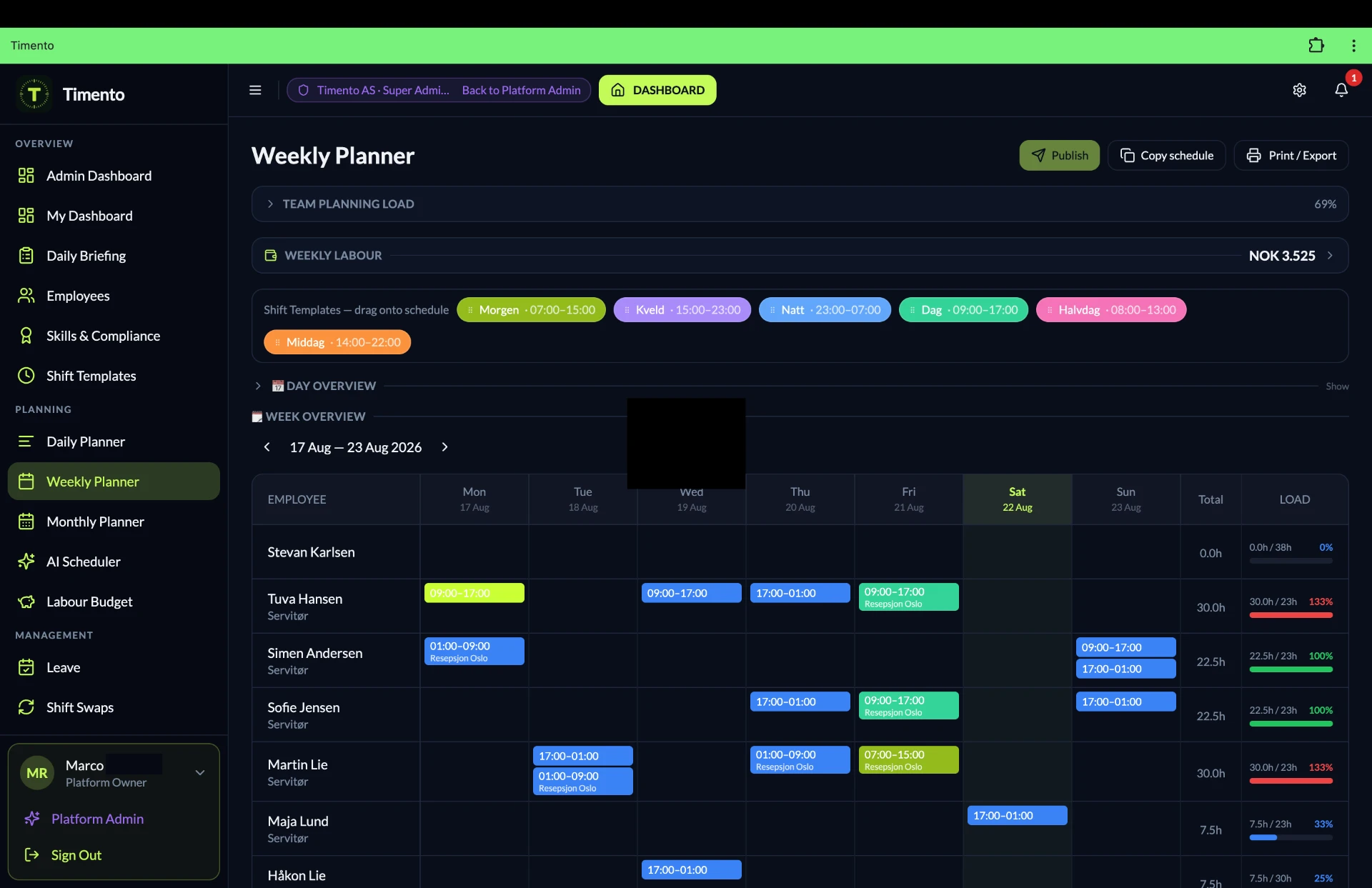
The result: planning becomes a decision about coverage and cost that leadership can compare across the organisation, instead of a set of local habits nobody can add up.
Explore Smart SchedulingPeople, roles, skills and operational readiness
Who is actually ready to work this role, in this place, this week?
In a larger organisation that question stops being answerable from memory. People Management, Job Roles and Skills & Certifications connect the person to the role requirement, and the role requirement to the schedule.
Employee records
Contact details, contract information, employment data and documents in one record per person.
Job Roles
Define the roles the organisation runs on and use the same definitions everywhere.
Role assignments
One person can carry several roles, so flexible employees stay visible for every role they can fill.
Skills & Certifications
Record who is trained or certified for what, with validity dates per qualification.
Validity and expiry visibility
See which qualifications are valid, which are close to expiring and where cover is thin.
Verification status
See whether a recorded qualification has been confirmed, so planning is based on checked information.
Role readiness
Understand which people can genuinely cover a role before the schedule depends on it.
- Employee
- Skills and certifications
- Role requirements
- Scheduling
Timento gives visibility on qualifications and role readiness. It does not certify anyone, and it does not guarantee legal or regulatory compliance on your behalf.
Explore People ManagementRoles, responsibility and operational control
Distribute the day without losing the overview.
Larger organisations have employees, supervisors, planners, location managers and operations leadership. Each of them needs the workforce context they are accountable for, and management needs a picture that spans them. Access in Timento follows the responsibility someone carries and the company and location context you configure.
- EmployeeOwn schedule, own hours, availability, leave requests, open shifts and the information needed for the shift.
- SupervisorThe team and the day in front of them: live status, clock exceptions, handovers and routines being completed.
- PlannerThe schedules they are responsible for: staffing requirements, conflicts, open shifts and publishing.
- Location managerThe operation of their location: coverage, hours, exceptions, routines and labour cost.
- Operations leadershipThe picture across locations and teams: staffing, exceptions, planned versus actual and reporting.
Operational responsibility moves down. Visibility does not disappear.
This progression is illustrative, not a fixed product hierarchy. Timento uses role-based access within company and location context, and does not impose an organisational chart on your business.
Standardise the important things
A common operational standard, with room where operations differ.
In a larger organisation the difference between a good site and a struggling one is usually not talent. It is whether the important routines happen the same way every day, whatever the shift, the season or who is on duty.
Operational Checklists
Opening, closing, handover and recurring checks with visible completion, so a routine is a fact and not an assumption.
Daily Briefing
The shift starts with what matters today: coverage, priorities, changes and what the previous shift left behind.
Handover & Team Updates
Structured transfer between shifts and teams, so context moves with the work instead of staying with a person.
Knowledge Hub
Procedures, role guidance and local information available where the work happens.
Skills & Certifications
A shared definition of what a role requires, applied the same way across the organisation.
Recurring routines
The routines that repeat every day and every week are planned, not remembered.
Standardise the important things. Keep flexibility where operations differ.
These are operational tools for consistent working practice. Timento is not a quality management system, a learning management system or a certified document-control platform.
Management by exception
Leadership should not read thousands of normal events.
In a large operation almost everything goes as planned. If the system reports all of it, the few things that need a decision disappear in the noise. Timento assumes the normal day is fine and surfaces what is not.
- Staffing gaps against the requirement for a role or part of the day
- Open shifts that nobody has picked up yet
- Clock exceptions such as a missing clock out or an unexpected time
- Overtime signals where planned or worked hours pass contract hours
- Leave and availability requests waiting for a decision
- Schedule conflicts and missing qualifications found before publishing
- Operational alerts raised from the floor that are still unresolved
- Checklists and routines that were not completed
- OpenSomething needs attention and nobody has taken it yet.
- AcknowledgedSomeone has picked it up, so it is not raised twice or forgotten.
- ResolvedThe item is closed, with the record of what happened kept.
Quiet means running well. Attention items mean a decision is waiting.
This is a way of working supported by the alerts, approvals and status views in the platform. It is not a separate enterprise command-centre product, and the illustration above is conceptual rather than a screenshot.
Labour cost and workforce control
Small scheduling differences become large numbers at scale.
Half an hour of unnecessary overlap per shift is a rounding error in one team. Across dozens of teams and locations, repeated every week, it is a budget line. The chain from requirement to reporting is what makes that visible while you can still act on it.
- Staffing Requirements
- Scheduled hours
- Planned labour cost
- Actual worked hours
- Review & Approve
- Planned versus actual
- Payroll Ready
- Reports & Insights
- See planned labour cost while the schedule can still be changed, not after the period closes
- Compare planned hours with actual worked hours per team, role and location
- Spot structural overtime patterns instead of individual incidents
- Approve hours where the work happened, with a clear record of what changed
- Hand payroll a checked set of hours instead of a collection of spreadsheets
- Use the same definitions everywhere, so comparison between units is meaningful
Timento covers workforce hours and labour cost visibility for operations and workforce management. It is not a business intelligence suite, a financial planning tool or accounting software, and the payroll run stays in your payroll system.
Explore Payroll and ReportingIntegrations become part of the architecture
Timento has to fit your system landscape, not replace it.
Larger organisations rarely start from an empty page. There is already a payroll system, an accounting platform, an HR record, a reporting environment and operational software the business depends on. The Enterprise conversation is usually about how the workforce layer connects to all of that.
Payroll
Approved hours prepared for the payroll run, so payroll starts from checked records.
Accounting
Cost and hour data made available to the finance side of the business where an interface exists.
HR systems
Employee and contract information kept aligned with the system of record where a viable interface exists.
Calendars
Calendar export so published shifts appear in the calendar people already use.
Reporting and BI
Workforce data made available to the reporting environment your organisation already reports in.
Operational systems
Connections to operational software where a viable technical interface is available.
- Assess system
- Map the workflow
- Define the data
- Technical interface
- Prototype and validate
Tell us the workflow, not only the software name.
Integration work is assessed per case. We do not promise a connection to every system, and we do not publish fixed delivery times. Customer-specific integrations can be separately scoped and quoted. Current integration statuses on the integrations page apply to Enterprise as well: nothing is marked available for an Enterprise agreement that is not available in the product.
Implementation, not just onboarding
A larger operation is configured, not simply activated.
Every Timento customer gets help getting started. What changes at Enterprise scale is that getting started involves structure decisions: how locations, teams, roles, routines and approvals should be set up, and what has to connect before the first location goes live.
Starter and Growth
Personal onboarding to get the team planning, clocking and working in Timento.
Business
Onboarding with configuration support for a more structured multi-team or multi-location setup.
Enterprise
Tailored implementation based on the scope agreed with you, which can include structure design, configuration, integration work and a phased rollout.
- 01
Discover the operation
How the day actually runs, who decides what and where the current process breaks.
- 02
Define the structure
Locations, teams, roles, skills and the workflows that have to be consistent.
- 03
Configure
Set up teams, schedules, requirements, routines and approvals to match that structure.
- 04
Prepare data and setup
Employee, role and schedule setup prepared for go live. Data import or migration is scoped where required.
- 05
Integrations where scoped
Agreed connections assessed, built or validated as part of the project scope.
- 06
Pilot and validate
Run one location or team first, confirm the model works, adjust before scaling.
- 07
Rollout
Extend to the rest of the organisation in phases, with the model already proven.
- 08
Support
Ongoing support arrangements agreed as part of the Enterprise agreement.
Implementation scope is agreed per customer and can be separately quoted. Data migration and import are only included when explicitly scoped and agreed.
Talk to us about implementationCustomer-specific workflows
Some operations need something the standard configuration does not cover.
That is a normal conversation at this scale, and we would rather have it openly than pretend every organisation fits the same template. Some requests turn out to be configuration. Some need development. Complex work is scoped and quoted separately.
Configuration
The requirement can be met by setting Timento up differently for your operation. Usually part of implementation.
Assessment
We look at the workflow, the data behind it and whether it fits the direction of the product.
Custom development
Where a requirement genuinely needs building, it is specified, scoped and quoted as its own piece of work.
Roadmap fit
Some requests are valuable for more customers and are better solved in the product itself.
- Describe the workflow
- Assess feasibility
- Configuration or development
- Scope and quote
- Build and validate
We assess every request honestly. We do not promise that everything gets built.
Customer-specific workflow and configuration work sits outside the standard subscription and is scoped and quoted separately.
Security and governance
Serious questions deserve straight answers.
Enterprise buyers ask how their workforce data is separated, who can see what, how integrations are controlled and how the platform is maintained. Here is the honest version, without certification claims we do not hold.
- Company data is separated, so one organisation does not reach another organisation's workforce data
- Role-based access within company and location context, so people work with what they are responsible for
- Integrations are controlled and set up deliberately rather than opened by default
- A least-required-data approach: connect and store what the workflow genuinely needs
- Data minimisation in operational features, including location verification limited to confirming a clock in at the workplace
- Ongoing security review as part of how the platform is maintained and released
- Clear answers to procurement and security questionnaires as part of the Enterprise conversation
Timento does not currently claim ISO 27001, SOC 2 or any GDPR certification, and we will not present one on a website. If your procurement process requires specific documentation, raise it early and we will tell you plainly what we can and cannot provide.
Read about securityKnowledge across a larger organisation
Operational knowledge should not live in one manager's head.
In a large organisation the most fragile thing is often what nobody wrote down. The Knowledge Hub keeps procedures, onboarding material, role guidance and local information where the team actually works.
- Procedures and working instructions available during the shift, not filed somewhere else
- Onboarding knowledge new employees can use from their first day
- Role guidance that explains what good looks like for each job
- Operational standards shared across the organisation
- Local information that belongs to one site or team
- Less dependency on the one person who happens to remember how it works
The Knowledge Hub is operational knowledge for teams. It is not a learning management system and it does not provide certified document control or formal training records.
Explore the Knowledge HubAI Copilot and Operations Intelligence
Turn operational data into questions worth asking.
At scale the data already contains the answer to most operational questions. The problem is that nobody has time to look for it. The AI Copilot layer is positioned as a second pair of eyes over operational data, offering observations a manager can accept, investigate or ignore.
- A location where scheduled hours structurally exceed the staffing requirement
- A role where qualified cover is thin and one absence creates a gap
- Unusual movement in labour cost compared with previous periods
- Recurring clock exceptions in the same team or at the same time of day
- Open shifts that consistently take too long to be picked up
- Routines that are regularly completed late or not at all
Suggestions, not decisions. The manager stays in control.
The AI Copilot is an optional supporting layer. It does not schedule autonomously and it is never used for disciplinary, payroll or safety decisions.
Connected enterprise architecture
The workforce operations layer, in context.
Timento sits between how your organisation is structured and the systems that already run around it. That position is the whole point: one workforce layer, connected outwards where a viable interface exists.
Organisation
- Company
Structure
- Locations
- Teams
- Roles
Workforce operations
- Planning
- Time & attendance
- Daily operations
- Exceptions
- Hours and cost
Connected systems
- Payroll
- Accounting
- HR
- Reporting and BI
- Operational systems
Standardise, configure, integrate
- StandardiseThe definitions, roles, routines and reporting that should be the same everywhere.
- ConfigureThe schedules, teams, requirements and routines that genuinely differ per location.
- IntegrateThe connections to payroll, HR, accounting, reporting and operational systems where supported.
This diagram is a conceptual architecture view, not a product screen. Connections depend on the interfaces that are available and on the scope agreed with you.
Enterprise commercial model
Pricing built around scale and scope, not a bigger box.
There is no published Enterprise price, because there is no standard Enterprise operation. A proposal reflects what your organisation actually needs, and separates the recurring subscription from work that is scoped once.
Enterprise
Let's talk
Workforce volume agreed with you
What Enterprise covers conceptually
- Larger workforce volumes
- Complex multi-location structures
- Customer-specific integrations
- Implementation support
- Custom operational workflows
- Contractual arrangements where required
- Tailored onboarding
What a proposal takes into account
- Workforce scale and how it changes across the year
- Number of locations and how they are structured
- Configuration required to match your operating model
- Implementation scope and rollout approach
- Integration scope and the systems involved
- Support requirements
- Contractual and procurement requirements
Four commercial layers, kept separate on purpose
You should always be able to see what is recurring and what is a one time piece of work.
- 01
Enterprise subscription
The recurring platform agreement, with workforce volume agreed with you.
- 02
Implementation
Structure design, configuration and rollout work, scoped to your project.
- 03
Customer-specific integrations
Connections to your systems, assessed and quoted per case.
- 04
Custom workflow and configuration work
Requirements that need building or configuring beyond the standard setup.
Implementation, integration and custom work can be separately scoped and quoted. We do not imply that all bespoke work is included in the subscription, and Enterprise does not unlock artificially withheld features.
From Business to Enterprise
When the Enterprise conversation becomes the right one.
It is not a hard employee threshold. Plenty of organisations run very well on the Business plan. The conversation usually changes when the requirements move beyond configuration you can do yourself.
- A location structure with layers: regions, departments or teams inside teams
- Integrations with systems that need to be assessed and built rather than switched on
- An implementation that needs structure design and a phased rollout
- Operational workflows the standard configuration does not cover
- Support requirements that go beyond the standard arrangement
- Procurement, security or contractual requirements that need a formal agreement
- A workforce volume beyond what the standard plans are built around
If most of these do not apply, the Business plan is probably the right starting point, and moving later does not mean rebuilding.
Your systems stay part of the picture
Timento is the workforce operations layer of your organisation: planning, people, time, daily operations, communication, exceptions, hours and labour cost. It does not need to replace your ERP, payroll or accounting platform, POS, booking or PMS system, MES, CRM, quality management system, maintenance system or specialist industry software. It connects and exports where supported and leaves those systems to do their own job.
Replace fragmentation, not every system.
See integrationsQuestions & answers
Enterprise questions, answered
How Timento is configured around a more complex operation, and what is scoped separately.
What makes Timento Enterprise different from the Business plan?
Enterprise is not a bigger box of features. It is Timento configured around a more complex operation: larger workforce volumes, layered location structures, customer-specific integrations, implementation support, custom workflows and contractual arrangements. The product capabilities are the same platform, set up around how you actually run.
Why is there no Enterprise price on the website?
Because there is no standard Enterprise operation. A proposal reflects workforce scale, location structure, configuration, implementation scope, integrations, support and contractual requirements. We would rather quote what you need than publish a number that fits nobody.
What can be charged separately?
Four layers are kept separate on purpose: the recurring Enterprise subscription, implementation, customer-specific integrations, and custom workflow or configuration work. Implementation, integration and custom work can be scoped and quoted separately, so you always see what is recurring and what is one time.
When does the Enterprise conversation make sense?
Usually when requirements go beyond configuration you can do yourself: layered location structures, integrations that must be assessed and built, an implementation that needs structure design and a phased rollout, workflows the standard setup does not cover, or procurement and contractual requirements. Plenty of organisations run very well on Business.
Can you integrate with our payroll, HR or operational systems?
We assess each system per case and look at the workflow, the data and the available technical interface. Some connections exist today, some are built as customer-specific integrations, and some are not viable. We do not promise a connection to every system and we do not publish fixed delivery times.
What does an Enterprise implementation look like?
It starts with understanding how the day runs, then defining locations, teams, roles and workflows, configuring the platform to match, preparing setup, handling scoped integrations, piloting one location and rolling out in phases. Scope is agreed per customer and can be quoted separately. Data migration is only included when explicitly agreed.
Will you build a workflow that only we need?
We assess every request honestly. Some turn out to be configuration and are handled during implementation. Some need development, in which case they are specified, scoped and quoted as their own piece of work. Some are better solved in the product for all customers. We do not promise that everything gets built.
What can you tell us about security and certifications?
Company data is separated, access is role based within company and location context, integrations are set up deliberately, and security review is part of how the platform is maintained. Timento does not currently claim ISO 27001, SOC 2 or a GDPR certification. If procurement needs specific documentation, raise it early and we will say plainly what we can provide.
Can managers only see their own location or team?
Yes. Access follows the responsibility someone carries within the company and location context you configure. Employees see their own schedule and hours, supervisors and planners see the teams they run, location managers see their site, and operations leadership sees the picture across locations.
Is the AI Copilot part of Enterprise?
The AI Copilot is an optional supporting layer, not the product itself. It offers observations over operational data that a manager can accept, investigate or ignore. It does not schedule autonomously and is never used for disciplinary, payroll or safety decisions.
Does Timento replace our ERP, payroll or industry software?
No. Timento is the workforce operations layer: planning, people, time, daily operations, exceptions, hours and labour cost. It connects and exports where supported and leaves your ERP, payroll, accounting, POS, PMS, MES, CRM or maintenance systems to do their own job.
How do we start?
Tell us how your operation works: workforce scale, locations, workflows, integrations and implementation requirements. We will tell you what Timento covers today, what would be configured, what would be scoped separately and what we would not promise.
Tell us how your operation works.
Bring your workforce scale, your locations, your workflows, your integrations and your implementation requirements. We will tell you what Timento covers today, what would be configured, what would be scoped and what we would not promise.
A conversation about your operation, not a checkout page.