Knowledge Hub
The answer shouldn't live in someone's head.
Keep procedures, guides, instructions and operational knowledge where your team can actually find and use them.
Knowledge Hub brings company knowledge into the same Timento experience your team already uses for schedules, time and daily operations.
30 days · Up to 4 employees · No credit card · Personal onboarding
Stop searching
Where was that procedure again?
Every operation runs on questions like these. They are answered dozens of times a week , usually by asking whoever happens to be nearby.
How should this machine be cleaned?
What's the opening procedure?
How should this room be set up?
Where is the safety checklist?
What's the plating standard?
How do we handle this customer request?
Where is the closing routine?
Which procedure applies here?
The answer might currently be in
- A PDF
- A binder
- A shared drive
- An old message
- Someone's phone
- Someone's memory
With Knowledge Hub
One place the team can actually reach.
Timento brings that knowledge together, in the same platform where the team already checks the schedule, clocks in and works through the day's checklists.
One place to look
Put operational knowledge where the team already works.
Employees shouldn't need to leave their working environment and search through different systems every time they need an answer.
Employee Portal
- My Schedule
- Clock In · Breaks · Clock Out
- Availability & Leave
- Operational Checklists
- Daily Briefing
- Notifications
Knowledge Hub
Part of the same working experience.
Company procedures, guides and standards sit alongside the schedule and the day's work instead of in a separate system with its own login.
The value isn't storage. It's that the knowledge is one step away from the moment somebody needs it.
What belongs here
From procedures to practical know-how.
Knowledge Hub is organised around the knowledge an operation actually runs on, not around file types.
Procedures
- Opening procedures
- Closing procedures
- Safety routines
- Service standards
How-to guides
- Equipment instructions
- Cleaning guides
- Setup instructions
- Troubleshooting
Standards
- Room setup
- Store presentation
- Quality standards
- Plating standards
Operational knowledge
- Recipes
- Product information
- Guest and customer procedures
- Internal routines
Training & onboarding
- Role instructions
- New employee information
- Working methods
- Company standards
Documentation
- Reference documents
- Images
- Attachments
- Supporting material
Knowledge Hub holds operational company knowledge written as knowledge items with supporting images and attachments. It is not a cloud drive, an intranet or a learning management system.
Show, don't describe
Sometimes a picture explains it faster.
Many operational instructions are far easier to understand visually than through a long written document. A photo of the finished result answers the question immediately.
- How a room should be prepared
- How a dish should be plated
- How equipment should be set up
- How a display should look
- How a cleaning routine should be performed
- Images
- Attachments
- Visual examples
- Documents
Knowledge items can carry images and attachments as supporting material. Timento does not host training videos or e-learning courses.
Structure
Useful knowledge needs context.
A procedure becomes useful when the right person can find it at the right moment. Structure is what makes that possible.
Categories
Group knowledge items by the part of the operation they belong to, so related material stays together.
Topics
Keep procedures, standards and guides recognisable by subject instead of by filename.
Roles
Point content at the people it is written for, so a kitchen guide doesn't sit in the middle of reception material.
Locations
Keep instructions that differ per site distinguishable from the company-wide standard.
Attachments
Keep the supporting document or image with the instruction it belongs to, not in a separate folder.
Visibility
Decide who a knowledge item is meant for before it is shared with the whole company.
Structure in Knowledge Hub exists for findability, not for filing. The measure is simple: can the person on shift get to the right instruction quickly?
Role-relevant
Show people what matters to their role.
The same Knowledge Hub, a different operational context. What reception needs to know is not what the kitchen needs to know.
Housekeeping
- Room setup
- Cleaning standards
- Lost property procedure
Kitchen
- Recipes
- Food handling
- Equipment instructions
Reception
- Check-in procedures
- Guest requests
- Emergency information
Retail
- Opening procedure
- Cash routines
- Product presentation
Facility services
- Site instructions
- Cleaning standards
- Equipment guides
Production
- Machine instructions
- Quality routines
- Safety procedures
Role-based visibility keeps Knowledge Hub relevant. Employees see the knowledge that belongs to their work instead of scrolling past everything the company has ever written down.
Know what + know how
The checklist says what. Knowledge Hub explains how.
Operational Checklists create accountability for the tasks of the day. Knowledge Hub holds the instruction behind them. Together they help create consistent execution.
Operational Checklist
Prepare conference room
Knowledge Hub
Conference room setup standard
Operational Checklist
Clean coffee machine
Knowledge Hub
Coffee machine cleaning procedure
Operational Checklist
Prepare breakfast buffet
Knowledge Hub
Breakfast presentation standard
A task without an instruction depends on experience. An instruction without a task depends on somebody remembering to look. Timento keeps both parts of the working day in one platform.
Explore Operations HubToday vs. always
Today's context. Permanent knowledge.
Daily Briefing and Knowledge Hub answer two different questions, and an operation needs both.
Daily Briefing
What matters today? The information that is only relevant for this shift, this group, this event.
Knowledge Hub
How do we normally do it? The standard that stays valid long after today's shift is finished.
VIP group arriving at 15:00
VIP arrival procedure
Special event setup today
Event room setup guide
New team member on the floor
Role instructions for the shift
The briefing gives the day its context. Knowledge Hub gives the team the standard behind it. Neither has to be repeated verbally every morning.
Explore Daily BriefingFor employees
Answers without leaving the working day.
The employee journey through a shift stays inside one experience. When instructions are needed, Knowledge Hub is the next step, not a different system.
- 01My Schedule
- 02Daily Briefing
- 03Clock In · Breaks · Clock Out
- 04Operational Checklists
- 05Need instructions?
- 06Knowledge Hub
Employees shouldn't need to switch between multiple disconnected systems to find out how something is supposed to be done.
At the point of work
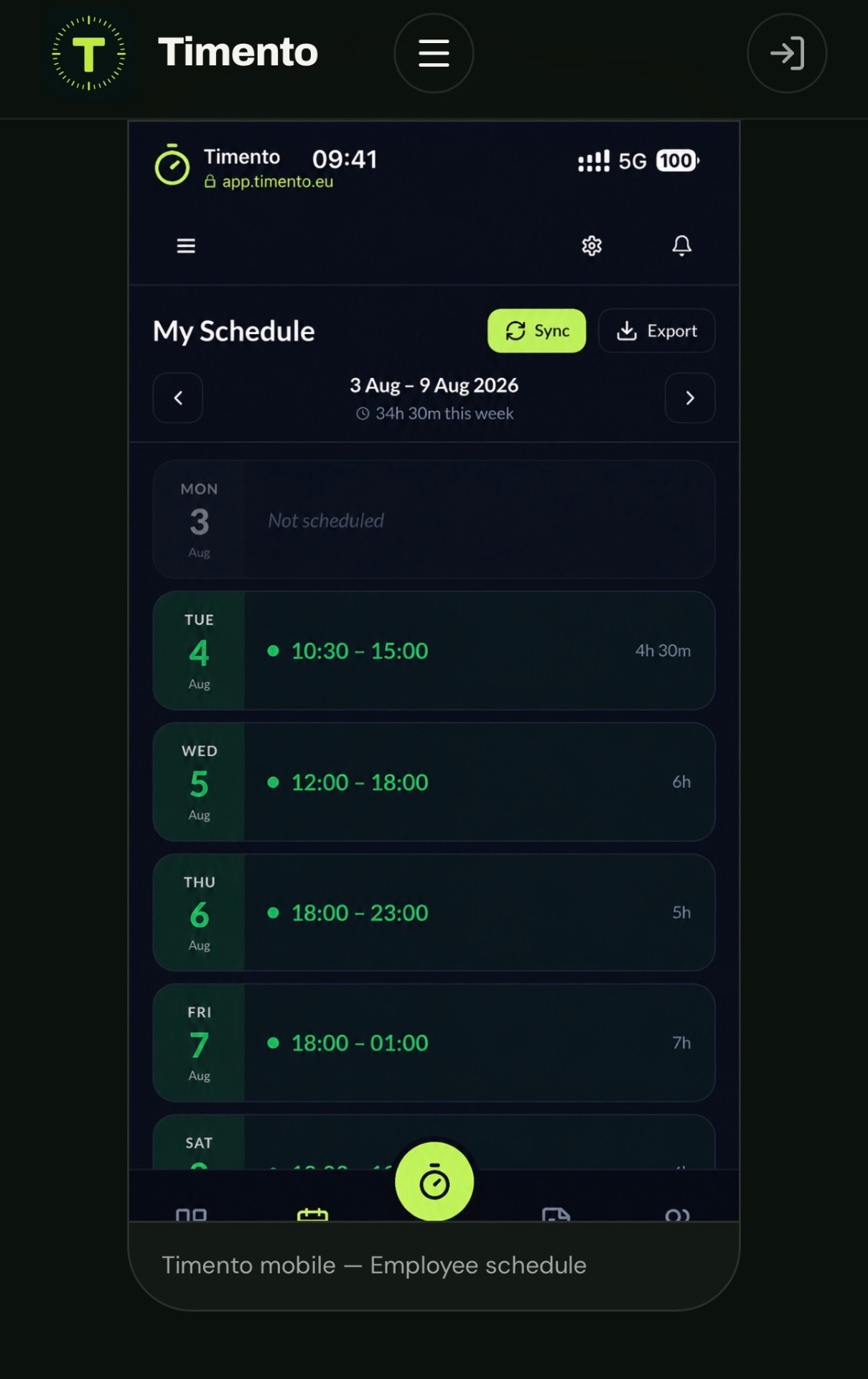
Built for the phone in someone's pocket.
Operational knowledge is rarely needed at a desk. It is needed while the work is happening, on the device the employee already has with them.
- Standing in a kitchen
- Cleaning a hotel room
- Working in a store
- Servicing a site
- Operating equipment
- Setting up an event
- Mobile first
- Readable at a glance
- Images included
- Same login
The mobile experience is designed for the moment of work rather than being a shrunken desktop layout.
AI Copilot
In developmentFrom finding information to asking for it.
Structured company knowledge is what makes useful AI assistance possible. Instead of searching manually, an employee could simply ask.
Searching
“Where is the opening procedure?”
Asking
“What is our opening procedure?”
AI Copilot answering from Knowledge Hub content is in development and is not available today. AI Copilot is an optional add-on, not the central Knowledge Hub proposition , the value of writing knowledge down does not depend on it.
AI CopilotOperational memory
Company knowledge shouldn't disappear when someone leaves.
Turn individual know-how into knowledge the organisation can keep, improve and reuse.
Employees change. Locations grow. Processes evolve. The knowledge should remain accessible.
People change roles
The way something is done stays documented instead of leaving with the person who knew it.
New employees start
Role instructions and working methods are available from day one rather than explained ad hoc.
Processes evolve
When a routine changes, the written standard is updated once instead of being re-explained to everyone.
The operation grows
More shifts and more people can follow the same standard without depending on a single experienced colleague.
This is not about replacing experience. It is about making sure the operation doesn't have to rediscover it every time the team changes.
Multi-location
One standard. Every location.
As a business grows, operational knowledge does not need to fragment into separate folders per site.
Company-wide procedures
The standards that apply everywhere stay written down once for the whole organisation.
Location-specific instructions
Sites that genuinely work differently keep their own instructions without contradicting the company standard.
Shared standards
Quality, safety and service expectations read the same way in every location.
Role-specific content
The same role sees knowledge relevant to their work, wherever they are on shift.
Knowledge Hub content lives in the same company setup as employees, locations and permissions, so growing the operation doesn't mean rebuilding the knowledge base.
Explore Multi-locationBuilt around real operations
Every industry has knowledge worth keeping.
The knowledge differs. The problem is identical: the instruction exists somewhere, but not where the work happens.
Select an industry to see the kind of knowledge teams keep in Timento.
Hotels
- Room standards
- Reception procedures
- Breakfast setup
- Emergency information
- Housekeeping guides
Same Knowledge Hub. Different operational context.
Connected workflow
Knowledge is part of the working day.
Knowledge Hub is not a separate document repository sitting beside Timento. It is a step in the same connected workforce experience.
- 01Smart Scheduling
- 02Publish & Notify
- 03Daily Briefing
- 04Clock In · Breaks · Clock Out
- 05Operational Checklists
- 06Knowledge Hub
- 07Handover & Team Updates
- 08Control Center
Every step uses the same employees, roles and permissions, so the knowledge behind the work stays connected to the people doing it.
Why this matters
More useful than another shared folder.
A shared drive stores files. Knowledge Hub connects operational knowledge with the people and the working day it belongs to.
Generic file storage
- Stores information
- Organised by folder
- Found by whoever knows the path
- Separate from the working day
Timento Knowledge Hub
- Inside the workforce environment
- Organised around the operation
- Visible to the roles it belongs to
- Next to schedules and checklists
- Reachable on mobile at the point of work
- Part of the connected workflow
Shared drives are not the problem. The difference is context: the same procedure is far more useful when it sits where the team already works.
For managers
Keep information useful as the business changes.
Knowledge only stays valuable if somebody can maintain it without a project. Managers create and update content in the same platform they use to run the operation.
Create knowledge items
Write down a procedure, a guide or a standard as its own knowledge item.
Edit content
Update the instruction when the routine changes, so the team reads the current version.
Add attachments
Include images and supporting documents with the instruction they belong to.
Set visibility
Decide who a knowledge item is intended for before it reaches the whole company.
Role restrictions
Keep manager-level material separate from what every employee sees.
Manage the library
Keep the collection tidy so what remains is the knowledge people should actually follow.
Timento does not currently expose full document version history, approval workflows or certification tracking. Knowledge Hub is about keeping operational knowledge current and reachable.
Visibility
Not everything needs to be visible to everyone.
Some knowledge belongs to the whole team. Some belongs to a role, and some only to managers.
- Role-based visibility
- Manager-only content
- Company-specific content
- Permissions
Knowledge Hub uses the same company, role and permission structure as the rest of Timento, so access follows the setup you already maintain.
Questions & answers
Knowledge Hub questions, answered
Short, factual answers about storing procedures, guides, images and operational knowledge in Timento.
What is Timento Knowledge Hub?
Knowledge Hub is where a company keeps its operational knowledge inside the Timento workforce management platform: procedures, guides, instructions, standards and supporting material. It sits in the same platform employees already use for their schedule, hours and daily operations, so the instruction is one step away from the work. It is not a cloud drive, an intranet or a learning management system.
What kind of information can I store in Knowledge Hub?
Operational knowledge: opening and closing procedures, safety routines, cleaning and equipment guides, setup and quality standards, recipes, product information, internal routines and role instructions for new employees. The point is the knowledge an operation runs on every day, written down where the team can reach it.
Can I add images and attachments?
Yes. Knowledge items can carry images and attachments as supporting material, which matters because many operational instructions are easier to understand visually , how a room should be prepared, how a dish should be plated, how equipment should be set up. Timento does not host training videos or e-learning courses.
Can employees access Knowledge Hub from mobile?
Yes. Employees reach Knowledge Hub in the same mobile experience they use for My Schedule, Clock In · Breaks · Clock Out and Operational Checklists. That matters because operational knowledge is usually needed while standing in a kitchen, cleaning a room or servicing a site rather than at a desk.
Can knowledge be restricted by role?
Yes. Knowledge Hub uses the same company, role and permission structure as the rest of Timento, so content can be pointed at the roles it is written for and manager-level material can be kept separate. Employees see the knowledge that belongs to their work instead of everything the company has ever written down.
Can Knowledge Hub be used for procedures and training material?
Yes. Role instructions, working methods and company standards are common Knowledge Hub content, and new employees can read them from day one instead of having everything explained ad hoc. Timento does not track course completion, exams or certifications , it keeps the material available, not the coursework.
How does Knowledge Hub work with Operational Checklists?
Operational Checklists say what has to be done during the day. Knowledge Hub explains how it should be done. A checklist task like “prepare conference room” has a matching knowledge item with the conference room setup standard, so accountability and instruction live in the same platform.
Can I use different procedures for different locations?
Yes. Company-wide standards can be written once for the whole organisation, while sites that genuinely work differently keep their own instructions. Because Knowledge Hub lives in the same company setup as employees, locations and permissions, growing the operation doesn't mean rebuilding the knowledge base.
Can AI Copilot answer questions using Knowledge Hub?
Not today , this is in development. The idea is that instead of searching for “where is the opening procedure?” an employee could ask “what is our opening procedure?” and AI Copilot would surface the relevant company knowledge. AI Copilot is an optional add-on, and the value of Knowledge Hub does not depend on it.
Put your team's knowledge to work.
Try Timento for 30 days with up to four employees and bring schedules, daily operations and company knowledge into one connected platform.
30 days · Up to 4 employees · No credit card · Personal onboarding