Events and venues
Build the crew. Brief the crew. Know what it cost.
Timento brings event staffing, time registration, briefing and operational execution together in one workforce platform, from build-up to breakdown.
For festivals, conferences, concerts, catering events, venues, fairs, sports events and seasonal attractions, where the team scales fast and the plan changes on the day.
30 days · Up to 4 employees · No credit card · Personal onboarding
Event reality
Nothing about an event day stays the way you planned it.
Event teams scale from ten people to two hundred and back again. Roles change, zones change, someone drops out at 16:00 and the crew lead is already on site.
- A spreadsheet that three people edited at the same time
- A group chat where the important message scrolled away
- Two shifts changed by phone and never written down
- A clock list on paper at the crew entrance
- Nobody is sure who is on the bar at 21:00
- A certificate or internal qualification checked from memory
- The briefing given twice, differently, to two crews
- Crew cost known three weeks after the event
A small event survives on improvisation. A full season of them does not.
From build-up to breakdown
One event day, start to finish.
An event is not a weekly rhythm. It is a single intense chain where every hour has a different crew, a different zone and a different priority.
07:00
Build-up starts
Setup and technical crew clock in at the configured venue on a shared kiosk device or their own phone. The crew lead sees who arrived and which build-up roles are still open.
10:30
Setup checklists run
Operational Checklists cover stage and zone setup, bar stocking, signage, guest areas and safety walk. Completion is recorded with who and when, so nothing is assumed.
15:00
Event crew arrives
The main crew clocks in. Staffing Requirements show coverage per zone and role against what is actually scheduled, so a gap at the entrance is visible before it becomes a queue.
15:30
Briefing before doors open
The Daily Briefing gives every team the same picture: focus for tonight, timings, zones, important tasks, deliveries, safety notes and decisions still needed.
17:00
Doors open
Live Team Status shows who is working now, per zone and per role. Breaks are registered as part of the shift instead of estimated afterwards.
20:15
Something changes
A no-show becomes an open shift, an issue on the floor becomes an alert with an owner: Open, Acknowledged, Resolved, rather than a message that disappears in a chat.
23:00
Shift change and handover
Handover & Team Updates pass the state of each zone to the late crew: what is done, what is open, what to watch and what needs a decision.
01:30
Breakdown and close
Closing and breakdown checklists finish the night, the crew clocks out and the event is operationally closed rather than just over.
Next day
Review and post-event control
The manager reviews worked hours, exceptions and missing clock actions, approves them, and compares planned crew cost with actual crew cost.
Timento records what the workforce did around the event. It is not event production, ticketing or venue-control software.
Build the crew around the event
Plan by event, by zone and by role.
Some events repeat every week, some happen once. Timento gives you a structure you can reuse and a schedule you can rebuild in minutes when the event changes.
- Event Manager
- Crew Lead
- Hospitality
- Bar
- Catering
- Security
- Ticketing
- Guest Services
- Setup and Breakdown
- Technical Crew
- Cleaning
- Logistics
Smart Scheduling
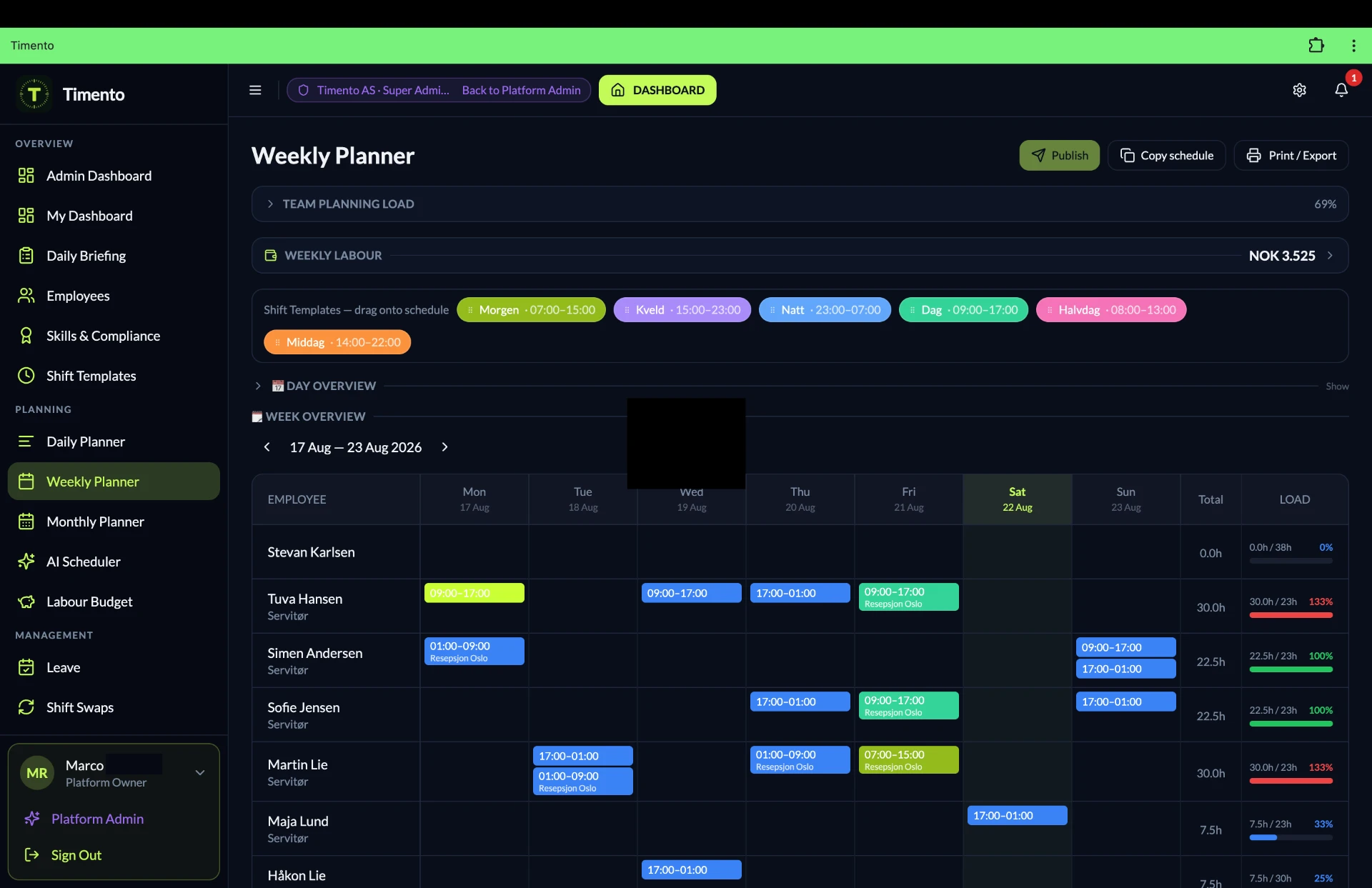
Plan the event crew in day, week or month view, per venue, zone or team, with the day view as your working surface on event days.
Shift templates
Save the standard crew for a club night, a conference day or a match day, then place it in one action instead of rebuilding it.
Recurring structures
Repeated events reuse the same pattern, so a weekly programme does not have to be typed again every week.
Copy schedule
Copy a full event day or a single shift to the next date and adjust only what actually changed.
Role-based shifts
A shift is defined by the role it needs, so a missing Bar or Guest Services position reads as a gap, not as a headcount.
Availability and leave
Flexible, student and seasonal crew set their availability, so you build the schedule against reality instead of hoping.
Open shifts
Publish an uncovered shift to the people who can work it and let them respond, with the manager approving.
Contract hours
See planned hours against contract hours per employee while you build, not after the event.
Conflict detection
Overlaps, double bookings and leave collisions are surfaced before you publish, which matters most when two events run at once.
Overtime signals
Long build-up days and late breakdowns are flagged while you can still spread the hours.
Publish and notify
Publishing sends the schedule to the crew through in-app and push notification, so everyone reads the same version.
Staffing Requirements
Set the crew an event needs per time block, zone and role, then compare it directly with what is scheduled.
Staffing Requirements
How many people do we need at 18:00, and where?
Event staffing is not a flat number. It moves per hour and per zone. Set what each time block needs per role and see the gap while you can still fill it.
- How many people do we need at 18:00?
- Which zones are still under-staffed?
- Which roles are missing, not just which numbers?
- What will this planned crew cost?
Staffing Requirements · Example
| Time and zone | Required | Scheduled | Coverage |
|---|---|---|---|
| 16:00 · Entrance and ticketing | 6 | 6 | Covered |
| 17:00 · Bar, main hall | 10 | 8 | 2 short |
| 18:00 · Guest services | 4 | 4 | Covered |
| 19:00 · Catering | 8 | 7 | 1 short |
| 21:00 · Bar, main hall | 12 | 12 | Covered |
| 23:30 · Cleaning and breakdown | 9 | 6 | Open shifts |
Example figures for illustration. You define the required crew per time block, zone and role for your own events.
Open shifts and last-minute changes
Staffing changes fast. The schedule should keep up.
A drop-out three hours before doors is normal in events. Instead of a phone chain, an uncovered shift becomes an open shift that the right people see immediately.
- Open shiftAn uncovered shift is published with its role, zone and time.
- In-app and pushThe people who can work it are notified on their phone.
- Employee respondsCrew members indicate they can take the shift.
- Manager approvesThe manager decides who gets it. Nothing is assigned automatically.
Availability first
Open shifts reach people whose availability fits, so you are not asking everyone about everything.
Approved shift swaps
Crew members can arrange a swap between themselves, and the manager approves before it becomes real.
Seasonal and flexible crew
Students, seasonal staff and flexible crew work with the same availability, schedule and clocking flow as the core team.
Manager stays in control
Every change to a published schedule goes through approval, so the plan on screen is the plan on site.
Timento manages the crew you already have. It is not a recruitment platform or a temporary staffing agency, and it does not assign shifts on its own.
Explore Smart SchedulingRight people, right roles
The role decides who can be scheduled for it.
Event roles carry expectations: internal training, service competence, equipment qualifications or whatever your operation requires. Timento keeps that next to the schedule.
- EmployeeThe person and the event roles they work in.
- Skills and CertificationsRecorded per employee, with validity and verification status.
- Role requirementsThe qualifications a role or shift expects.
- SchedulingPlan with role readiness visible while you fill the crew.
- Internal event training
- Bar and service competence
- Food handling training
- First aid
- Equipment qualification
- Crew lead readiness
- Valid
- Expiring soon
- Expired
- Verified
- Not verified
This gives the event manager better operational visibility of who is ready for a role. It is not a legal or regulatory compliance guarantee, and it does not replace your training provider or certifying body.
Explore People ManagementArrival, time and breaks
Hours registered on site, not reconstructed on Monday.
Crew arrive at a venue, not at an office. Clocking happens at the crew entrance, in the production office or on a phone at the configured workplace.
Clock In · Breaks · Clock Out
The whole shift is registered, including breaks, so a long event day reflects what actually happened.
Worked hours
Hours build up per employee, per event day and per period, ready for review instead of retyping from a paper list.
Exceptions
A missing clock out after breakdown, a shift without a clock in or an unusual difference is surfaced for the manager.
Review and approve
The manager checks and approves hours per period, so corrections happen before payroll rather than after.
- Clock in
- Breaks
- Clock out
- Exceptions
- Review and approve
- Payroll ready
Kiosk Mode at the crew entrance
One shared device lets a large crew clock in and out quickly at arrival, without personal logins in the middle of a build-up.
- Crew entrance
- Production office
- Backstage
- Catering point
Useful when a hundred people arrive in the same twenty minutes.
Location-based clock verification
Clock actions can be verified against the configured venue or workplace, so a clock in on a phone matches the site where the event takes place.
This verifies the clock action at the configured workplace. Timento does not follow crew members during the event and is not a tracking system.
Daily Briefing
Brief the team before the doors open.
The fifteen minutes before doors decide how the night runs. One briefing, written once, read by every team, instead of three versions told in three corridors.
Attendance figures and event details are entered or configured by you. Timento does not connect to ticketing or attendance systems unless a supported integration exists.
Explore OperationsDaily Briefing · Example
- Tonight's focus
- What matters most for this event and what good looks like.
- Timings
- Doors, programme moments, breaks, last orders, closing and breakdown.
- Expected attendance
- The numbers you enter yourself, so every zone plans against the same figure.
- Groups and VIPs
- Groups, guests or hospitality arrangements that need specific attention.
- Important tasks
- What must be done, by which team, and by when.
- Technical issues
- Known issues and workarounds, so nobody rediscovers them live.
- Deliveries and stock
- What arrives, when, and what is running low.
- Safety notes
- Internal safety agreements and how to report an issue.
- Decisions needed
- Open points that need someone to decide before or during the event.
Operations during the event
The routines that keep a busy night on track.
Setup, opening, bars, guest areas, cleaning, closing and breakdown all run on routines. Timento makes them configurable checklists with recorded completion.
Build-up and opening
Ready before the first guest
- Zone and stage setup checks
- Bar and catering stocking
- Signage, entrances and guest routing
- Safety walk before doors open
During the event
Recurring operational routines
- Bar and catering routines at fixed moments
- Guest area and cleaning rounds
- Temperature monitoring where food is served
- Reporting an operational issue from the floor
Closing and breakdown
Closed down and accounted for
- Closing routine per zone
- Cleaning and waste handling
- Equipment and materials returned
- Open items recorded for the post-event review
- Completed by
- Completed at
- Comment
- Photo where required
- Open item follow-up
Where catering or food service is part of the event, temperature monitoring can be part of the routine, with readings recorded by person and time. This supports your own internal procedures. It is not a food-safety certification.
Timento records workforce routines and follow-through. It is not event production software or a full task and project-management suite.
Explore OperationsCommunication when plans change
Three different things, kept apart on purpose.
On an event day, a message, a notification and an operational alert are not the same. Timento keeps them distinct so the important ones do not scroll away.
Messages
Human communication between people: a crew, a zone team or an individual.
- Crew updates
- Zone announcements
- Direct questions
- Replies
Notifications
Events the system sends: something happened that you should know about.
- Schedule published
- Shift changed
- Open shift available
- Request approved
Operational alerts
Things that need an owner and a resolution, not just an audience.
- Missing clock action
- Uncovered shift
- Checklist not completed
- Issue reported in a zone
- Open
- Acknowledged
- Resolved
Action Needed
From a message to someone who actually owns it.
Handover & Team Updates carry the same structure into shift changes, so a crew lead hands over a written state rather than a summary from memory. Timento is operational communication, not a replacement for every chat tool you use.
- RaisedSomeone flags an issue or sends an item that needs a response.
- AcknowledgedA crew member confirms they have seen it and takes responsibility.
- RepliedQuestions and updates stay attached to the item instead of spreading across chats.
- ResolvedThe item is closed, with a record of who handled it.
Live control for event managers
Who is working now, and what needs you next?
During an event the manager needs one screen that answers the questions being asked over the radio, without walking every zone.
This is a control layer for the workforce. Timento is not GPS tracking and it is not venue-control or security software.
Explore OperationsWorking Now
Who is clocked in at this moment, per role and per team, so coverage is a fact rather than an estimate.
Scheduled Today
The full crew for the day, including who is still expected and who has already finished.
Exceptions
Missing clock actions, uncovered shifts and unusual differences collected in one place.
Attention items
Open checklists, unresolved alerts and items waiting on someone to take responsibility.
Labour cost and post-event control
Did the crew cost what you planned?
For an event business that is the question that matters afterwards. Planned crew hours become planned labour cost, worked hours become actual cost, and the difference is visible per event.
- What will this event's crew cost before I publish the schedule?
- Where did planned and actual hours drift apart, and in which zone?
- How much overtime came from breakdown running late?
- Is this period ready to hand to payroll?
Labour cost and post-event control · Example
| Event | Planned hours | Actual hours | Difference |
|---|---|---|---|
| Conference day | 96.0 | 94.5 | -1.5 |
| Club night | 72.0 | 78.0 | +6.0 |
| Catering event | 48.0 | 47.0 | -1.0 |
| Festival Saturday | 310.0 | 328.5 | +18.5 |
| Period total | 526.0 | 548.0 | +22.0 |
Example figures for illustration. Your own rates, contracts and periods determine the actual numbers.
- Staffing need
- Planned crew hours
- Planned labour cost
- Worked hours
- Exceptions
- Review and approve
- Planned vs Actual
- Payroll ready
Multiple venues, zones or events
Two events on the same night, one way of working.
Event businesses rarely run one thing at a time. Timento keeps each venue, location or team in its own view while management sees the whole operation.
Larger and multi-location operations are supported through the Business and Enterprise plans.
See pricingPer venue and location
Plan and register work per location, so hours and coverage reflect where the crew actually worked.
Per team and zone
Bar, catering, guest services and technical crew each keep their own schedule, routines and updates.
Common processes
The same checklists, roles and briefing structure can be reused across venues, so a standard is a standard everywhere.
Management overview
An operations manager sees coverage, exceptions and hours across events instead of asking each crew lead separately.
Knowledge Hub
Everything a temporary crew needs to know, in one place.
Event crews change constantly. The person working their third shift should be able to find the answer without asking the crew lead mid-service.
- Per team
- Per venue
- Searchable
- Mobile friendly
- Linked from the shift
Knowledge Hub makes company knowledge available to the crew. It is not a certified document-control system.
Explore Knowledge Hub- Event proceduresHow your events run, from arrival to breakdown.
- Venue informationLayout, zones, entrances, storage and practical details per location.
- Briefing documentsBackground material that supports the briefing before doors open.
- Setup and closing instructionsHow a zone, bar or stage is set up and closed down.
- Internal emergency proceduresInternal agreements and how to report an issue.
- Service standardsWhat guests should experience, described the same way for everyone.
- Onboarding knowledgeWhat a new or seasonal crew member needs in their first shifts.
AI Copilot
A second pair of eyes on the event plan.
Operations intelligence that reviews what is already in Timento and points out what deserves the event manager's attention.
Explore the platform- Highlight staffing risks and thin coverage before the event
- Spot unusual patterns in absence, overtime and open shifts
- Show where crew cost keeps deviating from plan
- Suggest operational areas worth reviewing after an event
Suggestions only. Timento makes no autonomous staffing or operational decisions, and the event manager stays in control of every change.
Connected event flow
One chain, from staffing need to payroll-ready hours.
Every step feeds the next one. That is the difference between a scheduling tool and a workforce operations platform.
- 01Staffing need
- 02Roles
- 03Schedule and open shifts
- 04Publish and notify
- 05Arrival and clock in
- 06Briefing
- 07Event operations
- 08Handover and exceptions
- 09Review and approve
- 10Labour cost and payroll ready
Nothing is retyped between steps, because it is the same operational record throughout.
Event teams
Every crew around the event, in one environment.
An event is delivered by teams that rarely share a system. Timento gives them the same schedule, briefing and operational picture.
- Bar
- Catering
- Guest services
- Technical
- Cleaning
- Logistics
One workforce operations platform
Each team keeps its own schedule, routines and hours, while the event manager sees the whole operation.
Timento
Timento manages the workforce layer around your event.
Timento does not replace ticketing, event production, POS, security systems, venue management, ERP or accounting software, and it is not a specialist project-management tool. It manages who works, when they work, which roles they cover, which routines were completed and what the crew cost.
- Ticketing
- Event production
- POS
- Security systems
- Venue management
- ERP and accounting
Where a connection or export is supported, hours and workforce data can flow on to the systems that need them.
See IntegrationsQuestions & answers
Event staffing questions, answered
How Timento supports event crews, and where it stops.
Is Timento suitable for event and venue teams?
Yes. Timento is built for operations where the crew scales fast and the plan changes on the day: staffing per time block and zone, open shifts, briefing before doors open, clocking on site, live status and labour cost per event.
Can we scale a crew from ten to two hundred people for one event?
Yes. You define what the event needs per role, zone and time block, then fill it from your own pool. Open shifts let you publish the remaining gaps to everyone who is qualified and available, instead of calling people one by one.
How do open shifts work when someone drops out at short notice?
You publish the shift as open, qualified employees see it and claim it, and the manager approves. The schedule, the notification and the hours all follow the same record, so the change is written down instead of living in a phone call.
What happens when the schedule changes on the event day?
You adjust the shift and publish. Everyone affected is notified, and the current version is the one in the app. Conflict Detection flags overlaps with leave, availability and other shifts while the plan is still a draft.
Can Timento show who is qualified for a role or zone?
Yes. Skills and certifications sit on the employee with validity dates and verification status, and roles can require specific qualifications. This gives the crew lead operational oversight. It is not a legal compliance guarantee.
How does crew clock in on a festival site or in a venue?
Clock In, Breaks and Clock Out run on a shared device in Kiosk Mode at the crew entrance, or on the employee's own phone. Hours are registered while the event runs, then reviewed and approved afterwards.
Does location-based clocking track our crew?
No. Location-based clocking verifies that a clock action happens at a configured workplace. It confirms the clock-in at the venue or site. It is not employee tracking and there is no continuous location history.
How do we make sure every crew gets the same briefing?
The Daily Briefing collects what matters for that day: crew, zones, timings, guest numbers, priorities and open points. Everyone reads the same version in the app, so a briefing given twice is not given differently.
Can a manager see who is on site during the event?
Yes. Live Team Status shows who is clocked in, who is on break and who has not arrived, and Alerts & Exceptions surface what still needs attention with an Open, Acknowledged, Resolved lifecycle.
When do we know what the crew actually cost?
After the event, approved hours give you Planned versus Actual per role, zone or event, instead of an estimate weeks later. Approved hours can then be exported as payroll-ready reporting.
Can we run several venues or events at the same time?
Yes. Locations, zones and teams are separated, while a manager with the right access sees them together. Crew members can work across events and their hours stay on one record.
Does Timento replace our ticketing or event production software?
No. Timento is a workforce operations platform: crew planning, hours, briefing, routines, communication, control and reporting. Ticketing, production planning, POS, access control and payroll stay in your own systems.
Run your next event from one operational picture.
Crew, open shifts, briefing, hours, routines and labour cost for teams that work on site, not behind a desk.
30 days · Up to 4 employees · No credit card · Personal onboarding
Other industries
The same platform, written around a different operational reality.